
Install
Install with PiG
pig install npm:@kdejaeger/pi-model-routerInstall with Pi
pi install npm:@kdejaeger/pi-model-routerPackages run code with your permissions and influence agent behavior. Catalog inclusion is not a security audit. Review the source before installing a third-party package.
Pi manifest JSON
The pi field of package.json.
{
  "image": "https://raw.githubusercontent.com/kdejaeger/pi-model-router/main/docs/icon.svg",
  "extensions": [
    "./extensions/index.ts"
  ]
}
README
Written by the package's publisher, shown as published in version 0.6.0 (README.md). PiG does not review it.
pi-model-router

Think of pi-model-router as an automatic transmission for your LLM — it shifts gears up or down depending on what you're doing, so you never waste compute on a trivial task or run out of reasoning power on a complex one.
This extension (forked from yeliu84/pi-model-router) for the pi-coding-agent automatically selects between high, medium, and low-tier LLMs on every few turns. It considers conversation history, image presence, manual tier pins, tool-result continuation patterns, previous routing decisions, and automatic fallbacks — with temporary per-model cooldowns after failures, and percentage-based proactive session compaction before a model's context window fills up.
Table of Contents
- Overview
- Installation
- Quick Start
- Configuration
- Activating the Router
- Commands
- How Routing Works
- Architecture
- Documentation
Overview
The pi-model-router registers each profile as a pi virtual model (router/cheap, router/balanced, …). The model you select stays fixed while pi dispatches every request to a physical model the router picks for that request. Because selection and dispatch are separated by pi itself, assistant messages record the physical model that answered, /session costs stay per-model, and compaction and retries behave exactly as they do for any other model.

For the full decision pipeline, see How Routing Works.
Installation
As a user
pi install npm:@kdejaeger/pi-model-router
Requires pi 1.5.2 or newer (declared as a peer dependency).
For development
git clone https://github.com/kdejaeger/pi-model-router.git
cd pi-model-router
pi install .
Or load directly for a single run:
pi -e ./extensions/index.ts
Quick Start
Install the package (see above).
Create a config file at
.pi/model-router.json. This is a complete, working example.
{
  "debug": true,
  "classifierModels": [
    "openrouter/meta/muse-ember",
    "opencode-go/glm-5.3-flash",
    "openrouter/deepseek/deepseek-v4.1-flash-1017",
    "openai-codex/gpt-6-luna"
  ],
  "classifierModelThinking": "high",
  "defaultContextThresholdPercent": 80,
  "contextThresholdPercentOverrides": {
    "opencode-go/deepseek-v4.1-flash": 50,
    "openrouter/deepseek/deepseek-v4.1-flash-1017": 50,
    "openrouter/google/gemma-4-31b-it": 50,
    "openrouter/google/gemini-3.8-flash": 80,
    "opencode-go/qwen3.8-flash": 80,
    "openrouter/moonshotai/kimi-k2.6": 70,
    "openrouter/moonshotai/kimi-k2.7-code": 60,
    "openrouter/moonshotai/kimi-k3": 50,
    "opencode-go/minimax-m3": 50,
    "openrouter/minimax/minimax-m3": 50,
    "openrouter/z-ai/glm-5.3": 50,
    "openrouter/z-ai/glm-5.3-flash": 50,
    "opencode-go/glm-5.3": 50,
    "opencode-go/glm-5.3-flash": 50,
    "openai-codex/gpt-5.6-luna": 65,
    "openai-codex/gpt-5.6-terra": 65,
    "openai-codex/gpt-5.6-sol": 65,
    "openai-codex/gpt-6-luna": 60,
    "openrouter/anthropic/claude-opus-4.8": 65,
    "openrouter/x-ai/grok-4.7": 50,
    "openrouter/xiaomi/mimo-v2.6-flash": 60,
    "openrouter/xiaomi/mimo-v2.6-pro": 50,
    "opencode/muse-ember-1.0": 50,
    "openrouter/meta/muse-ember": 50
  },
  "profiles": {
    "cheap": {
      "high": {
        "thinking": "max",
        "models": ["opencode-go/deepseek-v4.1-flash", "openai-codex/gpt-6-luna"]
      },
      "medium": {
        "thinking": "xhigh",
        "models": ["opencode-go/deepseek-v4.1-flash", "openai-codex/gpt-6-luna"]
      },
      "low": {
        "thinking": "high",
        "models": ["opencode-go/deepseek-v4.1-flash", "opencode-go/qwen3.8-flash"]
      }
    },
    "balanced": {
      "high": {
        "thinking": "max",
        "models": [
          {
            "model": "openrouter/meta/muse-ember",
            "thinking": "xhigh"
          },
          "opencode-go/deepseek-v4.1-flash",
          {
            "model": "openrouter/deepseek/deepseek-v4.1-flash-1017",
            "thinking": "high"
          }
        ]
      },
      "medium": {
        "thinking": "max",
        "models": [
          "opencode-go/deepseek-v4.1-flash",
          {
            "model": "openrouter/deepseek/deepseek-v4.1-flash-1017",
            "thinking": "high"
          }
        ]
      },
      "low": {
        "thinking": "high",
        "models": ["opencode-go/deepseek-v4.1-flash", "openrouter/deepseek/deepseek-v4.1-flash-1017"]
      }
    },
    "expensive": {
      "high": {
        "thinking": "max",
        "models": ["openrouter/z-ai/glm-5.3", "openrouter/google/gemini-3.8-flash"]
      },
      "medium": {
        "thinking": "high",
        "models": ["openrouter/google/gemini-3.8-flash", "openrouter/x-ai/grok-4.7"]
      },
      "low": {
        "thinking": "max",
        "models": ["opencode-go/deepseek-v4.1-flash", "openrouter/deepseek/deepseek-v4.1-flash-1017"]
      }
    },
    "glm": {
      "high": {
        "thinking": "max",
        "models": ["opencode-go/glm-5.3-flash", "openrouter/z-ai/glm-5.3-flash"]
      },
      "medium": {
        "thinking": "high",
        "models": ["opencode-go/glm-5.3-flash", "openrouter/z-ai/glm-5.3-flash"]
      },
      "low": {
        "thinking": "high",
        "models": ["opencode-go/glm-5.3-flash", "openrouter/z-ai/glm-5.3-flash"]
      }
    },
    "deepseek": {
      "high": {
        "thinking": "max",
        "models": [
          "opencode-go/deepseek-v4.1-flash",
          {
            "model": "openrouter/deepseek/deepseek-v4.1-flash-1017",
            "thinking": "high"
          }
        ]
      },
      "medium": {
        "thinking": "max",
        "models": [
          "opencode-go/deepseek-v4.1-flash",
          {
            "model": "openrouter/deepseek/deepseek-v4.1-flash-1017",
            "thinking": "high"
          }
        ]
      },
      "low": {
        "thinking": "high",
        "models": ["opencode-go/deepseek-v4.1-flash", "openrouter/deepseek/deepseek-v4.1-flash-1017"]
      }
    },
    "gpt-6": {
      "high": {
        "thinking": "medium",
        "models": ["openai/gpt-6.2-sol"]
      },
      "medium": {
        "thinking": "high",
        "models": ["openai/gpt-6.1-terra"]
      },
      "low": {
        "thinking": "max",
        "models": ["openai-codex/gpt-6-luna"]
      }
    }
  }
}
Activate the router -- choose one approach:
Runtime switch (per session): Restart pi (or run
/router reload), then run:/router profile balancedPersistent activation (all sessions): Add
router/balanced(and/orrouter/cheap) to your scoped models list in pi's configuration. On restart, the router will load automatically with the profile you last used.
Check the status:
/router
How Routing Works
For every turn, the router executes this ordered pipeline:
GATE 0: GOOGLE LOCK
  Google thinking used last turn AND this is a tool continuation?
  → Freeze the exact model/tier (skip everything below)

GATE 1: CLASSIFIER GATING
  Manual pin active?       → Use pinned tier (skip classifier)
  New user message?       → Run classifier from scratch
  Tool-result continuation?
  ├─ Initial tool results back after user prompt?   → Run classifier
  ├─ Multiple tool failures in a row?               → Run classifier
  ├─ Periodic check due?                            → Run classifier
  └─ Otherwise                                      → Reuse previous routing decision

POST-ROUTE CORRECTIONS (always apply)
  Image doesn't fit?  → Search current and higher tiers for a model supporting images

EXECUTION (route() returns a model + thinking level; pi sends the request)
  Retry after a failure?  → Skip the failed model, bench it, take the next fallback
  Model slug benched?     → Skip it until its cooldown expires
  Model switched away?    → Disable the router and record the model
  Context over threshold? → Compact the session after the agent settles
Classifier Gating
When the router has an LLM classifier configured (classifierModels), it doesn't run on every turn. Instead, the classifier is gated by smart triggers that avoid waste while catching real tier mismatches. The classifier has final say on tier (post-route corrections like image escalation).
| Gate | Trigger | Reason |
|---|---|---|
| Google lock | Previous model was Google with thinking, and this is a tool-result continuation | Freezes to the same model — any change breaks thought-signature replay |
| Fresh feedback | Tool-continuation count first reaches or exceeds classifierRunOnceAfterToolCount (default: 5) | Captures the assistant's first response + tool result after a new user message |
| Tool failures | Consecutive failed tool results (from the tail) ≥ classifierRunAfterToolFailures (default: 3) | Model is struggling — reclassify to potentially upgrade tier |
| Interval | Tool-continuation count % classifierInterval === 0 (default: 15) | Periodic re-check for long-running turns where initial assessment might be stale |
All counters reset per user turn — each new user message is treated as a fresh task. The tool failures gate counts consecutive failures from the tail: one successful tool result resets the count to 0, so it only fires when failures are actually piling up.
When the classifier is skipped, the previous routing decision is reused directly. Post-route corrections (image escalation) still apply regardless.
Context Controls
Filling a context window to 100% before compacting is rarely desirable, and some models increase pricing past a token threshold (e.g. double input/output cost beyond 250K tokens). Both settings below are percentages of the routed model's own window, so one policy scales across models with different windows. See Context Thresholds & Proactive Compaction for when compaction runs.
Default Threshold (defaultContextThresholdPercent): Percentage at which proactive compaction starts. Default 90.
Per-Model Overrides (contextThresholdPercentOverrides): Tune the threshold per canonical model ref — e.g. compact a cheap long-context model at 95% while compacting an expensive one at 50%. Keys that name no loaded model are reported in the config warnings (see /router status), so a typo cannot silently disable an override.
{
  "defaultContextThresholdPercent": 80,
  "contextThresholdPercentOverrides": {
    "openrouter/deepseek/deepseek-v4-flash-0731": 60,
    "openrouter/deepseek/deepseek-v4-pro": 50,
    "openai-codex/gpt-5.5": 60,
    "openrouter/google/gemini-3.1-pro-preview": 18
  }
}
Model Chains and Per-Model Thinking
A tier lists its candidates in models, most preferred first: the first entry serves the tier, the rest are fallbacks. When a request fails, pi retries it and the router routes the retry to the next model in the chain, so a failure costs one retry rather than the whole turn.
{
  "profiles": {
    "auto": {
      "high": {
        "thinking": "high",
        "models": [
          { "model": "openai/gpt-5.4-pro", "thinking": "xhigh" },
          "anthropic/claude-3-5-sonnet-20241022",
          { "model": "google/gemini-2.5-pro-latest", "thinking": "medium" }
        ]
      }
    }
  }
}
The tier's thinking is the default for every model in it. An entry's own thinking overrides that default for that model only, so a cheaper fallback can think less than the primary without a separate tier. In the example above, gpt-5.4-pro requests xhigh, Claude inherits high, and Gemini requests medium.
A bare model ref is shorthand for { "model": ref }: use it for every entry that should inherit the tier's level, and the object form only where the level differs.
When a model does not support the requested level, the router clamps it with pi-ai's own clampThinkingLevel — which searches upwards first, so a model that only offers high gets high rather than being silently dumbed down to off. When a fallback is used, decision.isFallback is set to true and shown in the status.
model and fallbacks were replaced by models and are no longer read; a config that still uses them gets a warning naming the tier.
Pi owns retries: when pi retries a failed request, route() sends it down the tier's chain instead of back to the failed model, and the failed slug is benched so later turns skip it while other candidates remain. Only when no other candidate can serve the request is the failed model tried again — as a last resort, ignoring its cooldown rather than failing the request. Retries are conditional on pi's retry settings — non-retryable failures such as quota/billing errors are not retried by pi, so the router instead benches the model when it sees the failed assistant message on the next request.
A tier's last-used model is tried first on later turns of that tier, so a working fallback is not dropped back to the primary that made it necessary — including failures the cooldown rules do not classify, which are never benched. The primary leads again once the tier changes (a new classifier decision, or a changed pin), or when nothing else can serve the request. Direct requests such as compaction summaries are exempt: they stay primary-first.
- Rate limits / quota / billing — benched for the delay advertised in the failure text (e.g. "resets in 2hr 30min"), 5 minutes by default, capped at 24 hours. pi uses response headers for its own retry timing but does not expose them to extensions, so the router cannot read
retry-afterdirectly. - Transient failures (5xx, timeouts, dropped connections) — benched for 5 minutes.
- Credential/model failures (401/403/404, model retired) — benched for 10 minutes.
- Context overflow — never benches the model; pi compacts and retries instead.
Other models from the same provider stay eligible, and a tier whose models are all benched still gets tried rather than failing outright.
Image-Aware Auto-Routing
When the user attaches an image, the router restricts candidates to models that accept image input. If none in the routed tier can, it escalates to higher tiers until one is found, rather than letting pi substitute placeholders for the image.
OpenCode Session Headers
OpenCode Go requires x-opencode-session on every inference request; without it requests can fail with 400 MissingSessionID and prompt caching is disabled. Because pi's provider-header hook does not identify which provider is being called, the router sends x-opencode-session (the pi session id) and x-opencode-client: pi on every request — other providers ignore unknown headers.
OpenRouter attribution headers (HTTP-Referer, X-OpenRouter-Title, X-OpenRouter-Categories) are likewise sent on every request. The body-level OpenRouter session_id is only added when the router has just dispatched the agent request to an OpenRouter model, because unknown body fields may be rejected by other providers.
Google Thinking Tool Continuation
When using Google models with thinking enabled, tool-result continuations require the same model to avoid thought-signature replay errors. The router detects this pattern and preserves the exact model/tier for the continuation turn.
Context Thresholds & Proactive Compaction
The virtual model advertises the largest context window across all models in the profile, while pi resolves the real limits per request from the physical model it dispatches to:
- Fitting the conversation: if the transcript does not fit the routed model, pi compacts before sending the request and still sends it to the model the router chose. Context size therefore never changes which model is routed.
- Compacting early: after each settled turn, the router calls
ctx.compact()when usage is at or above the configured percentage (see Context Controls). On large windows this fires before pi's own reserve (contextWindow - compaction.reserveTokens, 16k tokens by default), while on small windows pi's reserve can fire first — the two policies are complementary, not strictly ordered.
Automatic compaction is controlled by pi: ctx.compact() ignores pi's setting, so the router honours compaction.enabled from settings.json and does nothing when it is false. The former router-level autoCompaction key is gone.
Session & Debugging
Persistent State: Router state lives on the session branch as a pi.virtual-model-state entry — the same mechanism pi uses for any virtual model's route() state. Pins, debug mode, the last routing decision and the last non-router model are preserved, and each branch keeps its own copy, so /tree navigation, forks and compaction restore the state that belongs to that branch. /router commands append the entry directly; route() returns new state only when something routing-relevant changed.
Ephemeral State: Model cooldowns are deliberately not persisted: they live in memory for the current process, are shared across conversation branches, and reset on restart. They are short-lived (see Fallback Chains), so persistence would be machinery for nothing.
Status Line: The router shows its status as a single line in the pi TUI status bar, e.g.:
⇋ medium -> google/gemini-flash-latest
The status line may show decision flags in brackets when applicable:
[fallback]— a fallback model was used instead of the tier's primary
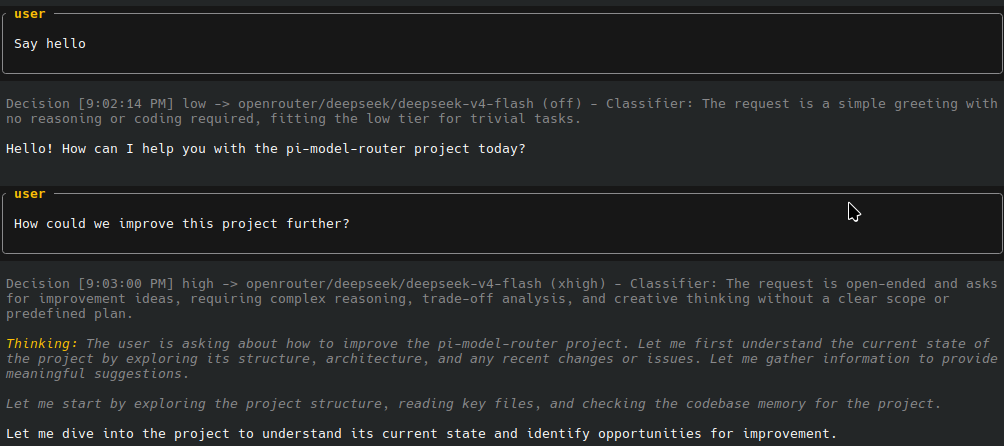
Debug Notifications: With /router debug on, routing decisions and classifier runs are logged as notifications with timestamps. The classifier notification shows why the classifier was triggered (cont = tool-result continuations since the last user message, fail = consecutive recent tool failures).
[10:32:15 AM] high -> openai/gpt-5.4-pro (high) - Classifier: multi-file architecture change across 4 services requires careful trade-off analysis.
[10:33:42 AM] medium -> google/gemini-flash-latest (medium) - Classifier: implementing a well-defined feature with clear acceptance criteria.
[10:34:10 AM] low -> openai/gpt-5.4-nano (low) - Classifier: simple field rename with no behavioral changes.
Configuration
Config Locations
Config is loaded from two locations and merged:
| Location | Scope | Path |
|---|---|---|
| Global | User-wide | ~/.pi/agent/model-router.json |
| Project | Per-project | .pi/model-router.json |
For details on merging order and validation, see Config Merging Order in the architecture doc.
Configuration Fields
| Field | Type | Default | Description |
|---|---|---|---|
debug | boolean | false | Enable debug mode. Equivalent to running /router debug on at startup. |
classifierModels | string[] | -- | Array of fast model refs (e.g. ["google/gemini-flash-latest"]) used to classify user intent via LLM. Models are tried in order, providing fallback if one hits an error. When set, the classifier has final say on tier selection (gated by triggers below). Omit to route without a classifier: the remembered tier is reused, and medium is the initial default. |
classifierModelThinking | ThinkingLevel | off | Reasoning/thinking level for the classifier model calls. Defaults to off (no extended reasoning) to keep calls fast and cheap. |
classifierRunOnceAfterToolCount | number | 5 | Run the classifier once after this many tool continuations (only after the first user message of a turn). Default: 5. Set to 0 to disable. |
classifierRunAfterToolFailures | number | 3 | Run the classifier after this many consecutive tool failures (counting from the tail of the current turn). Default: 3. |
classifierInterval | number | 15 | Run the classifier every N tool continuations as a periodic re-check (crossed interval buckets). Default: 15. Set to 0 to disable. |
defaultContextThresholdPercent | number | 90 | Percentage of the routed model's context window at which the router proactively compacts the session after it settles. See Context Thresholds & Proactive Compaction. |
contextThresholdPercentOverrides | object | -- | Per-model compaction thresholds keyed by "provider/model", overriding defaultContextThresholdPercent for those models. |
profiles | object | (required) | Map of profile definitions. |
Each profile defines three tiers (high, medium, low). Each tier config:
| Field | Type | Default | Description |
|---|---|---|---|
thinking | ThinkingLevel | medium | Default reasoning/thinking level for the tier, used by every model entry that does not set its own. |
models | TierModelEntry[] | (required) | Ordered candidates (objects or bare refs): the first serves the tier, the rest are fallbacks. |
Each entry in models:
| Field | Type | Default | Description |
|---|---|---|---|
model | string | -- | Required. Canonical model ref in "provider/model" format (e.g. "openai/gpt-5.4-pro"). |
thinking | ThinkingLevel | -- | Optional. Overrides the tier's thinking for this model only. |
Valid thinking levels (from least to most reasoning): off, minimal, low, medium, high, xhigh, max
The router owns the thinking level: the classifier picks the tier, the chain picks the model, and that model's thinking (or the tier default) is used for the request. The router mirrors it into pi so the footer and picker show the level that was actually sent. Changing the level with shift+tab or /thinking does not affect routed requests — change the config instead.
Activating the Router
When you define profiles in your config, each profile is registered as a pi virtual model under the router provider — e.g., router/balanced, router/cheap. They appear in pi's model list and are selected like any other model; pi then dispatches each request to the physical model the router picks.
1. Persistent activation (on session start)
To have the router activate automatically every time pi starts:
- Add the router model(s) to pi's scoped models list in your pi configuration (e.g., add
"router/balanced"). - When pi starts with a router model in scope, the router activates using the profile name embedded in the model ID (e.g.,
router/balancedactivates thebalancedprofile).
2. Runtime activation (current session only)
Once the extension is loaded, run /router profile <name> to switch to a router profile. This activates and remembers the router profile for the current session.
Commands
All commands are accessible via /router in the pi chat interface. Tab-completion is fully supported for all subcommands and arguments.
/router status
Show the current router status: enabled/disabled state, active profile and its pin, pins per profile, available profiles, last non-router model, debug mode, the last routing decision, and config warnings.
/router
/router status
/router profile [name]
Switch to a different router profile. This automatically enables the router if it was disabled.
/router profile balanced    # Switch to the 'balanced' profile
/router profile             # List available profiles
If you call /router with a profile name directly (e.g. /router balanced), it also works as a shortcut.
/router pin [profile] <tier|clear>
Force a specific tier for a profile, overriding all automatic routing decisions. Pins are persisted in session state (branch-safe) but do NOT modify your config file.
/router pin high           # Pin current profile to 'high' tier
/router pin clear          # Clear pin on current profile
/router pin cheap low      # Pin the 'cheap' profile to 'low' tier
/router pin                # Show current pin status
Valid pin values: high, medium, low, clear.
Note:
clearremoves the pin and returns the profile to automatic routing.
/router debug <on|off>
Control turn-by-turn routing debug notifications.
/router debug on       # Enable
/router debug off      # Disable
/router debug          # Toggle
/router disable
Disable the router and restore the last used non-router model.
/router reload
Hot-reload the configuration from disk without restarting pi. Preserves debug state.
If the active profile was removed from the config, the router becomes inactive until you switch to an available profile via /router profile <name>.
/router help
Show a comprehensive help listing of all subcommands.
/router help
Architecture
See docs/ARCHITECTURE.md for a detailed architectural deep dive, including the decision flow, module responsibilities, state persistence, and fallback chain design.