
Install
Install with PiG
pig install npm:@jmcombs/pi-stewardInstall with Pi
pi install npm:@jmcombs/pi-stewardPackages run code with your permissions and influence agent behavior. Catalog inclusion is not a security audit. Review the source before installing a third-party package.
Pi manifest JSON
The pi field of package.json.
{
  "image": "https://raw.githubusercontent.com/jmcombs/pi-extensions/main/assets/steward/preview.png",
  "extensions": [
    "./index.ts"
  ]
}
README
Written by the package's publisher, shown as published in version 2.0.0 (README.md). PiG does not review it.




@jmcombs/pi-steward
Hosts: pi ✓ · oh-my-pi ✓
Steward — the llama.cpp control panel for Pi. How may we serve your models?
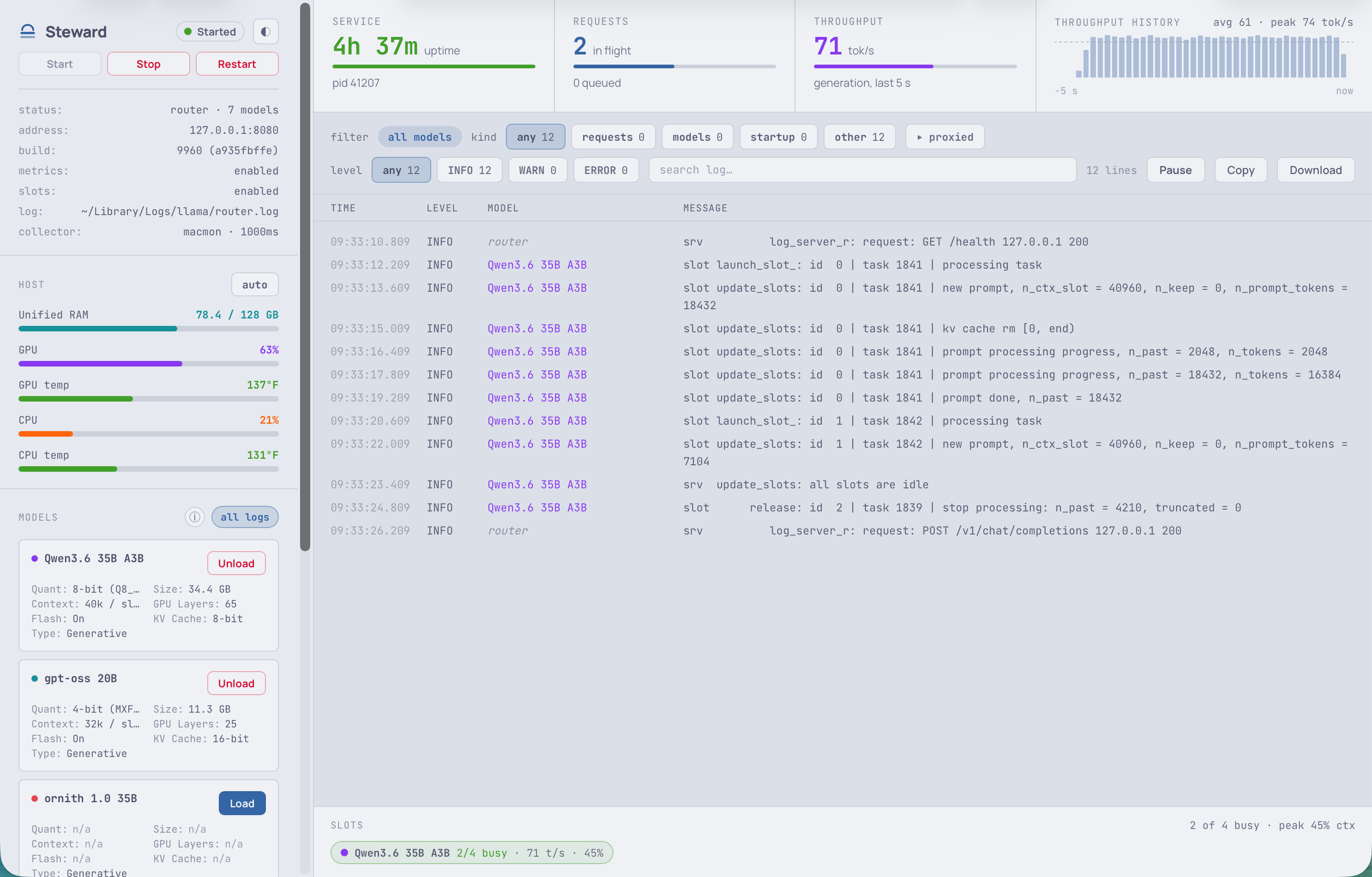
A single-page operator dashboard for the local llama-server behind Pi's llama.cpp provider, plus a
status bar inside Pi itself. It answers four questions at a glance, and lets you act on all of them
without leaving your editor:
- Is the service up, and for how long?
- Which models are resident, and what is each costing you in memory?
- Is the box healthy — GPU, CPU, memory, temperature?
- What is the server doing right now — slots, throughput, requests, and its live log?
Start, stop and restart the service; load and unload models; watch the log — all from the dashboard.
Requirements
| (blank) | (blank) |
|---|---|
| Node | ≥ 22.13 |
| Pi | any recent version |
llama-server | running in router mode — --models-dir and/or --models-preset, with no -m/--model/-hf. Pi's own llama.cpp provider requires this too. |
| A Nerd Font | for the status bar's mark and separators. Set STEWARD_GLYPH="" to drop the mark if you would rather not install one. |
/steward_initialize checks everything else — metrics, slots, log capture, host sensors — and offers
to fix whatever is missing.
Install
# Globally (recommended)
pi install npm:@jmcombs/pi-steward

# For a single session, without installing
pi -e ./packages/steward
See the Pi packages documentation for git, local path, project-scoped install, and filtering options.
Quick start
Start Pi, then:
/steward_initialize     1. connect this machine — review, approve, done
/steward_start          2. start the dashboard service
/steward_dashboard      3. open it in your browser
That is the whole path. Step 1 is once per machine; steps 2 and 3 are once per session — and
/steward_dashboard starts the service for you, so you can skip straight to it.
Commands
| Command | What it does |
|---|---|
/steward_initialize | Connects this machine to Steward. Works out how llama-server runs here, proposes the changes it needs, and writes steward.json — asking before every change. Run once per machine, or again whenever the setup moves. |
/steward_start | Starts the dashboard service on 127.0.0.1:8788 for this session. Prints the URL and opens nothing — useful on a headless box, or when you only want the status bar. |
/steward_dashboard | Opens the dashboard in your browser, starting the service first if it is not already running. |
/steward_stop | Stops the dashboard service. It also stops on its own when the Pi session ends. |
The status bar
Steward draws a line above the editor whenever it has something to say. It reports Steward's own
state first, with llama.cpp as detail.
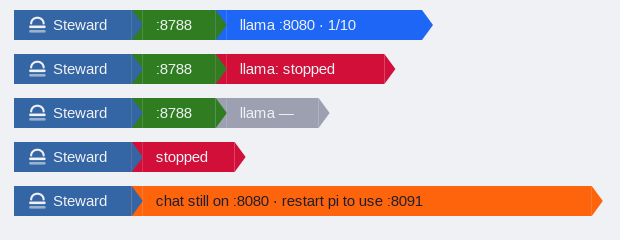
- Everything up — the dashboard is on
:8788,llama.cppanswers on:8080, and 1 of its 10 models is resident. The count is models holding weights in memory, not models on disk. - llama.cpp down — Steward is fine and says so in green; the server gets its own red block. The dashboard still opens, and Start is there if you recorded one.
- Not read yet — Steward is up but has not completed a read. Deliberately its own colour: an absent reading is not a healthy one.
- Dashboard not running — no
/steward_startyet, or you stopped it. Nothing is said aboutllama.cpp, because Steward is not watching it. - Pointed elsewhere — Pi is dialling a different address than the server Steward watches, so chat fails while everything else looks healthy. The bar names the fix.
Three colours, and only three: green started, red stopped, orange running but something needs a person.
It refreshes while the dashboard is up, and reads the same data the dashboard does — no extra connection to your server.
Configuration
Run /steward_initialize and let your clanker set me up. It reviews the local environment, captures
how llama.cpp is currently configured, works out what is needed for Pi, Steward and llama.cpp to
run together, then hands you a plan to approve. Nothing is applied before you say so.
It writes ~/.config/steward/steward.json at mode 0600 — the collector, the log path, the base
URL, the service commands, and a consent hash for every command Steward may run. Steward ignores
that file if it is not owned by you or is world-writable, because it is a code-execution surface.
Environment variables
| Variable | Default | Purpose |
|---|---|---|
STEWARD_CONFIG | ~/.config/steward/steward.json | Where the artifact lives. |
STEWARD_PORT | 8788 | Dashboard port. 0 asks the OS for any free port; a port already taken costs an ephemeral one, not the dashboard. |
STEWARD_LOG_FILE | — | Overrides the recorded log.path for the log console. |
STEWARD_GLYPH | | The status bar's mark. "" drops it; any other value replaces it. |
Development
# From the repo root
npx vitest run packages/steward     # tests
node scripts/typecheck.mjs          # types
npx biome check packages/steward    # lint and format

# Run the dashboard without Pi
npx tsx packages/steward/scripts/dev.ts
License
MIT © Jeremy Combs