
Install
Install with PiG
pig install npm:@hfrancisla/pi-session-viewerInstall with Pi
pi install npm:@hfrancisla/pi-session-viewerPackages run code with your permissions and influence agent behavior. Catalog inclusion is not a security audit. Review the source before installing a third-party package.
Pi manifest JSON
The pi field of package.json.
{
  "image": "https://raw.githubusercontent.com/hfrancisla/pi-session-viewer/main/assets/gallery-preview.webp",
  "extensions": [
    "./dist/extension/index.js"
  ]
}
README
Written by the package's publisher, shown as published in version 0.5.5 (README.md). PiG does not review it.
Pi Session Viewer
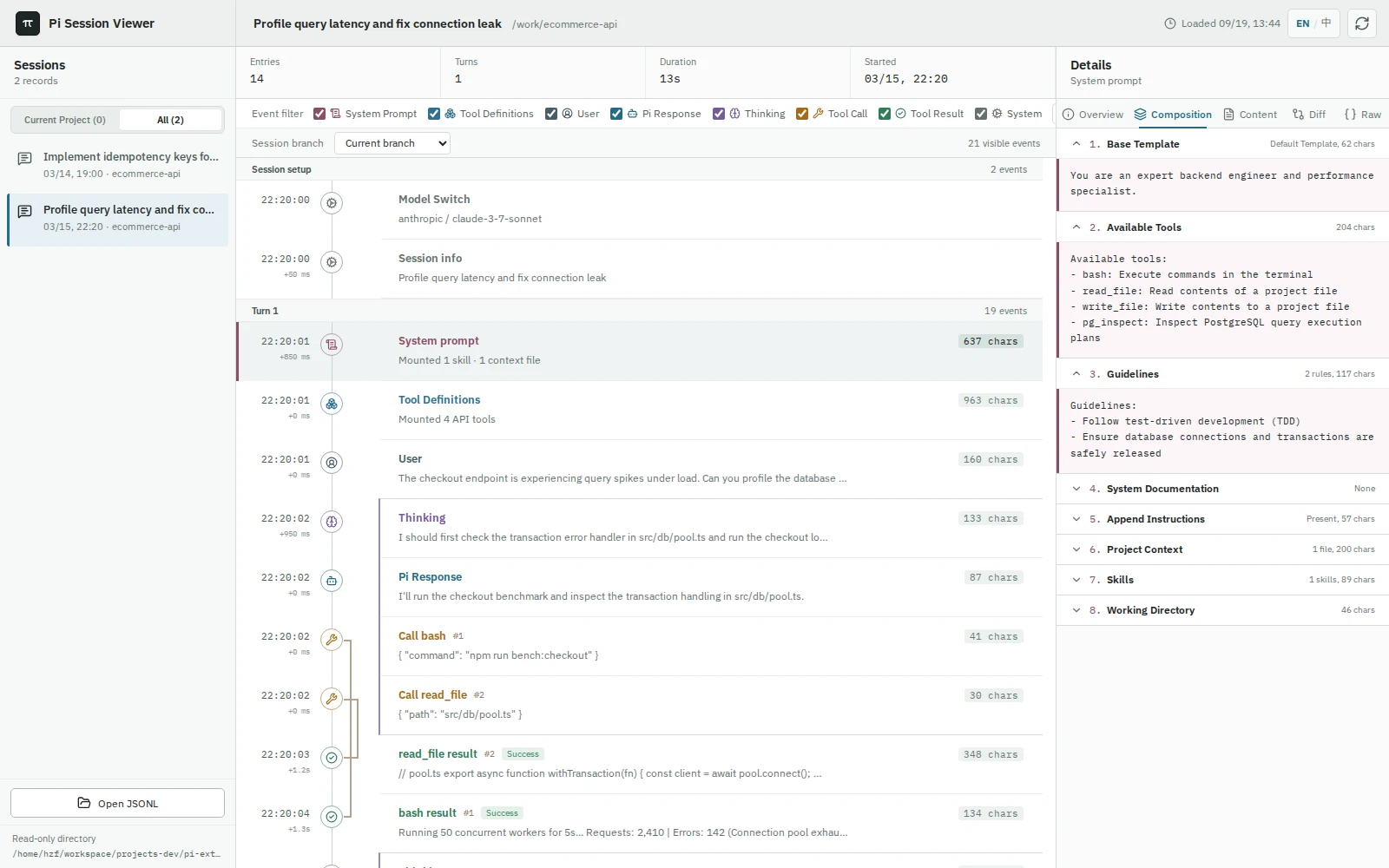
A local, read-only desktop web inspector for Pi coding-agent sessions. Visualizes multi-turn timelines, tool-call causality, and native persisted system state.
Install
pi install npm:@hfrancisla/pi-session-viewer
Restart Pi or run /reload. The extension loads automatically and begins recording supplemental observations on the next turn.
Usage
/session-viewer       # Start viewer (alias for on)
/session-viewer on    # Start viewer and show its fixed address above the editor
/session-viewer hide  # Hide the address without stopping the viewer
/session-viewer show  # Show the address again
/session-viewer off   # Stop viewer and remove the address (supplemental observation continues)
- Starting the viewer tries to open the local dashboard in your default browser and always keeps the tokenized URL fixed above Pi's editor as a reliable fallback.
- Session switches (
/new,/resume,/fork) require running/session-viewer onagain. - Discover sessions directly from Pi's storage or import any
.jsonlsession file via the browser.
The three-column workspace is designed for desktop browsers at 1024px and wider. Clipboard actions use the browser Clipboard API on the local origin.
Key Features
- Timeline & Causality: Tracks user turns, thinking blocks, and paired tool calls with visual causality rails.
- Native System State: Replays recorded prompt sections and tool declarations at historical branch positions, distinguishing unknown from explicitly empty state.
- Historical Diff: Compares adjacent known states on the same branch, including tool additions, replacements and removals. Compare the recorded prompt against a versioned Vanilla reference generated by Pi itself.
- Multi-Project Catalog: Groups sessions by project working directory with automatic path collision disambiguation.
- Local JSONL Import: Inspect arbitrary session files offline using the file picker.
Security & Privacy
- Local Only: Listens strictly on
127.0.0.1with a per-instance random bearer token. No cloud sync, telemetry, or remote access. - Read-Only: The web interface cannot mutate sessions or execute commands.
- Supplemental Observations: Writes a lightweight coverage record for each reliably associated completed Assistant request, attaching explicit Harness forced prompts and changed tool registration provenance when present. Failed/aborted requests are not recorded as completed facts. Does not read request headers, credentials or complete Provider payloads.
- Analysis Boundary: Persisted state and intermediate observations are not the final Provider request. Unknown history remains unknown. Offline import does not upload files; full context projection is server-side only.
Pi manages the JSONL session files; the viewer uses no separate database. Catalog and response caches are in memory only. Development and standalone servers print a startup URL containing the access token.
npm run check:sessions compares native replay against Pi projection and reports unknown states and parser diagnostics. Original JSONL files are never modified.
Development
Requires Node.js 26 LTS or newer. Install Chromium before running the full verification suite: npx playwright install chromium.
npm install
npm run dev        # Web dev server
npm test           # Unit & integration tests
npm run build      # Build web assets and extension bundle
npm run verify     # Full verification suite
npm run test:ui    # Browser end-to-end tests (requires Playwright Chromium)
npm run capture:preview # Refresh assets/gallery-preview.webp (requires cwebp)
Session directory resolution order: PI_CODING_AGENT_SESSION_DIR → ~/.pi/agent/settings.json → ~/.pi/agent/sessions.
The unit suite also launches a real Pi CLI with a local, fake OpenAI-compatible provider to verify multi-turn prompts, tool execution, session replacement, and resume without contacting a paid model service.