
Install
Install with PiG
pig install npm:@henryqw/pi-footerInstall with Pi
pi install npm:@henryqw/pi-footerPackages run code with your permissions and influence agent behavior. Catalog inclusion is not a security audit. Review the source before installing a third-party package.
Pi manifest JSON
The pi field of package.json.
{
  "image": "https://raw.githubusercontent.com/HenryQW/pi-harness/main/extensions/pi-footer/example.png",
  "extensions": [
    "./extensions/footer.ts",
    "./extensions/open.ts",
    "./extensions/tool-rows.ts"
  ]
}
README
Written by the package's publisher, shown as published in version 5.3.0 (README.md). PiG does not review it.
@henryqw/pi-footer
Keep footer identity, model usage, agent-work time, and extension status visible in Pi. Fold long tool rows so agent replies stay on screen. Enable the footer, tool rows, and open commands independently.
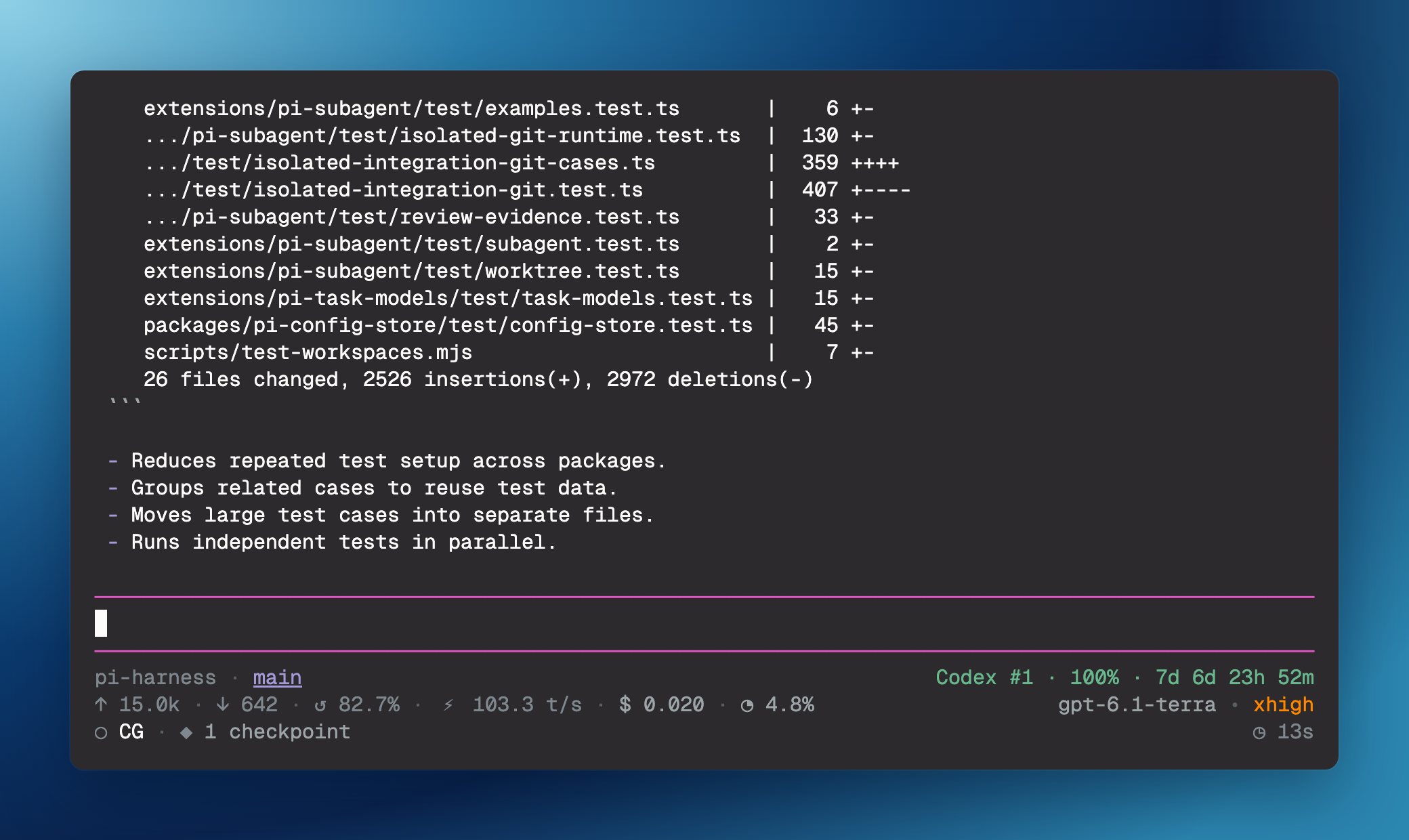
Install
This package requires Pi 1.5.0 or later in the 1.x series.
pi install npm:@henryqw/pi-footer
All three entry points load by default. Use pi config or the package extensions filter in settings.json to select the entries you need.
| Entry point | Features |
|---|---|
extensions/footer.ts | Footer. |
extensions/open.ts | Open commands. |
extensions/tool-rows.ts | Tool-row folding. |
Works with
| Package | Relationship | Purpose |
|---|---|---|
@henryqw/pi-codegraph | Improves | Shows CodeGraph index status, quiet setup progress, and direct tool activity when loaded. |
@henryqw/pi-magpie | Improves | Adds Magpie route and quota status. |
@henryqw/pi-multi-codex | Improves | Adds active Codex subscription quota and reset status. |
@henryqw/pi-pr | Improves | Adds current-branch pull-request status. |
Use
Start a Pi TUI session to see the footer. Run /open to open the current directory in VS Code, even while the agent is busy.
| Surface | Type | Purpose |
|---|---|---|
| Footer | ui | Shows footer identity, usage, model, agent-work time, and extension statuses to the user. |
/open | command | Opens the current directory for the user: runs <command> <current-working-directory>. |
/set-open-in <command> | command | Sets the user's open command, such as cursor --reuse-window. |
/tool-rows [group|line|off] | command | Sets and saves the tool-row mode. Without an argument, shows the current mode. |
Footer lines
| Line | Left | Right |
|---|---|---|
| First | Repository, branch, Git state, and pi-pr pull-request status. Linked-worktree branches omit the generated worktree/ prefix. | Non-empty pi-multi-codex and pi-magpie status. |
| Second: usage line | Input and output token totals, latest cache-hit rate, response throughput, estimated cost, and context use. | Active model and thinking level. For Magpie, the served model and account card number replace the selected model when available. |
| Third | CodeGraph first, then other extension statuses sorted by key, including Ponytail and pi-rewind. | Cumulative agent-work time. |
Token and cost totals include native usage entries, reported tool usage, and completed background workflow entries from a retired subagent install. Response throughput measures output tokens per second from first to last streamed content. Non-streamed or instantaneous responses show —. Other unavailable values show — without a percent sign.
The model label includes its provider to distinguish models that several providers serve. Direct Magpie models on vps/ omit the relay prefix in the footer. For example, magpie/vps/claude/opus-5.5 shows as claude/opus-5.5. A missing model shows no-model. When a Magpie route is unknown, the selected model shows with route?.
Virtual models show the latest successful physical model and thinking level after an arrow: router/auto • high → openai-codex/gpt-5.6-luna • medium.
Other dependency statuses, such as ⠋ deps · installing 12s, disappear after completion. Middle dots separate statuses.
Tool rows
The default mode is off, so the terminal user interface (TUI) shows Pi's own rows.
Run /tool-rows group or /tool-rows line when Pi is idle. A mode change reloads Pi extensions and redraws the transcript.
| Mode | Collapsed tool rows |
|---|---|
group | One summary line for all tool calls between a user message and the next agent text, such as ▸ 4 tools: bash ×3, read · skills: git-pr · ↑ 1.5k ↓ 340 · 1 failed. The Thinking... line of a hidden thinking block also disappears. |
line | The first line of each finished call. A running or failed call keeps its full row. |
off | Pi's own rows. |
The summary line shows the skills whose SKILL.md file the agent read, and the input and output tokens of the messages that made the calls. The footer counts tokens the same way. A running call shows running <tool>.
Press the tool-expansion key (app.tools.expand, Ctrl+O by default) to show every row in full. Pi can still display inline images in folded rows.
To hide thinking blocks, set hideThinkingBlock in Pi settings or press Ctrl+T.
Git state
Badges appear only when action is necessary:
| Badge | Meaning |
|---|---|
+2 | Two staged paths |
~3 | Three unstaged tracked paths |
?N | N untracked porcelain status entries; Git can collapse an untracked directory into one entry. |
!1 | One unresolved path |
↑2 | Two commits ahead of upstream |
↓1 | One commit behind upstream |
Active operations appear first: REBASE 3/7, MERGING, or CHERRY-PICKING. Detached HEAD shows a short commit, such as @a1b2c3d.
Git state refreshes after agent runs and branch changes. No model call or remote fetch occurs. Ahead and behind counts use the last fetched upstream state.
Config
Package-owned paths:
~/.pi/agent/config/pi-footer/config.json: footer colors.~/.pi/agent/config/pi-open-in/config.json: open command.~/.pi/agent/config/pi-tool-rows/config.json: tool-row mode.
| Name | Description | Values | Default |
|---|---|---|---|
colors | Footer-owned colors by role. | Object mapping roles to theme tokens, #RGB, #RRGGBB, oklch(...), okhsl(...), or ANSI indices 0 to 255. | Built-in colors. |
command | Command for /open. | Non-empty string. | "code" |
mode | Tool-row mode. | "group", "line", or "off". | "off" |
Colors load at session start; run /reload after edits. A role with a missing or invalid color keeps its built-in color; other roles are not affected. A file problem gives all built-in colors. The footer never writes the colors file. For the shared rules, see Config files.
Footer color roles
Every role is optional:
| Role | Surface |
|---|---|
repository | Repository name. |
branch | Branch name, with a hyperlink where supported. |
gitStatus | Git badges. |
input, output, cache, throughput, cost, context | The six usage metrics. |
model | Active and physical models. |
runtime | Agent-work time. |
codegraphActive | Direct-call ● CG badge. |
separator | Middle dots, bullets, arrows, and truncation ellipsis. |
Theme tokens: accent, dim, muted, text, success, warning, error, and thinkingText. Colors do not change the thinking gradient or other extensions' status colors.
{ "colors": { "branch": "accent", "cost": "#ce9178" } }
API
Consumers must use the owner API, not read config directly.
| Surface | Type | Purpose |
|---|---|---|
default (openInExtension(pi)) | function | Registers open commands without the footer. |
OpenInConfig | type | Describes the command. |
loadOpenInConfig(agentDir?) | function | Reads and validates owner config; accepts an optional agent directory. |
configuredOpenUri(path) | function | Returns a safe VS Code URI for code, or undefined for other commands. |
Neither function shows notifications. For code -n and code --new-window, configuredOpenUri(path) adds windowId=_blank.
Limits and recovery
Open commands split on whitespace. Quoting and tokens with spaces are unsupported; use a wrapper script for executable paths with spaces.
The tool-row mode loads at session start. Only /tool-rows writes the file. An invalid mode or a file problem gives off, and /tool-rows refuses to write until you fix the file.
Tool rows replace Pi's row frame with an identical frame, so a folded row can take no lines. Another extension that also changes tool rows can conflict; set off to restore Pi's rows.
/open reads config on each run. Only /set-open-in writes the file. An invalid command or a file problem uses code, and /open reports the problem. Fix the file or run /set-open-in <command>.
With code and Pi hyperlink support, the accent-colored branch name links to the current path. code -n and code --new-window open a new window. Other executables or disabled hyperlinks give plain text.
Use primary click in Pi's default fullscreen TUI. Regular TUI ("tuiMode": "regular" or --tui-mode regular) needs terminal support for OSC 8 links and custom URI schemes. Ghostty uses Cmd+click, but might not open custom URI schemes.