
Install
Install with PiG
pig install npm:@hcflabs/pi-session-recallInstall with Pi
pi install npm:@hcflabs/pi-session-recallPackages run code with your permissions and influence agent behavior. Catalog inclusion is not a security audit. Review the source before installing a third-party package.
Pi manifest JSON
The pi field of package.json.
{
  "skills": [
    "./skills"
  ],
  "extensions": [
    "./extensions/session-recall.ts"
  ]
}
README
Written by the package's publisher, shown as published in version 5.4.0 (README.md). PiG does not review it.
@hcflabs/pi-session-recall
Search past Pi sessions locally for decisions and context. Saved transcripts enter model context only when requested, not on every turn.
Install
pi install npm:@hcflabs/pi-session-recall
Use
Ask the agent to search distinctive keywords:
{ "query": "database migration rollback" }
Use a result's path and matchMessageId for transcript retrieval.
| Surface | Type | Purpose |
|---|---|---|
session_search | tool | Agents browse, search, read, scroll, or prepare a bounded pattern-mining corpus. |
/skill:pi-session-pattern-miner | skill | Users ask the agent to find repeated work and select useful automation. |
Tool modes
| Mode | Arguments | Result |
|---|---|---|
| Discovery | query | BM25 text-ranked metadata and snippets, including path and matchMessageId. |
| Browse | No arguments | Recent sessions: path, name, cwd, start date, and preview. |
| Read | sessionId | Raw messages, including tool results. Large sessions return the first 20 and last 10 messages. |
| Scroll | sessionId + aroundMessageId | Raw messages within ±window of the scroll anchor on the selected branch. window: 1 to 20, default 5. |
| Pattern preparation | operation:"prepare-pattern-miner" + scope:"repository" or scope:"all" | Recent lineage-distinct sessions and repository inventory. |
Browse and discovery limit defaults to 3; preparation defaults to 10. All clamp limit to 1 to 10.
Narrow discovery before retrieving transcripts. To scroll to a result, use:
{
  "sessionId": "<result path>",
  "aroundMessageId": "<result matchMessageId>",
  "window": 10
}
This retrieves up to ten messages on either side. Scroll further from the first or last message ID. Across forks, retain the response's branchTip; aroundMessageId must belong to that branch. sessionId must name a .jsonl file under Pi's sessions directory.
Start pattern mining with:
{
  "operation": "prepare-pattern-miner",
  "scope": "repository",
  "limit": 10
}
Repository scope selects sessions whose stored cwd is the scope root or below it, before it applies the limit. It excludes the current session file. The tool compares the real paths of both, so a symlink does not hide a session.
Inside a Git repository, the scope root is the Git root. Outside Git, for example in a parent directory that holds many repositories, the scope root is the real path of the current directory. The result then has scope.gitRoot:null and inventory.available:false with reason:"not-a-git-repository". scope.root always names the directory that the tool used. It is null for scope:"all".
Use scope:"all" to sample sessions from every directory.
The TUI shows the last five visual lines and earlier-line count. Press the tool expand key (Ctrl+O by default) for the full bounded response; the model always receives it.
Programmatic output
The output schema gives programmatic callers, including Pi codemode, a structured value. The model receives the same JSON. mode selects the schema variant; fields include contentTruncated and syncWarning. Results and errors stay within 50,000 characters, including rejected paths and scroll identifiers.
Failures are tool errors, not success JSON; codemode calls reject with the error message. Errors include invalid/conflicting arguments, missing or refused paths, unknown scroll anchors, oversized files, required inventory failures, cancellation, and metadata exceeding the output limit.
The tool uses Pi's default direct exposure and a read-only annotation. It writes only its derived index and does not enable codemode. Its schema, descriptions, and guideline still add prompt cost while active.
Pattern-miner skill
Read the pi-session-pattern-miner skill for its procedure and evidence rules.
Repository inventory
Inventory gives discovery hints, not workflow ownership or verified worktree content (worktreeVerified:false). Package scripts, executables, and instructions come from stage-0 Git-index entries; package content comes from indexed blobs, never working-tree package paths.
Executables require mode 100755. Instructions require recognized names and regular-file modes. Skills come from Pi's effective command registry, with canonical source paths inside the repository.
Available inventory reports:
{
  "packageScripts": "git-index",
  "executableScripts": "git-index",
  "agentInstructions": "git-index",
  "skills": "pi-effective-registry"
}
Staged additions, changes, and deletions affect Git-index collections. Unstaged changes, deletions, mode changes, symlinks, and untracked files do not; effective skills can include untracked files. Check current files before assigning ownership. Make no recommendation if safe checks are not possible.
Flow
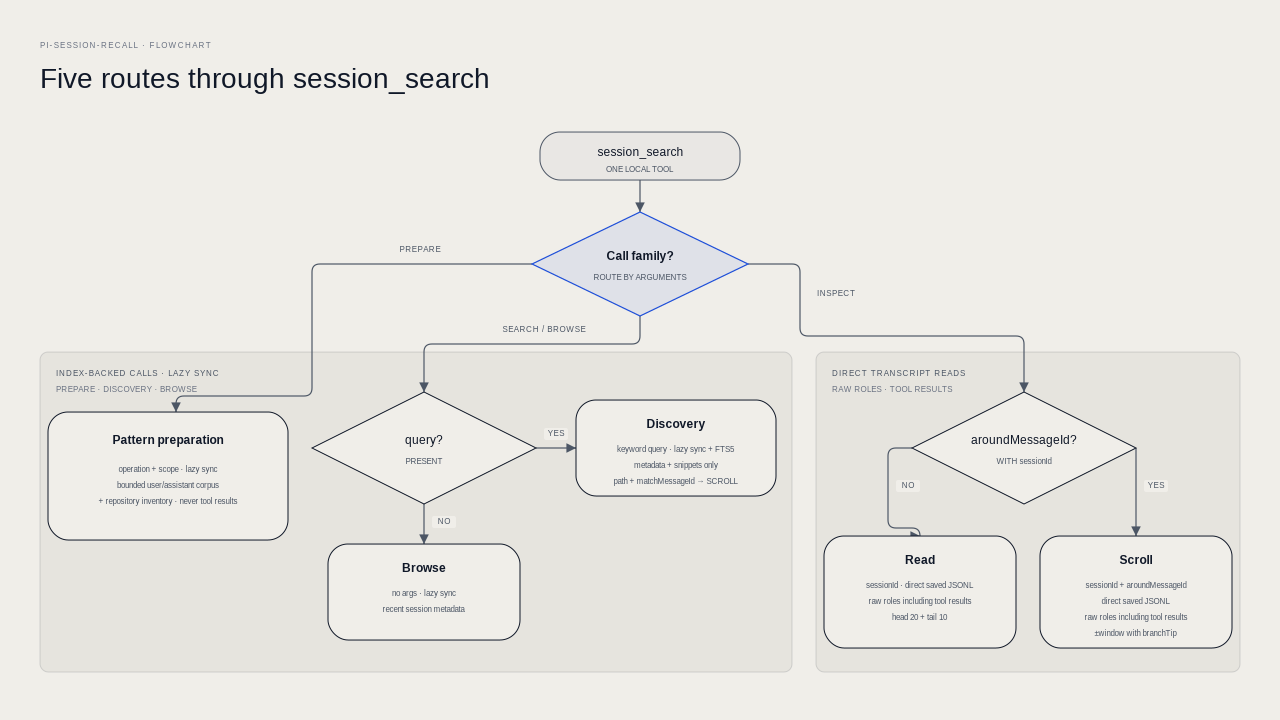
Search makes no model calls.
Query and index
- Queries are trimmed, then limited to 512 characters; later text is ignored.
- Prefer distinctive identifiers, package names, issue numbers, or uncommon terms. Quote phrases only when you know their exact wording.
- FTS5 trigram search uses AND between words. Use
OR, quoted phrases, andNOTfor alternatives, exact matches, and exclusions. Wildcards need stems of at least three characters. - Only user and assistant text is searchable, never thinking or tool output.
- Messages exceeding 20,000 characters contribute only their first and last regions. Phrases and
NEARcannot cross the omitted middle; ordinary AND terms can. - Discovery excludes the current session file when its path is available. Matching forks collapse into their matching parent.
Retrieval and sync
Browse, discovery, and preparation sync the index before use. Preparation reports sync.walkComplete, sync.backlogRemaining, and sync.complete. Completion requires a complete walk and zero backlog.
Preparation returns non-empty user and assistant text, never thinking or tool results. Unreadable sources retain citation and lineage metadata.
Historical tool output can contain secrets or sensitive data. Raw retrieval puts that output in active model context. All returned content follows your configured model provider's data path.
State and storage
The derived SQLite index is ~/.pi/agent/config/pi-session-recall/index.db. Delete it to rebuild from session files; no migration or recovery tools are necessary. Index and transcript reads are local; transcripts stay in place.
Limits and recovery
Incomplete sync can leave partly updated or stale results. Files reached before failure can update; unreached rows remain stale.
| Sync result | Report |
|---|---|
| Partial walk | syncWarning: {kind:"incomplete-walk"}; unseen indexed paths are never purged. |
| Total failure | syncWarning: {kind:"sync-failed", error} with a capped error. |
| Completed sync | No warning. |
Session directories starting with encoded --tmp- or --private-tmp- are never indexed; these represent /tmp or /private/tmp.
Files over 32 MiB are neither indexed nor retrieved. Discovery cannot find new oversized files, but can return earlier metadata after source changes. Read and scroll report size errors.
Preparation runs one sync pass. Backlog or incomplete walks limit the sample and set sync.complete:false. Total sync failure is a tool error. Preparation rejects query, session cursors, or window; scope requires the preparation operation.
Both scopes return their corpus with inventory.available:false when the current directory is not in a Git repository (reason:"not-a-git-repository"). Repository scope fails when inventory fails inside a Git repository. All scope returns its corpus with inventory.available:false and reason:"inventory-failed" in that case.
| Limit | Maximum |
|---|---|
| Serialized preparation output | 50,000 characters |
| Inventory output | 10,000 characters |
Inventory rejects malformed index data, invalid UTF-8, conflict entries, unsupported package modes, Git errors, unexpected stderr, and stream overflow. It reads Git objects locally without lazy fetching or replacement refs.
omittedCounts counts only omitted inventory entries; inventory.truncated reports those omissions. Session and top-level contentTruncated report transcript budget trimming only; session truncated reports omitted middle messages.