
Install
Install with PiG
pig install npm:@hcflabs/pi-auto-compactInstall with Pi
pi install npm:@hcflabs/pi-auto-compactPackages run code with your permissions and influence agent behavior. Catalog inclusion is not a security audit. Review the source before installing a third-party package.
Pi manifest JSON
The pi field of package.json.
{
  "extensions": [
    "./extensions"
  ]
}
README
Written by the package's publisher, shown as published in version 5.4.0 (README.md). PiG does not review it.
@hcflabs/pi-auto-compact
Keep free context space with read trim before summary compaction. Normal compaction preserves completed tool turns and does not restart a final answer.
Install
pi install npm:@hcflabs/pi-task-models
pi install npm:@hcflabs/pi-auto-compact
Configure fast in /task-models. The compaction task uses fast unless a task entry overrides it.
Disable Pi's built-in compaction in ~/.pi/agent/settings.json:
{
  "compaction": {
    "enabled": false
  }
}
Restart Pi after installation or settings changes. Activation requires effective compaction.enabled: false; check that trusted .pi/settings.json files do not override it with true.
Works with
| Package | Relationship | Purpose |
|---|---|---|
@hcflabs/pi-task-models | Required | Provides shared compaction routes. |
Use
Run /auto-compact without arguments and enter a threshold. Pi confirms Auto-compact threshold set to <value>%.
| Surface | Type | Purpose |
|---|---|---|
/auto-compact | command | For users: set the context-use threshold interactively. |
/auto-compact status | command | For users: inspect the last auto-compaction operation in this session. |
pi-auto-compact/autoCompact | task | For Task Models users: configure compaction model routes. |
Read trim has no separate switch. Disable or remove this extension to opt out.
Status
Run /auto-compact status to inspect the last auto-compaction operation. Without a record, Pi shows No auto-compact attempt in this session.
The record contains:
- Start time and trigger.
- Each executed route's model, outcome, duration in milliseconds, and safe error code when it fails.
- Total duration, final outcome, and final error code when the operation fails.
- The reason for the current session model fallback, including
config-missing. - The reason retries stopped.
The command does not run compaction or change config. It shows no message, summary, or error message text. Without UI, stdout contains the status.
Pi already shows a compaction loader during compaction. This extension adds no running footer status.
Flow
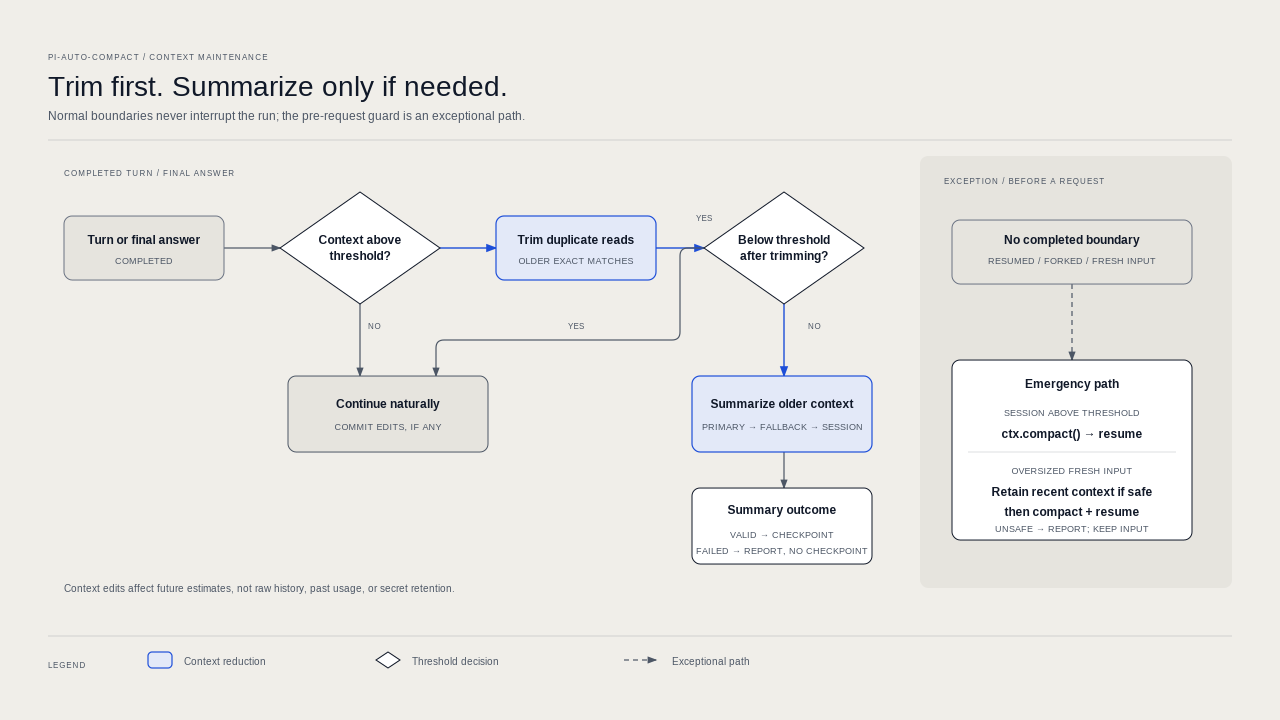
- Context measurement matches Pi's status bar: latest provider usage plus estimates for later messages. Without usage data, including after compaction, estimates use about four characters per token. Replayed reasoning can make estimates too high until the next response.
- Between completed turns, read trim replaces older successful, text-only
readresults only if identical full reads remain in protected recent context. Tool names, arguments, and text must match. Failed, changed, already edited, and image results stay intact. Sufficient read trim avoids a summary request. - Otherwise, summary compaction sends older effective context to the configured primary route, fallback route, then the current session model. Malformed shared config also selects the current session model.
- Resumed or forked sessions and oversized fresh input can require emergency compaction. This interrupts the current task, then resumes it.
Config
Package-owned: ~/.pi/agent/config/pi-auto-compact/config.json
| Name | Description | Values | Default |
|---|---|---|---|
autoCompactThreshold | Context-use percentage above which compaction starts. | Number from 25 inclusive to below 100. | 70 |
Missing files and invalid thresholds use the default. Reading never creates or changes the file. Unknown keys, including misspelled or obsolete model keys, are ignored.
At startup, one warning gives the path and reasons for malformed JSON, invalid thresholds, and unknown keys. Without a UI, warnings go to stderr.
Only /auto-compact writes config. It rereads and reports problems when opened. Writes are atomic. Valid-file updates preserve concurrent changes. Replacing a problem file removes unknown keys and invalid values, but fails without writing if another session changed it during input.
State and storage
Compaction changes only future context for the active session. Raw history, exports, UI display, and historical usage stay unchanged. Providers do not refund earlier tokens. Older-prefix edits can decrease provider cache reuse.
The last record stays only in memory. Session start clears it. Branch navigation does not restore an earlier record.
This does not erase secrets.
Limits and recovery
If fresh input cannot fit safely, Pi reports the limit without discarding the request. Shorten the input or run /compact.
If all summary requests fail, no checkpoint is saved. Check /auto-compact status for the error code and retry limit.
A failed boundary blocks automatic retries at that same boundary. The next boundary can retry. Native emergency compaction can retry on the next request.
Check model routes and authentication, then run /compact to try again. Missing shared config selects the current session model without a notice each turn.