
Install
Install with PiG
pig install npm:@giladbarnea/sideInstall with Pi
pi install npm:@giladbarnea/sidePackages run code with your permissions and influence agent behavior. Catalog inclusion is not a security audit. Review the source before installing a third-party package.
Pi manifest JSON
The pi field of package.json.
{
  "extensions": [
    "./index.ts"
  ]
}
README
Written by the package's publisher, shown as published in version 0.0.26 (README.md). PiG does not review it.
pi-side-chat
You deserve your own side chats, too. It's only fair.






No token tax. No derailed turns. No trace — unless you say so.
Pi extensions give your agent subagents. This one gives you — the user — your own: side chats you start mid-turn, watch live, steer, and whose results stay out of the main agent's context until you decide otherwise.
Why
You're watching your agent grind through phase 1, and you already know what phase 2 needs.
You have two options, and both are bad. Steer — and derail the work in progress with an errand. Wait — and carry the thought in your head for twenty more minutes.
Now there's a third:
/side plan the next phase and write it to phase-2.md
The instant you press Enter, a side chat forks off with a snapshot of the current conversation and gets to work — while your main agent keeps going, none the wiser.
A second pair of hands with the same memory — and a separate token budget.
Install
pi install npm:@giladbarnea/side
Coming from pi-user-agents? This is the same extension under a new name. Remove the old package first (pi remove npm:@giladbarnea/pi-user-agents), then install this one. /agent is now /side and /agent-attach is now /side-attach. Sessions dispatched by the old package still attach and render. Do not keep both installed: each loads its own widget and editor hooks.
The loop
1. Dispatch
/side <task> starts a side chat in the background, with the current conversation as its starting context — it knows everything the main agent knows up to that moment. /side -i <task> starts one with a blank slate instead. Start as many as you like; they run concurrently.
Classic dispatches:
/side write a handoff document for the work currently in progress
/side -i -m flash summarize what PARSER_SPEC.md guarantees
/side -s --thinking high find the root cause of the flaky widget test
The first preserves the session's knowledge before the context window fills, without interrupting the main agent to do it. The second is a cheap, isolated errand. The third auto-squashes: its findings are delivered into the main conversation when it finishes.
2. Watch
Every side chat gets a row in a widget under the editor: status, task, model, turn count, tool uses, elapsed time, a one-cell context meter, and the last line of live activity.

Press ← or ↓ from the editor to focus the widget. The selected row shows a short session ID and offers the same actions as the overlay. Press Enter to open the full conversation, streaming live and following the tail as it grows. Tool calls render as proper views — read, edit, write, grep, find, ls, and bash each get a dedicated format, everything else a readable generic one.
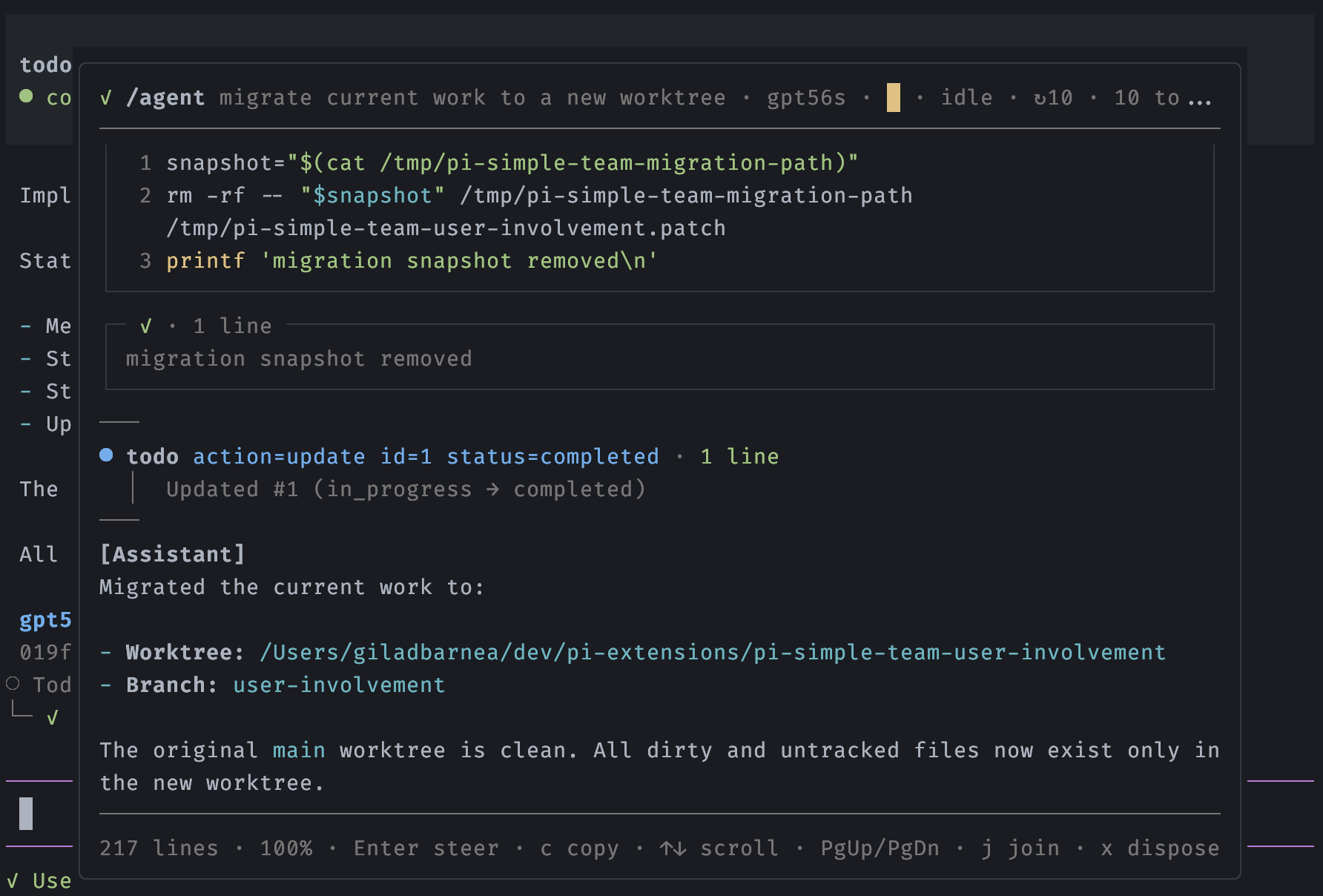
3. Steer
A side chat is not fire-and-forget — it's a session you can talk to.
Press Enter in the overlay to open the steer composer. Mid-turn, your message queues in after the current tool batch, before the next model call — exactly like steering the main agent. After the turn completes, the same composer starts another turn on the same live session. Follow up as many times as you need. Read each response in the side chat overlay.
Ctrl+x interrupts only the current turn — the side chat goes idle and stays available for steering, squashing, or detaching. In fact, nothing ends a side chat except you: pressing d twice, squashing or rebasing it, or ending the Pi session.
4. Detach
When a row has served its purpose, press d twice: the side chat stops, its row leaves the widget, and its session file is left untouched. The transcript records which one it was:
Detached session 0199c4f2-8b1a-7c3d-9e05-6a2f18d7b4ce
Pick it back up whenever you like — /resume 0199c4f2, or pi -r and choose it from the list. It resumes as an ordinary Pi session with its full history, its model, and its thinking level, and from there it is a normal agent you talk to directly.
Or take it back as a side chat instead: /side-attach 0199c4f2 puts the session back in the widget — parked idle, restored as dispatched down to its --tools and the rest of its options — and offers to open it. A unique id prefix is enough, only this conversation's own side chats qualify, and the transcript records the return: Attached session 0199c4f2-….
5. Squash — or don't
This is what makes side chats different from subagents: by default, the main agent never learns any of this happened.
Completed responses stay in the side chat overlay, accessible through the widget below the editor. Completion adds no transcript card. Ask a side chat ten questions and your main agent's token budget does not move.
When a result does belong in the main conversation, squash it in:
- Dispatch with
-s/--squashand the result is delivered automatically on completion. - Or press
sin the overlay of any completed side chat, whenever you decide it earned its place.
A squash delivers a compact record, not a transcript dump: every message you sent the side chat and the final answer to each — no thinking, no tool traffic. The record is rebuilt from the side chat's full history at squash time, so early turns survive even after it compacts its own context. If the main agent is mid-turn, the record is steered in; if idle, it triggers a turn. Squash adds no transcript card. A squashed side chat retires; its overlay stays readable.
6. Or rebase — rewrite history
Squash has a raw sibling. Press r in the overlay and the side chat's whole conversation — prompts, replies, tool calls and their results — is appended to the main session as ordinary messages, exactly as if you had prompted the main agent all along. The dispatch preamble is stripped, nothing is wrapped or summarized, and no trace remains that a side chat ever existed.
Everything the side chat lived through rides along untouched. If it compacted its own context mid-run, the compaction rides along too, and the main conversation's context picks up exactly where the side chat's left off. The transcript redraws with the conversation inline, plus one dim provenance line:
Rebased session 01a0534e-9fa7-7d6f-bd44-b85fba1f5e05 into this conversation (added 32 messages, ~135K tokens, 1 compaction event)
Rebase is a fast-forward, in the git sense: the side chat forked from the main conversation's tip, and its history can graft back only while that tip hasn't moved. Send the main agent anything after the dispatch and r disappears, leaving s — which always works — as the way in. Press r anyway and the footer tells you why not.
Delivering the rebase switches the session in place — same file, same session id, transcript redrawn — so r is withheld while any side chat is mid-turn, and parked side chats are detached first, each leaving its Detached session … line to /resume from. When siblings would be detached, the first r warns with the count and a second r confirms.
7. Or give it a pane — herdr or tmux
When Pi runs inside herdr, the terminal multiplexer for coding agents, a side chat does not have to stay in the background at all. Press h on any idle or finished side chat and its session opens in a new pane beside you, as an ordinary interactive Pi: same model, same thinking level, same --tools and the rest of its dispatch options. Talk to it there.
The row stays in the widget, labeled with its new home:
⧉ /side plan the next phase · luna · herdr pane w1:p3 · ↻2 · 5 tool uses · 42.1s
Everything the side chat said before it left is still readable in the overlay, and still squashes or rebases. The pane's Pi is the session's only writer from then on; d on the row clears it and leaves the usual Detached session … line, so the id stays findable.
/side -h <task> skips the background entirely: the side chat is born in a new pane, starts from the conversation snapshot (or from nothing with -i), and takes the task as its first prompt. Its row points at the pane from birth. Outside herdr, h explains why it did nothing and -h is an error.
-h takes an optional place: /side -h tab <task> opens the side chat in a new tab of your workspace, and /side -h workspace <task> in a new workspace. Neither takes your focus. The side chat is told where it runs. Because of the place, a task that starts with pane, tab or workspace loses that word after -h. Quote it to keep it: /side -h "tab order" is wrong. The quotes reach the side chat too.
When Pi runs inside tmux, /side --tmux <task> does the same in a new tmux pane beside you. The pane runs pi from the tmux server's PATH. --tmux has no short form, because -t is --tools. Outside tmux, --tmux is an error. The h key stays herdr-only.
The mechanics
🎛️ Per-dispatch configuration
Each side chat takes its own configuration, using the same flags as the pi CLI:
/side -m opus --thinking high design the caching layer
/side --tools read,grep,find audit the error handling in src/
/side -i --system-prompt "be terse" what does the session-format doc guarantee?
Options come first; everything after them is your task, verbatim. The full grammar lives in PARSER_SPEC.md — not that you'll need it.
✨ The fanciest autocomplete in the Pi universe
You'll rarely type any of this by hand. The moment you type -, a completion menu opens — no Tab needed. Anywhere the set of valid values is finite, the editor hands it to you: models, providers, thinking levels, the session's tools, even skill and prompt-template paths. You pick from what actually exists instead of typing and hoping.
And what you do type by hand is checked live, as you type. Valid options and values light up in your theme's syntax colors; anything that won't parse — a blocked option, a model that doesn't resolve, an option stranded after the task began — shows in the error color before you ever press Enter. A /side line that looks right is right.
🧱 Side chats are durable Pi sessions
Every dispatch writes a real session file, exactly like the one you're sitting in, so side chats show up in /resume and pi -r alongside your own sessions.
The widget does not survive a session reload. Each side chat's session remains on disk, accessible through /resume or /side-attach. Completion cards from older versions stay hidden.
🌡️ A context meter in one cell
Each row carries the side chat's own footer gauge: it fills ▁▂▃▄▅▆▇█ against that side chat's model context window and shifts color through the same stages as Pi's footer — dim, then muted at 40%, warning at 65%, error at 85%. You see a side chat approaching its limit before it becomes a problem.
Reference
Everything goes through one command: /side [options] <task>. Its one companion, /side-attach <session-id>, brings a detached session back into the widget.
| Flag | Effect |
|---|---|
-i, --isolate | Start without the conversation snapshot |
-s, --squash | Deliver the result into the main context on completion |
-h, --herdr [pane|tab|workspace] | Start the side chat in a new herdr pane (the default), tab, or workspace instead of the background |
--tmux | Start the side chat in a new tmux pane instead of the background |
-m MODEL | Model for this side chat (alias of Pi's --model) |
| pi CLI options | Forwarded to the side chat — --thinking, --tools, --system-prompt, … |
| Where | Key | Action |
|---|---|---|
| Editor | ← / ↓ | Focus the side chats widget |
| Widget | ↑ ↓ · Enter | Select a side chat · open its overlay |
| Widget / overlay | Ctrl+x | Interrupt the current turn (the side chat stays alive) |
| Widget / overlay | d d | Detach the side chat, keeping its session (twice to confirm) |
| Widget / overlay | Esc | Back |
| Overlay | Enter | Steer mid-turn, or start another turn when idle |
| Widget / overlay | s | Squash the conversation into the main context |
| Widget / overlay | r | Rebase the raw conversation into the main context (fast-forward only) |
| Widget / overlay | h | Open the side chat's session in a new herdr pane |
| Widget / overlay | c | Copy the latest response |
| Widget / overlay | i | Copy the side chat's full session ID |
| Overlay | scroll (keys, or the mouse wheel in fullscreen mode) · End | Pause tail-following · resume it |
Good to know
- Some accepted
pioptions have no effect on a background run (the session, approval, offline, and API-key families). They parse; they just don't do anything yet. A Pi in a herdr or tmux pane does not receive them. candicopy viapbcopy, so they are macOS-only for now.-hand-sconflict, and so do--tmuxand-s: a side chat in a pane never squashes into this context by itself. Squash its row later instead.-hand--tmuxconflict too.- The overlay caps very large tool outputs and omits thinking entries.
Roadmap
- Side chats stay alive until you end them — steer, interrupt, resume, across turns.
- Squash: a compact record of the exchange, delivered into the main context.
- Rebase: the raw conversation grafted onto the main session — fast-forward only, compaction-faithful.
- Attach: a detached session returns to the widget, restored as dispatched.
- Live syntax coloring and eager autocomplete for the
/sideline. - Herdr: hand a side chat's session to a pane beside you, or dispatch straight into a pane, tab, or workspace.
- Tmux: dispatch straight into a tmux pane.
- Render a side chat's compaction event in the overlay.
- Wire the accepted-but-inert
pioptions. - Clipboard support beyond macOS.
Under the hood
Design notes — result delivery through the Pi SDK, the squashed-message format, the rebase, attach, and herdr mechanisms, runtime sharing, model resolution, and editor internals — live in INTERNALS.md. The complete command grammar lives in PARSER_SPEC.md.
Heavily inspired by tintinweb/pi-subagents.