Install
Install with PiG
pig install npm:@ghosthvj/gentle-canvas-lanInstall with Pi
pi install npm:@ghosthvj/gentle-canvas-lanPackages run code with your permissions and influence agent behavior. Catalog inclusion is not a security audit. Review the source before installing a third-party package.
Pi manifest JSON
The pi field of package.json.
{
  "extensions": [
    "./extensions/canvas-lan.js"
  ]
}
README
Written by the package's publisher, shown as published in version 0.1.2 (README.md). PiG does not review it.
Gentle Canvas LAN
Open the Gentle Design canvas from your phone or laptop on the same network while Gentle Shell runs on a headless machine. No tunnels, no Tailscale, one stable address.
What it does
- Keeps one fixed LAN address for a canvas whose real port and token change every time you reopen it.
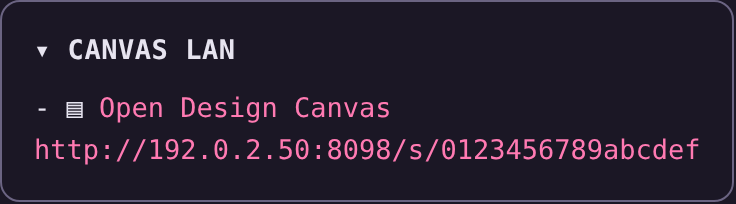
- Shows a short, stable link (
http://LAN_IP:PORT/s/<16-hex>) in the sidebar card that redirects to the current canvas. The full tokenized URL is still printed by/canvas-lan:statusand in tool output. - Proxies the canvas over the LAN with guarded upstream forwarding: exact Host/Origin rules, token paths, SSE streaming, and no forwarded-header trust.
- Never advertises a dead link. The registration is probed before a link is shown; a canvas that stopped answering is revoked.
- Explains an empty port. With nothing live, a request shows a short page saying the canvas is not running instead of a bare
Bad Gateway.
Requirements
- Gentle Shell (
gentle-pi) and Node.js 22+. - Gentle Design running in that session — the canvas it serves locally is what gets exposed.
- The other device on the same trusted network.
Install
pi install npm:@ghosthvj/gentle-canvas-lan
From a git checkout instead:
pi install git:github.com/ghosthvj/gentle-canvas-lan
To try it once without touching your settings: pi -e npm:@ghosthvj/gentle-canvas-lan.
Configure
Run /canvas-lan:setup.
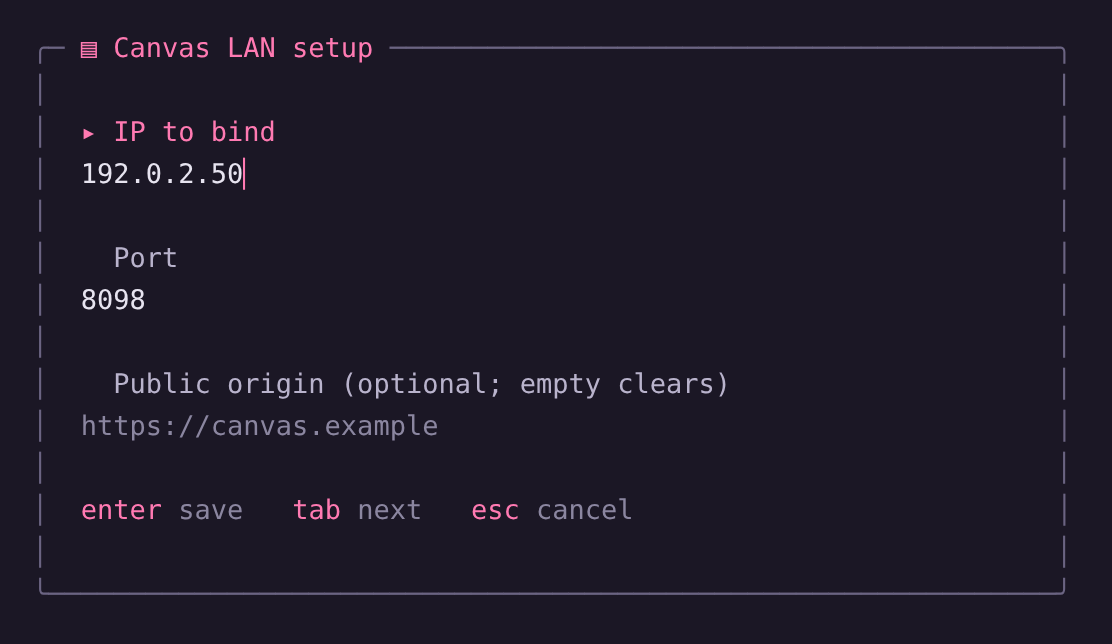
It writes ~/.config/gentle-canvas-lan/config.json (mode 0600, atomic replace) and rebuilds the proxy. The two optional caps can also be saved there as plain JSON keys, e.g. { "ip": "192.168.1.20", "port": "34316", "maxBodyBytes": "10485760" }.
| Setting | Environment variable | Notes |
|---|---|---|
| Bind IP | GENTLE_CANVAS_LAN_IP | Required. A concrete IPv4/IPv6 address of this host, never 0.0.0.0, :: or a hostname. |
| Port | GENTLE_CANVAS_LAN_PORT | Defaults to 34316. |
| Public origin | GENTLE_CANVAS_LAN_PUBLIC_ORIGIN | Optional exact http(s)://host[:port] origin when a reverse proxy terminates TLS. |
| Max body size | GENTLE_CANVAS_LAN_MAX_BODY_BYTES | Optional cap in bytes for request bodies forwarded to the canvas. Defaults to 52428800 (50 MB). |
| Max connections | GENTLE_CANVAS_LAN_MAX_CONNECTIONS | Optional cap on concurrent client connections. Defaults to 64. |
Environment variables win per key over saved values.
Commands
| Command | What it does |
|---|---|
/canvas-lan:setup | Configure the bind IP, port and optional public origin. |
/canvas-lan:start | Enable the listener. The card appears only while the registered canvas answers. |
/canvas-lan:status | Show the effective IP and port with their source (env/saved), the listener state and the current LAN link. |
/canvas-lan:stop | Stop listening and disable automatic start until you start it again. |
In the TUI, command results and errors stay in the transcript instead of the one-line status slot that the next notification would replace.
Troubleshooting
- The browser shows "Gentle Design canvas is not running". The port is still reserved but the local canvas stopped. Open a design in Gentle Shell and reload the page.
- No card, and
statussays the proxy is running with no URL. There is no live canvas registration yet; opening a design registers it and starts the listener. - Port already in use. Pick another port in
/canvas-lan:setup; a conflict is reported without killing the other process.
Security
Traffic is plain HTTP and there is no authentication. Tokenized URLs and the short link are capabilities: anyone on your network who has one can view the canvas and send comments to the agent. Use it only on a trusted network, never forward the port to the internet, and stop the listener when you are done.
Docs
Configuration · Public origin trust · Proxy · Controller · Sidebar adapter · Card · Changelog
License
MIT. See LICENSE and THIRD_PARTY_NOTICES.md for the upstream attribution.