
Install
Install with PiG
pig install npm:@geoqiao/pi-askInstall with Pi
pi install npm:@geoqiao/pi-askPackages run code with your permissions and influence agent behavior. Catalog inclusion is not a security audit. Review the source before installing a third-party package.
Pi manifest JSON
The pi field of package.json.
{
  "skills": [
    "./skills"
  ],
  "extensions": [
    "./src/index.ts"
  ]
}
README
Written by the package's publisher, shown as published in version 1.3.5 (README.md). PiG does not review it.
Pi Ask


Answer your agent's questions without losing the thread.
@geoqiao/pi-ask adds structured clarification to Pi: choose options, type your own answer, or ask for an explanation before deciding. Get a rich terminal form in TUI mode and portable sequential dialogs in RPC mode, with normalized answers returned to the agent.
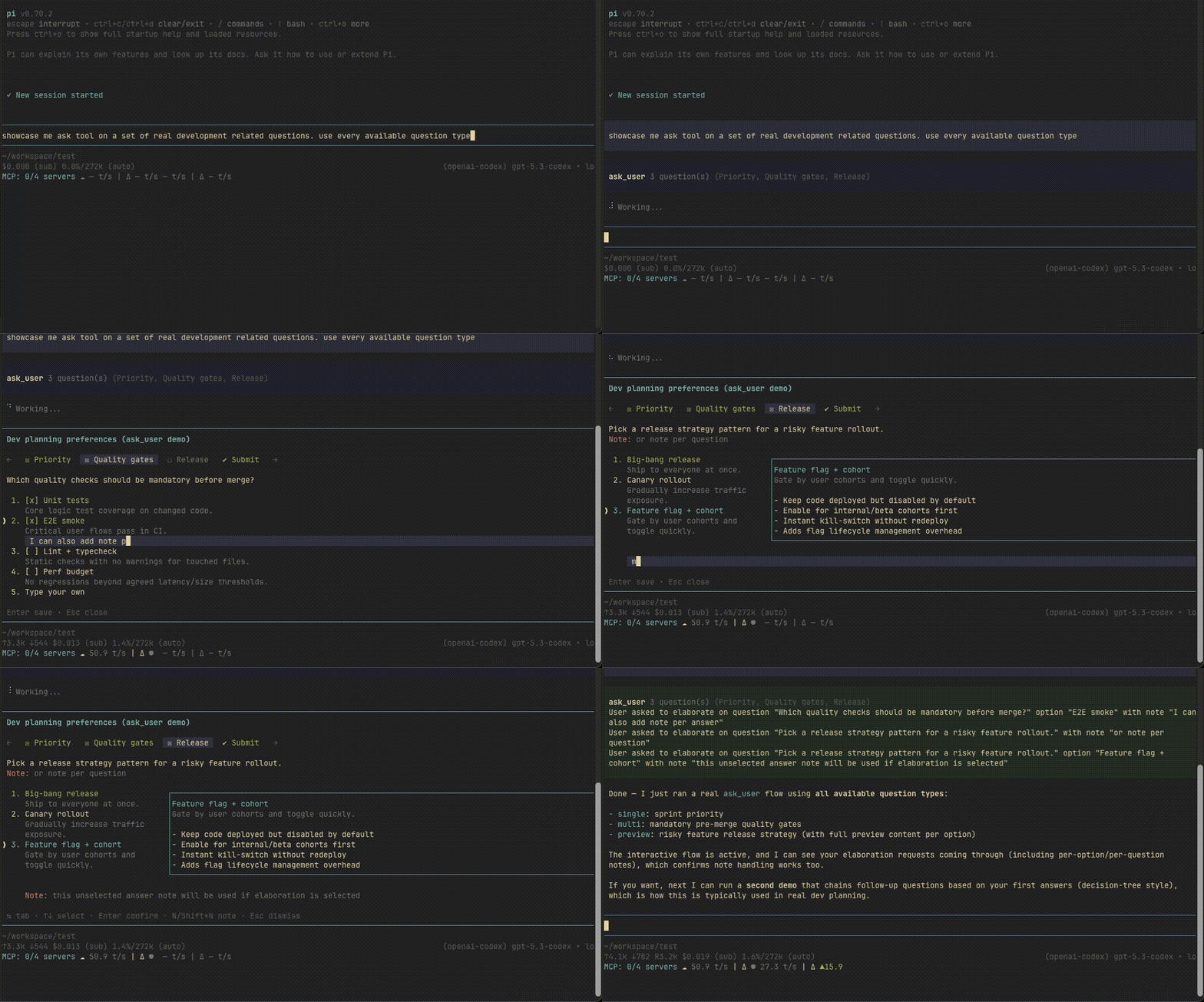
Quick start · Everyday use · TUI and RPC · Settings · Documentation
Quick start
pi install npm:@geoqiao/pi-ask
Run /reload in an already-open Pi session. The agent can then call ask_user when clarification is needed; you can also explicitly ask it to interview you.
To try the package for one run without adding it to your saved package configuration:
pi -e npm:@geoqiao/pi-ask
If the agent has already asked questions in plain text, run /answer in TUI mode to turn its latest completed message into a form.
Independently maintained continuation of eko24ive/pi-ask, preserving the upstream history, MIT license, and attribution while adding portable Pi RPC support.
Everyday use
| Need | Feature |
|---|---|
| Choose one answer or several | Single-select, multi-select, and preview questions |
| Give an answer outside the options | Inline Type your own, with native Pi-style @ file references |
| Understand a choice before deciding | Notes on a question or option, followed by Elaborate |
| Review before continuing | Submit, Elaborate, and Cancel review actions in TUI |
| See the agent's recommendation | Optional (recommended) markers with reasons; never preselected |
| Recover a previous form | Replay commands and automatic recovery of interrupted TUI asks |
Commands
| Command | What it does |
|---|---|
/answer | Extracts questions from the latest completed assistant message and opens an ask form |
/answer:again | Reopens the latest /answer form on the current branch |
/ask:replay | Reopens the latest real ask_user form on the current branch |
/ask-settings | Opens the settings overlay; ? inside a form opens the same overlay |
These commands are TUI-only. Replay is branch-aware and works with /resume and /tree. Closing a command-opened form does not start an agent turn; submitting or elaborating sends a normal user follow-up.
/answer uses a configured extraction model and the preceding user message as context. It validates the extracted form and retries missing or invalid output. Normal ask_user calls do not use this extraction model. See extraction settings.
When the agent asks
The agent checks relevant context first. It asks only for unresolved critical requirements, outcome-changing preferences, or consequential/hard-to-reverse actions beyond existing authorization. Explicitly requested interviews, requirements gathering, and interactive questions also use ask_user.
Clear small changes, settled choices, authorized reversible steps, and routine implementation details proceed without reconfirmation. Multiple options or architecture/naming/research labels alone do not trigger questions; clear comparison/research requests get analysis first. Follow-ups address only current blockers, and settled decisions reopen only for materially new information.
Delegated autonomy does not waive safety boundaries. Cancellation, skipped questions, and unclear answers are not high-risk approval. This is prompt guidance, not a runtime permission check or a guarantee of model behavior. The tool's compact guidance works without loading the skill; the skill routes to interaction details and examples only when needed. See the policy and verification limits and decision cases.
TUI and RPC
Both modes return normalized answers, but their interfaces differ:
| Capability | TUI | RPC with portable UI support |
|---|---|---|
| Layout | Tabbed, same-screen form | Sequential dialogs with [current/total] progress |
| Answers | Native single/multi selection and custom text | One real option or Type something…; type multiple choices as free-form text |
| Previews and recommendations | Preview pane and recommendation subtitles | Details flattened into option text; canonical labels and values stay unchanged |
| Notes and review | Question/option notes and final review tab | No notes or final review; submitting an option advances directly |
| Settings and replay commands | Supported | TUI-only |
| Dismissal | Flow-level cancel/dismiss, with optional dirty-state confirmation | Dismissing a card or input skips that question; tool abort cancels the flow |
RPC does not emulate checkbox cards, repeated multi-select dialogs, or custom preview panes. Unanswered questions remain unanswered, including those marked required: that field is advisory, not submission enforcement.
Print, JSON, and RPC without portable UI cannot open a form. They return a needs-user-input message with pending questions rather than pretending to collect answers.
Interrupted forms
Starting, resuming, or forking a TUI session recovers its newest unresolved ask_user form once. Submission is delivered as a user message because the original tool execution no longer exists. Submit or cancel prevents another automatic reopen; /ask:replay remains available.
New sessions, extension reloads, non-TUI modes, and RPC do not trigger recovery.
Settings
Open /ask-settings, or press ? inside the TUI form. You can adjust auto-submit, dirty-dismiss confirmation, review shortcut confirmation, single-as-multi presentation, footer hints, and notifications. Resetting defaults requires a guarded double press.
Settings save when the file is writable; failed saves revert the change and show a manual-edit message. Invalid files and load-time migrations do not rewrite user-owned configuration. The established upstream-compatible path remains:
~/.pi/agent/extensions/eko24ive-pi-ask.json
For the complete config shape, defaults, keymap rules, notification channels, and extraction settings, use docs/configuration.md rather than copying a second config example from this README. You can also ask your agent to configure pi-ask; it is instructed to read that guide first.
Handy default keys
| Key | Context | Action |
|---|---|---|
Tab / Shift+Tab | Main flow | Next / previous question tab |
↑ / ↓ | Main flow | Move between options |
Enter / Space | Main flow | Confirm / toggle |
1..9 | Options | Select or toggle by number |
n / Shift+N | Main flow | Add an option / question note |
t | Main flow | Change the current question type |
? | Form | Open settings |
@ | Answer and note editors | Complete a file reference |
In non-empty editors, arrows and Tab stay with the text. On the review tab, 1, 2, and 3 mean Submit, Elaborate, and Cancel; by default, each needs a second press. Destructive multi-to-single changes also require confirmation. The single-as-multi setting applies to new/replayed forms; t changes the active question. See keymaps for customization and the contract for exact editing and cancellation behavior.
Feature screenshots
| Feature | Preview |
|---|---|
| File references in answers and notes | 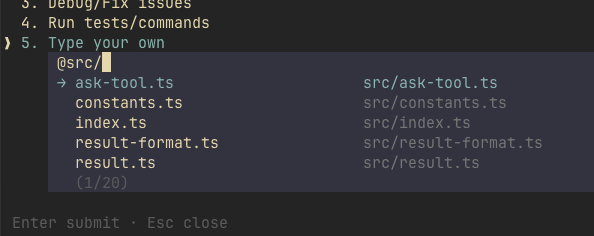 |
| Option and question notes | 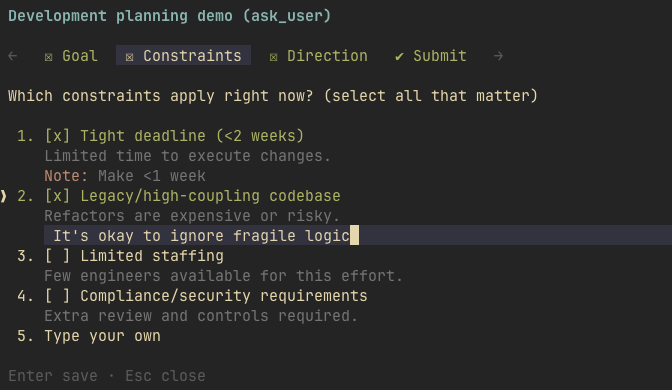 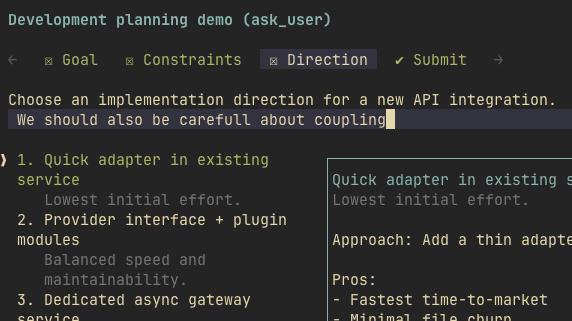 |
| Elaborate and Submit review | 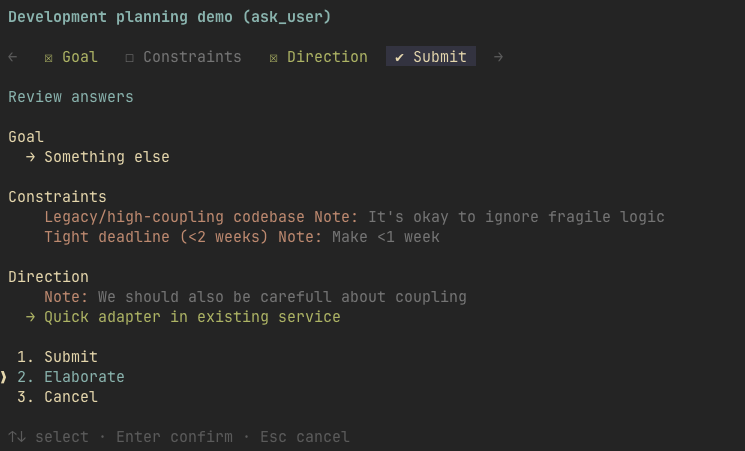 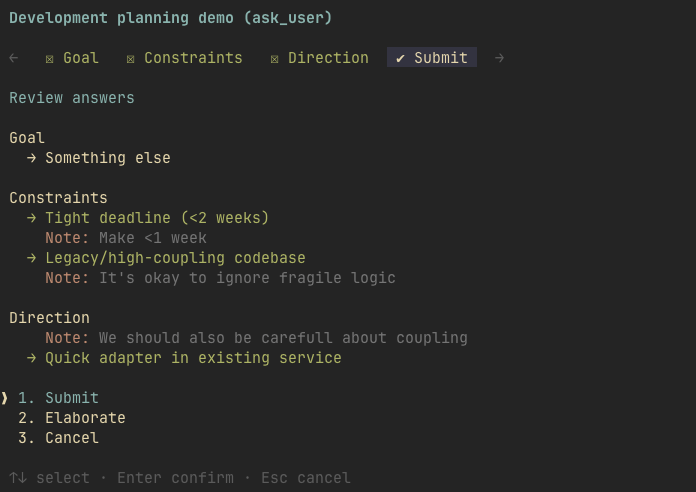 |
| Single and multi selection | 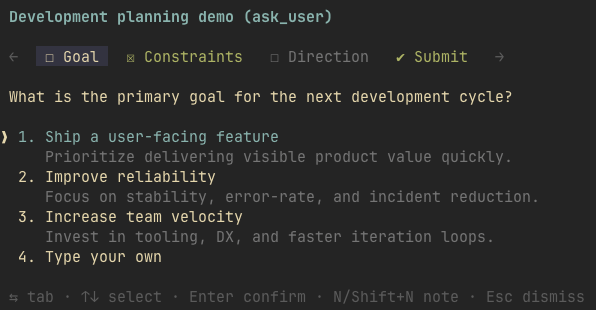 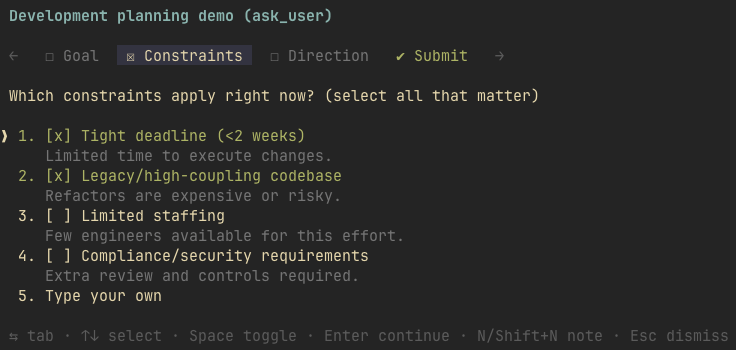 |
| Rich option previews | 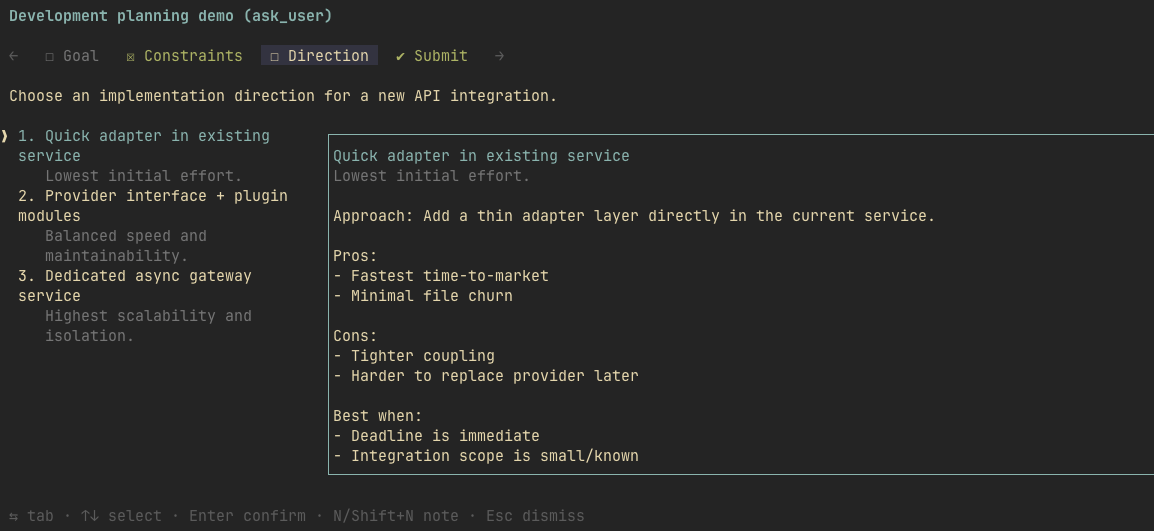 |
| A custom answer | 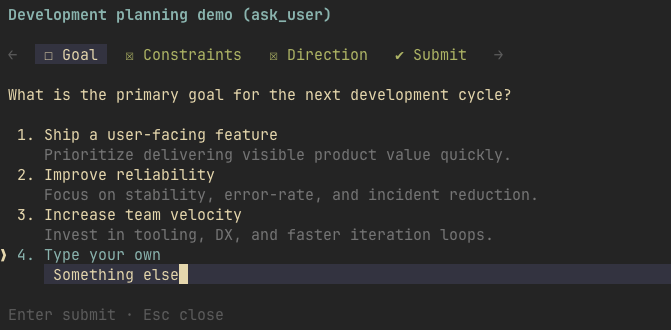 |
Documentation
| Guide | Contents |
|---|---|
| Configuration | Settings, keymaps, notifications, and /answer extraction |
| Contract | Input/output, TUI/RPC behavior, replay, and recovery guarantees |
| Architecture | Module responsibilities and invariants |
| Remote events | Trusted local inter-extension integration |
| Ask User skill | Compact decision boundary and on-demand interaction/evaluation references |
The bundled skill is enabled by default when installed and can be disabled through pi config. Tool guidance remains available without it.
Development
From the monorepo root:
pnpm --filter @geoqiao/pi-ask dev
pnpm --filter @geoqiao/pi-ask dev /absolute/path/to/project
The dev script isolates this extension and its bundled skill using --no-extensions --no-skills --no-prompt-templates --no-themes --no-context-files, then changes to the target directory before launching Pi. To load just the extension manually, run pi -e ./src/index.ts from this package directory.
pnpm --filter @geoqiao/pi-ask typecheck
pnpm --filter @geoqiao/pi-ask test
pnpm --filter @geoqiao/pi-ask pack:check
See CONTRIBUTING.md for workspace setup, formatting, conventional commits, and Changesets. Local hooks are optional and are not installed automatically; run pnpm exec lefthook install at the workspace root if wanted. Keep README media in docs/media/; these assets are repository-only.
Attribution and contributions
MIT. This independently maintained continuation preserves eko24ive/pi-ask's history and attribution. Development and issues live in geoqiao/pi-tools.
Thanks to @k0valik for the /answer idea. The bundled skill was inspired by edlsh/pi-ask-user.