
Install
Install with PiG
pig install npm:@fitchmultz/pi-mcp-adapterInstall with Pi
pi install npm:@fitchmultz/pi-mcp-adapterPackages run code with your permissions and influence agent behavior. Catalog inclusion is not a security audit. Review the source before installing a third-party package.
Video
Declared by the package manifest. Open the file ↗
Pi manifest JSON
The pi field of package.json.
{
  "video": "https://github.com/fitchmultz/pi-mcp-adapter/raw/refs/heads/main/pi-mcp.mp4",
  "extensions": [
    "./dist/index.js"
  ]
}
README
Written by the package's publisher, shown as published in version 8.0.65 (README.md). PiG does not review it.
Fitch MCP Adapter
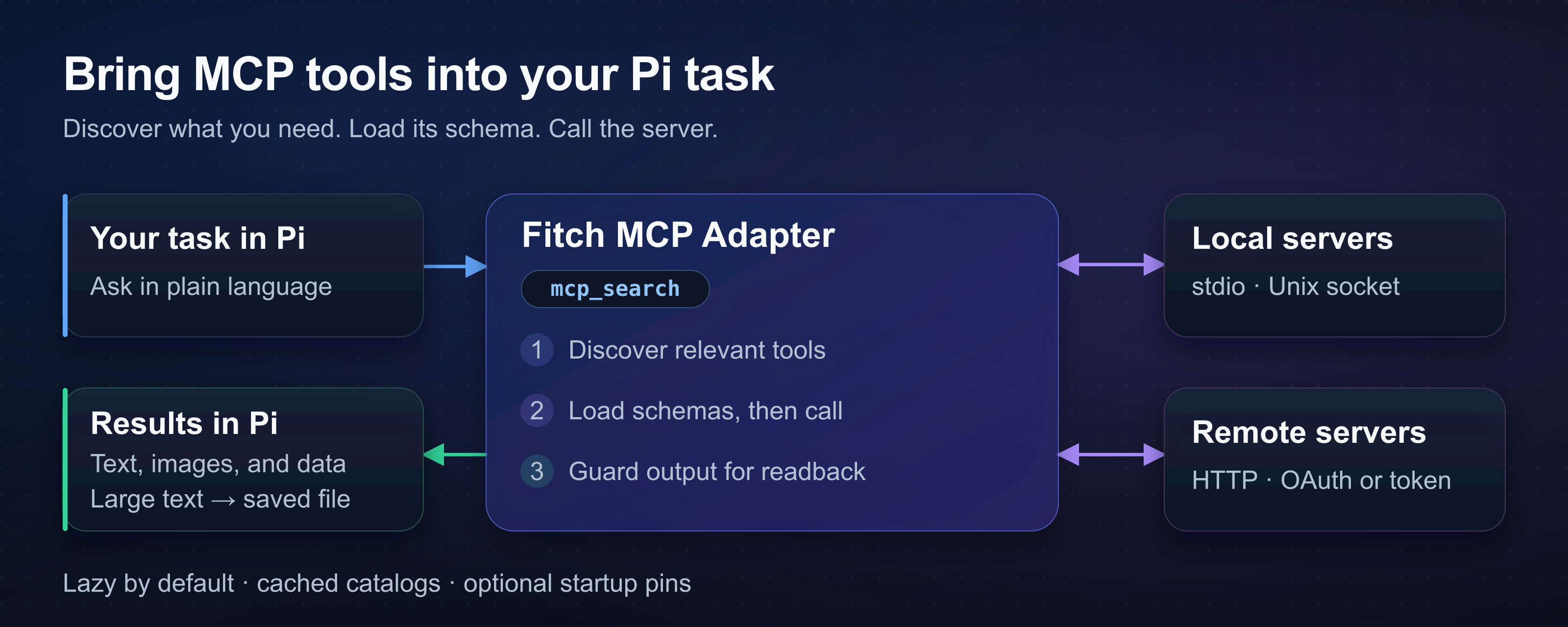
Connect Pi to MCP servers for browsers, databases, and APIs. The adapter loads selected tool schemas when needed to keep large catalogs out of the conversation context.
Install
Check the Pi and Node.js requirements.
pi install npm:@fitchmultz/pi-mcp-adapter
pi
Restart Pi if it was open during installation. Load only one adapter per Pi host. For legacy adapter state, read the upgrade guide before you restart Pi.
For a Git install, run pi install git:github.com/fitchmultz/pi-mcp-adapter.
First use
Enter /mcp setup to add a server or import configs from other hosts. Preview the changes before you save them. The adapter leaves external host files unchanged.
The adapter reads .mcp.json, project .pi/mcp.json (read-only native Pi format when no other Pi MCP extension is coexisting in the session), and ~/.config/mcp/mcp.json automatically. Pi loads project configs only after project trust. See config paths and precedence.
For Chrome DevTools, create .mcp.json in your project:
{
  "mcpServers": {
    "chrome-devtools": {
      "command": "npx",
      "args": ["-y", "chrome-devtools-mcp"]
    }
  }
}
Run /reload after config changes. Ask Pi:
Use Chrome DevTools to take a screenshot of the current page.
By default, servers connect when Pi discovers an uncached catalog or calls a tool. Cached catalogs register as deferred Pi tools without a connection: Pi's tool_search loads the ones a task needs, codemode scripts can call them directly, and the mcp gateway discovers servers that have no cached catalog yet.
Controls and settings
| Command | Purpose |
|---|---|
/mcp | Open the interactive server and pin panel |
/mcp status | Show connection state, blocked/disabled servers, and validation notes |
/mcp tools [server] | List discovered tools and estimated token cost (all or one server) |
/mcp reconnect [server] | Reconnect and refresh the catalog (skips disabled servers) |
/mcp reload | Reload MCP configuration and runtime state |
/mcp doctor [server] | Inspect config sources, validation errors, auth health, and stderr |
/mcp-auth <server> | Start OAuth in an interactive session |
/mcp disable <server> | Disable the server live in-session and in project overrides |
/mcp enable <server> | Enable the server live in-session and connect/register its tools |
Use directTools to pin tools at startup. Other tools stay deferred until tool_search loads them. Like Pi's own MCP extension, the adapter activates a registered tool_search when it registers deferred tools, once per session start or tree navigation; a branch that recorded removing tool_search keeps it off. Gateway search covers known catalogs; mcp({ action: "connect", server }) discovers an unknown catalog.
Use approveTools to require confirmation before sensitive calls. Matching calls fail with isError: true in headless sessions or when denied, and concurrent prompts for the same tool serialize cleanly.
More server features
The adapter supports MCP Skills (verified SEP-2640 skills auto-discovered for trusted projects into Pi's resources_discover, on by default via exposeSkills), resources and URI templates (resources / read-resource), and prompt templates (slash commands under /mcp__<server>__<prompt> with MCP argument completions, plus prompts / get-prompt gateway actions).
MCP Apps open interactive UIs in a browser or through Glimpse on macOS. Apps can send messages to Pi. Try the interactive visualizer.
Use Pi's codemode tool for loops and dependent tool calls. See gateway examples for exact call shapes.
Warnings and platform limits
MCP servers can execute programs or access accounts. Check server commands and account access before you trust a project config.
OAuth requires an available OS credential store. Unlock a Secret Service-compatible keyring on headless Linux. The adapter has no plaintext fallback. See the OAuth guide for remote sign-in.
Android and Termux do not support persistent OAuth by default. Unauthenticated, header-token, and stdio servers work. Git/source builds require an Android-native tsgo compiler. Use the precompiled npm package if you have no compiler. See Android build details.
The adapter saves text above the default 50 KiB or 2,000-line limit to local files. Saved results and App histories can contain sensitive data. Remove files when you no longer need them. See output handling and readback.
If App history cannot be saved, reload or exit discards unsaved messages. Retrieve pending messages before either action. See App history and recovery.
Documentation
- Reference: all settings, tool actions, SDK integration, transport behavior, and limits.
- Upgrade guide: API changes and legacy state migration.
- Development and releases: local checks and maintainer procedures.
- Changelog · Report an issue
License and background
Mitch Fultz maintains Fitch MCP Adapter under the MIT license. Mario Zechner discusses tool schema costs in his article about MCP.