
Install
Install with PiG
pig install npm:@firstpick/pi-extension-bang-command-autocompleteInstall with Pi
pi install npm:@firstpick/pi-extension-bang-command-autocompletePackages run code with your permissions and influence agent behavior. Catalog inclusion is not a security audit. Review the source before installing a third-party package.
Pi manifest JSON
The pi field of package.json.
{
  "image": "https://unpkg.com/@firstpick/pi-extension-bang-command-autocomplete/images/Common_commands_v0.1.4.png",
  "extensions": [
    "./index.ts"
  ]
}
README
Written by the package's publisher, shown as published in version 0.2.3 (README.md). PiG does not review it.
Bang Command Autocomplete for Pi
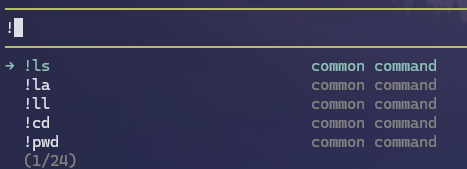
Suggests shell commands when you type ! or !! in Pi.
What you can do
- Suggests commands while you type
!or!!. - Includes a useful built-in command list.
- Can optionally learn command names from your shell history.
- Keeps normal Pi prompts unchanged.
Install
Install it through Pi:
pi install npm:@firstpick/pi-extension-bang-command-autocomplete
Restart Pi if the package does not appear in your current session.
How to use it
Type ! followed by part of a shell command. Choose a suggestion, finish the command, and submit it as usual. Use !! when the output should stay out of the next model prompt.
/bang-refresh— rebuild autocomplete index./bang-status— show indexed command count, history-index status, runtime-learned command/line counts, and learned flag count.
Before you start
No setup is needed for the built-in command suggestions. Suggestions from your shell history are optional; see the technical reference if you want to enable them.
Technical details
See TECHNICAL.md for complete commands, configuration, compatibility, security, and troubleshooting information.