
Install
Install with PiG
pig install npm:@dumbmice/pi-mailbridgeInstall with Pi
pi install npm:@dumbmice/pi-mailbridgePackages run code with your permissions and influence agent behavior. Catalog inclusion is not a security audit. Review the source before installing a third-party package.
Pi manifest JSON
The pi field of package.json.
{
  "extensions": [
    "./src/extension.ts"
  ]
}
README
Written by the package's publisher, shown as published in version 0.3.2 (README.md). PiG does not review it.
pi-mailbridge



When you step away from pi, it can email you its last answer or a question. Hit Reply from any device with email. Your answer goes back to the session that asked, even if you have several sessions open. The bridge runs on your machine and uses your mail provider's IMAP and SMTP servers.
Use a mailbox you trust. Someone who can reply as an allowed sender can give instructions to an agent with shell access. A dedicated mailbox for pi keeps its mail separate from yours. Read the security guide before connecting an account.
Quick start
Install the extension for pi (Node.js ≥ 22.6):
pi install npm:@dumbmice/pi-mailbridge
Open pi and enter the address pi will read, followed by the address where you want to receive notifications:
/mailbridge setup pi-you@example.com to you@example.com
Setup looks up the mail servers, writes ~/.config/pi-mailbridge/config.json and starts or reloads the local daemon. If your provider has no published settings, use the example config. Setup leaves an existing config alone unless you add force.
For password login, enter your provider's app password in both mail.imap.password and mail.smtp.password. For QQ or 163, use the 授权码. Personal Outlook (@outlook.com or @hotmail.com) requires OAuth2 and can refuse IMAP even with a valid token. Follow the OAuth guide, then run /mailbridge auth in pi. Microsoft Graph is not implemented.
One mailbox or two?
The example uses two addresses. Setup allows replies from you@example.com and requires a DMARC pass. To use one mailbox for both roles, omit to and its address. Setup then allows self-replies and disables DMARC because some providers omit the authentication header on mail you send yourself. That means someone can forge an allowed From address. Use Reply on a notification; composing a new message with the same subject won't work in this layout. See the mailbox settings for the trade-off.
Test the connection
/mailbridge check
/mailbridge smoke
check looks for missing settings or credentials without logging in. smoke reloads the config, sends one real email and opens the watched folder. If the folder already has mail you want pi to skip, run /mailbridge prime now, before first enabling email. It skips existing messages without marking them read and refuses once the bridge is already watching.
Your first notification
/mailbridge on
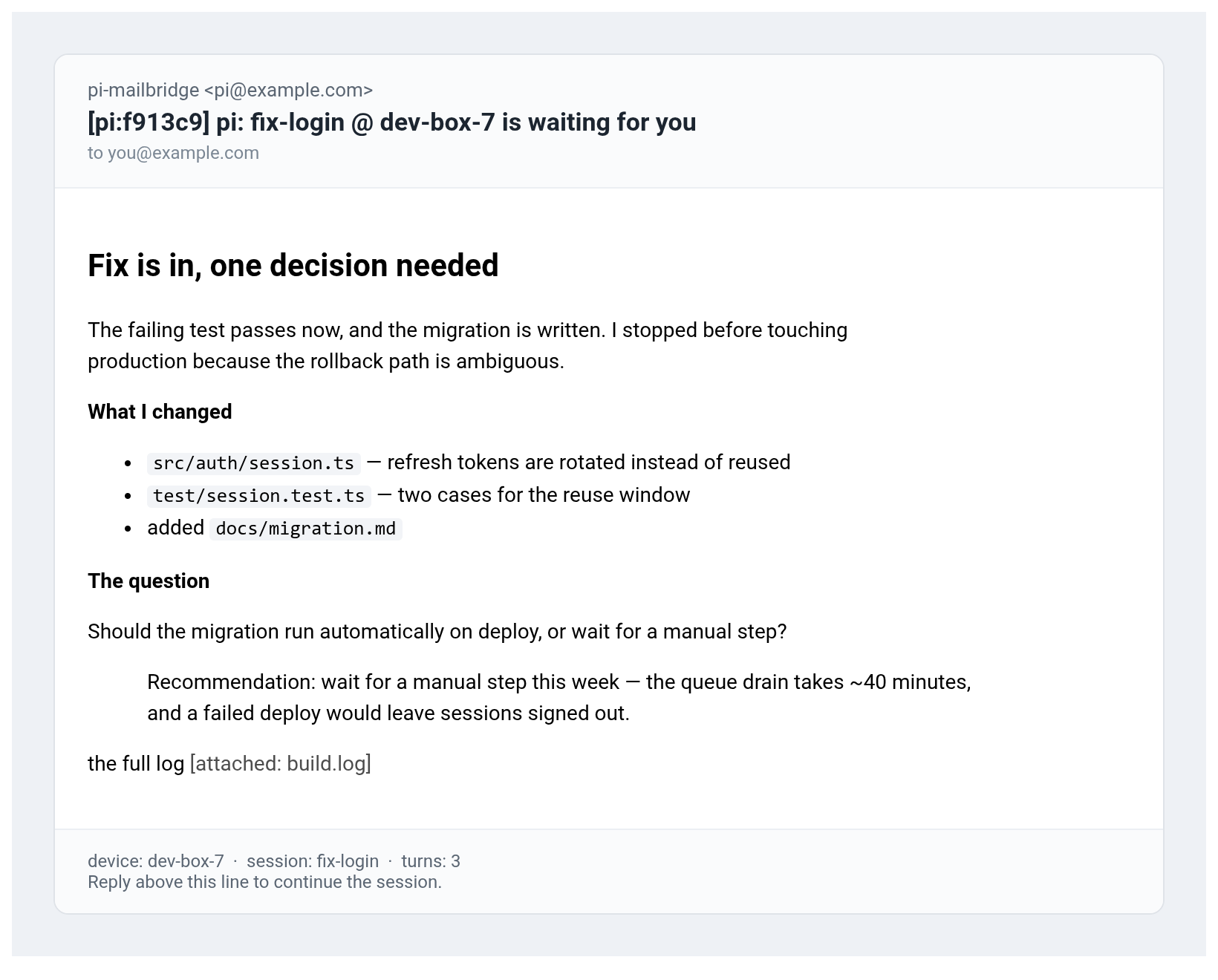
Leave the session running and give pi a task. When the turn settles, look for a message like this:
Subject: [pi:f913c9] pi: fix-login @ dev-box-7 is waiting for you

Done: the failing test passes now.

--
device: dev-box-7
session: fix-login
Type your answer above the quoted message. Pi receives it as a follow-up; if the agent is busy, the answer waits for its turn. The bridge marks the reply read after the session acknowledges it.
While you're away
| In pi | What it does |
|---|---|
/mailbridge or /mailbridge status | Show this session's mode, mailbox connection and last scan. |
/mailbridge off | Silence this session. Use /mailbridge on in pi to resume. |
/mailbridge off --all or /mailbridge on --all | Change every session on this machine and save the default for future sessions. |
/mailbridge restart | Restart the daemon to pick up an update. |
/mailbridge help | List all commands. |
Email is off by default. With a running daemon, a bare on or off changes only this session, even when the machine default is different. Without a daemon, the command changes the saved default and tells you. You can turn a session off by replying with /mailbridge off on its own line; turning it back on requires the terminal.
The agent can use request_decision to email a question or notify_user for a one-way update. To keep those and stop automatic end-of-turn emails, set notify.onSettled to false.
Images and files
In a notification,  displays the image in the body; [the log](./build.log) attaches the file. A link must point inside the agent's working directory. The bridge skips hidden paths below that directory, its own config and state directories, and unsupported file types. By default a message can carry 10 parts, up to 5 MB per inline image, 15 MB per linked file and 18 MB in total.
 sends a PNG if a converter such as rsvg-convert is available on the daemon's machine. Without a working converter, supported SVGs go inline as SVG, which some mail clients cannot display. Use [diagram.svg](./diagram.svg) to send the original as a download.
You can also attach a screenshot or log to your reply. Pi receives small images and text inline (up to four parts, 1 MB in total). For documents such as PDFs it gets a local file path to open. See reply file types and limits.
Start a session by mail
To start work when no pi session is open, configure the optional session starter. It runs separately as pi-mailbridge starter run and launches pi in tmux under a project directory you allow. Send a new message with [pi-start] in the subject. To stop or list sessions, put stop: <name> or list: in the body of a reply to the result. The starter is off by default.
A reply did not arrive
Run /mailbridge status in the session that sent the notification. Check that its mode is on and IMAP is connected. The daemon also checks for mail once a minute by default. If status reports not-allowlisted, check the address you replied from; for no-token, reply to the original notification. The troubleshooting guide explains each reason, queued replies and attachment drops.
Uninstall
Stop the starter if you run it. Remove the extension with pi remove npm:@dumbmice/pi-mailbridge and close the sessions that loaded it. The daemon normally exits within two minutes of the last session closing. Stop any manually supervised process as well. To erase credentials, queued replies and saved attachments, delete ~/.config/pi-mailbridge and ~/.local/state/pi-mailbridge (or their XDG equivalents). Revoke the provider app password or OAuth grant if you no longer need it.
Reference
- Settings, command reference and headless CLI, including
pi-mailbridge --check,pi-mailbridge --smokeand--prime. - Mail flow diagram, architecture and design notes.
- Release notes for
0.3.2. MIT license.