
Install
Install with PiG
pig install npm:@dianel/pi-workspace-historyInstall with Pi
pi install npm:@dianel/pi-workspace-historyPackages run code with your permissions and influence agent behavior. Catalog inclusion is not a security audit. Review the source before installing a third-party package.
Pi manifest JSON
The pi field of package.json.
{
  "extensions": [
    "./.pi/extensions/workspace-history.ts"
  ]
}
README
Written by the package's publisher, shown as published in version 1.0.5 (README.md). PiG does not review it.
Pi Workspace History
Based on wcldyx/pi-workspace-history.
Real workspace undo/redo for Pi. Tracks file snapshots around each agent turn so you can time-travel your workspace state.
Install
pi install npm:@dianel/pi-workspace-history
Commands
| Command | Description |
|---|---|
/undo | Restore workspace to before the last agent turn |
/redo | Re-apply the last undone turn |
/checkpoint [label] | Save a manual snapshot |
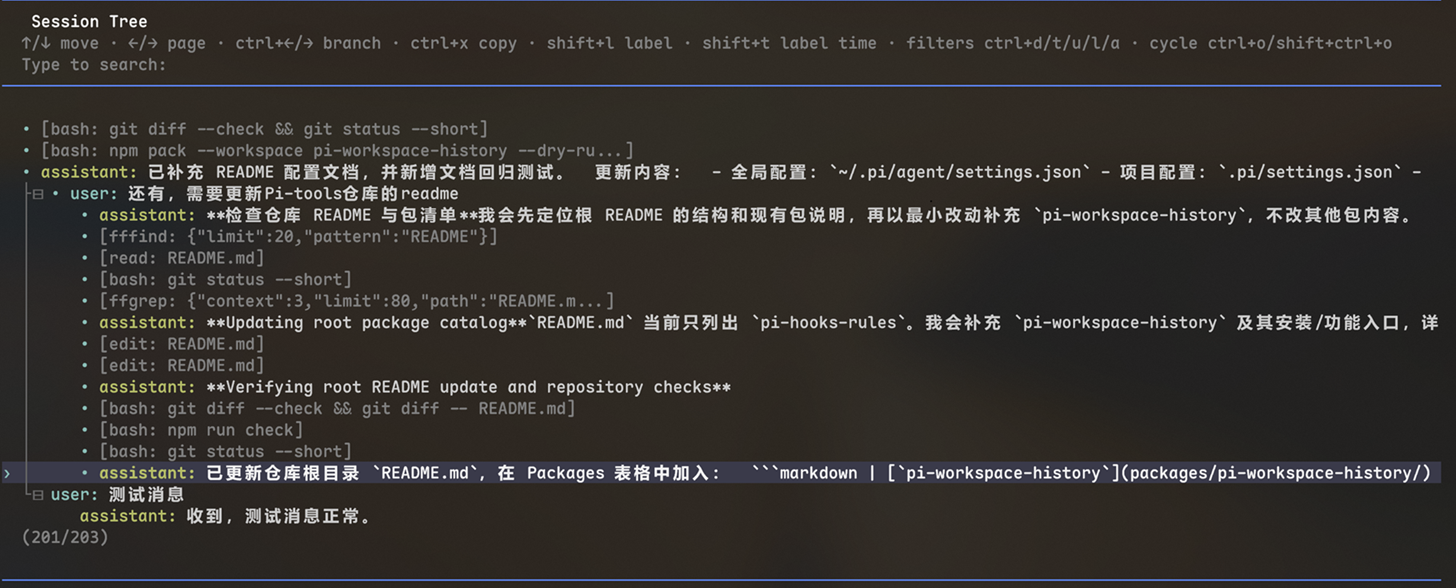
/rewind [entry-id] | Browse history interactively or jump to a specific entry |
How It Works
- A lightweight shadow git repo stores file snapshots committed around each turn.
before_agent_start/turn_startsnapshots the workspace before changes.turn_endcommits the state after./undoresets to the previous snapshot;/redore-applies the undone turn./checkpointcreates a named manual snapshot for bookmarks./rewindopens a filterable history picker (↑↓ navigate, ⌃D/T/U/L/A cycle filters, ⌃X copy, ⇧L label, ⇧T time, ⌃←/→ branch).
Shortcuts (in /rewind picker)
| Key | Action |
|---|---|
| ↑ / ↓ or j / k | Move selection |
| ← / → | Page up / down |
| Ctrl+← / Ctrl+→ | Branch |
| Ctrl+X | Copy selected entry text |
| Shift+L | Toggle label |
| Shift+T | Toggle time |
| Ctrl+D / T / U / L / A | Cycle filter mode |
| Enter | Confirm selection |
| Esc | Cancel |
Preview
The /rewind picker:
Configuration
Configure the plugin through Pi settings. Trusted project settings override global settings; untrusted projects use only global settings.
- Global:
~/.pi/agent/settings.json - Project:
.pi/settings.json
Example:
{
  "workspaceHistory": {
    "storageDir": "D:\\pi-history",
    "maxSessionsPerWorkspace": 3,
    "maxWorkspaces": 10,
    "enabled": "auto",
    "allowHomeDirectory": false,
    "requireProjectMarker": true,
    "maxScanFiles": 20000,
    "maxScanDirs": 3000,
    "maxScanMs": 5000,
    "gitTimeoutMs": 60000,
    "excludePatterns": ["*.tmp", "scratch/", "data/large/"]
  }
}
| Setting | Default | Description |
|---|---|---|
workspaceHistory.storageDir | ~/.pi/agent/state/workspace-history | External storage root; it and the workspace must not contain each other, including through symlinks |
workspaceHistory.maxSessionsPerWorkspace | 3 | Keep only the most recently used sessions per workspace |
workspaceHistory.maxWorkspaces | 10 | Keep only the most recently used workspaces globally |
workspaceHistory.enabled | "auto" | "auto" disables the plugin outside project-like directories; true bypasses directory checks but not storage-overlap validation; false disables it completely |
workspaceHistory.allowHomeDirectory | false | Allow the plugin to run in the user home directory |
workspaceHistory.requireProjectMarker | true | Require a marker in the current directory, such as .git, package.json, pyproject.toml, Cargo.toml, or go.mod |
workspaceHistory.maxScanFiles | 20000 | Maximum number of files scanned when checking ignored/protected paths |
workspaceHistory.maxScanDirs | 3000 | Maximum number of directories scanned when checking ignored/protected paths |
workspaceHistory.maxScanMs | 5000 | Maximum time spent scanning ignored/protected paths, in milliseconds |
workspaceHistory.gitTimeoutMs | 60000 | Pi process timeout for internal Git operations, in milliseconds |
workspaceHistory.excludePatterns | [] | Extra paths to exclude from snapshots, in .gitignore syntax. Appended to the built-in defaults; see below |
Excluded Paths
The plugin never snapshots large, regenerable, non-source paths, so that time-travel stays fast and history stays small. This works even in a project with no .gitignore and no Git repository at all — the defaults are built in, not read from the project.
Built-in defaults: .git, .pi/workspace-history, node_modules, dist, build, .cache, .next, .turbo, coverage, .env, .env.*, tmp, temp, logs, *.log, __pycache__, *.pyc, .venv, venv, .pytest_cache, .mypy_cache, .ruff_cache, .gradle, .idea, .DS_Store.
If the project has a .gitignore, its rules are merged on top of the defaults. To exclude anything else, add workspaceHistory.excludePatterns (.gitignore syntax):
{
  "workspaceHistory": {
    "excludePatterns": ["*.tmp", "scratch/", "data/large/"]
  }
}
Paths matched by the current rules are left unchanged during /undo, /redo, and /rewind, including when they are currently absent but present in an older snapshot. A restore stops before changing files if a required backup fails. If excluded-path recovery fails, the error reports the retained excluded-backup-* directory for manual recovery.
Git index locks are never automatically removed based on age. After a crashed Git operation, check that no process owns the lock before removing it manually.
Debug Logging
Logging is off by default. It is controlled by the PI_WORKSPACE_HISTORY_LOG environment variable. Accepted values are 1, true, yes, and on.
# PowerShell, before launching pi
$env:PI_WORKSPACE_HISTORY_LOG = "1"
pi
# bash / zsh
PI_WORKSPACE_HISTORY_LOG=1 pi
The log is written to <storageDir>/logs/timemachine.log — by default ~/.pi/agent/state/workspace-history/logs/timemachine.log, or under workspaceHistory.storageDir when that is set.
It records snapshot commits, Git invocations with timings, restore and navigation outcomes, and how many paths each restore had to back up. That makes it the first thing to enable when a /rewind, /undo, or /redo behaves unexpectedly.
Installation and Usage
Install from npm after publishing:
pi install npm:@dianel/pi-workspace-history
Or install from a local checkout:
pi install /path/to/workspace-history
After installing into an already-running Pi session, run /reload. Then test with:
/rewind
/undo
/redo
/checkpoint test
Local Development
The repository is configured for direct local extension loading:
.pi/extensions/workspace-history.ts
.pi/settings.json
Start Pi in the repository directory, or run /reload after changing the extension.
Testing
Run the complete check suite:
npm run check
Or run individual checks:
npm test
npm run typecheck
npm pack --workspace @dianel/pi-workspace-history --dry-run
Recent Changes
- 1.0.4: tested against Pi 1.3.0; custom-message runs no longer attach snapshots to a previous user turn.
- Queued steering snapshots follow the delivered user message, not the preceding custom or user response; tool-result leaves use Pi's persisted assistant anchor.
- Restored actual file undo/redo with cancellation rollback and dirty-workspace protection.
- Hardened project trust, storage validation, Git timeouts/locks, and excluded-path recovery.
- History is stored outside the workspace by default.
- Added
workspaceHistory.storageDir. - Added retention limits for sessions and workspaces.
- Reduced runtime overhead with cached settings/paths and throttled cleanup.
Storage Layout
The plugin stores history outside the workspace by default:
~/.pi/agent/state/workspace-history/
  workspaces/
    <workspaceHash>/
      meta.json
      sessions/
        <sessionId>/
          repo.git/
          redo.json
          turn-snapshots.json
          meta.json
  logs/
    timemachine.log
Notes:
- History is isolated from the user's project
.githistory. - Old workspace-local
.pi/workspace-history/state is not migrated automatically. - Cleanup is LRU-style based on recent use.
- In
automode, the plugin disables itself in broad directories such as the user home folder to avoid expensive scans and startup stalls.
License
MIT