
Install
Install with PiG
pig install npm:@denismrvoljak/agentwatchInstall with Pi
pi install npm:@denismrvoljak/agentwatchPackages run code with your permissions and influence agent behavior. Catalog inclusion is not a security audit. Review the source before installing a third-party package.
Pi manifest JSON
The pi field of package.json.
{
  "extensions": [
    "./extensions"
  ]
}
README
Written by the package's publisher, shown as published in version 0.3.1 (README.md). PiG does not review it.
agentwatch
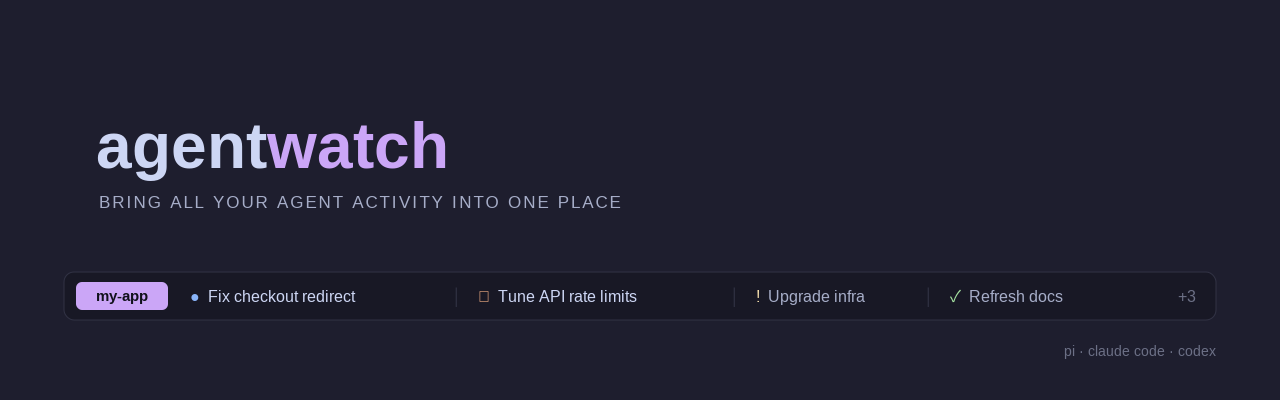
pi install npm:@denismrvoljak/agentwatch
Bring all your agent activity into one place.
agentwatch is a local status board for your coding agents. Each agent writes its status to a small JSON file on your machine. The dashboard, the tmux status line, and tmux notifications read those files. Nothing leaves your machine.
I built agentwatch because I wanted a simple way to see what my coding sessions were doing while multitasking.
Each session shows the conversation title that the agent sets, like "Fix checkout redirect". Without a title, agentwatch uses the tmux session name. Outside tmux, it uses the directory where you launched the agent. See Session titles.
Supported harnesses:
- Pi — installed as an extension
- Claude Code — installed as hooks, see Claude Code
- Codex — installed as hooks, see Codex
The dashboard doesn't care which one wrote a state file, so they share one view, one status line, and one keybinding.
There are already agent control-center tools and tmux dashboards out there, but I wanted something smaller and calmer: a lightweight TUI that gives me live status for my harnesses without changing how I work.
You can run it anywhere in your terminal setup — inside a tmux pane, in a separate terminal window, or in something like Ghostty.
Demo
Watch the demo video on YouTube:
Screenshot
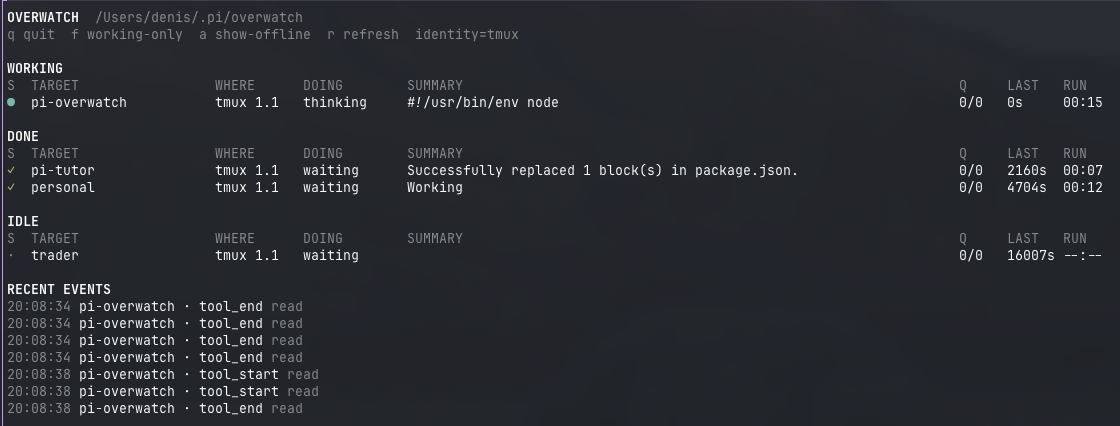
What it shows
- current session status at a glance, whichever harness it is
- conversation titles as session labels, also shown as tmux session names
- tmux-session-aware target labels
- cwd fallback when tmux is not available
- current phase or tool activity
- which sessions are blocked waiting on you
- queue counts, heartbeat age, and runtime
- stale-session detection
- simple local config in
~/.local/state/agentwatch/config.json
Demo
Install
From npm
pi install npm:@denismrvoljak/agentwatch
From GitHub
pi install https://github.com/denismrvoljak/agentwatch
Project-local install
pi install -l npm:@denismrvoljak/agentwatch
One-off test
pi -e npm:@denismrvoljak/agentwatch
Run agentwatch
Open another terminal pane or window and run:
agentwatch
If you want to run it directly from the repo:
node /absolute/path/to/agentwatch/bin/agentwatch.js
How targeting works
agentwatch is tmux-aware, not tmux-dependent.
Target resolution is:
- tmux session name
- agent session name
- cwd basename
That means if you use a tmux workflow like "one tmux session per project", the dashboard naturally follows that naming. If you are not using tmux, it still works fine and identifies sessions from the directory where the agent was launched.
Dashboard columns
S— status iconSRC— which agent produced the row (πPi,✳Claude Code,◇Codex)TARGET— main identity for the agentWHERE— source context, usually tmux pane info liketmux 1.1DOING— current phase or toolSUMMARY— short activity summaryQ— steering/follow-up queue countsLAST— seconds since last heartbeatRUN— elapsed runtime for the current or most recent task
Status icons:
●working⏸blocked — waiting on you;DOINGsays on what (permission,question,auth)✓done!stale — claimed to be working, then went silent✕error○offline
Program status (OSC 7501)
agentwatch statuses follow the program status protocol (spec), so a state means the same thing in the dashboard as it does to a terminal that supports it.
| agentwatch | OSC 7501 | Notes |
|---|---|---|
idle | idle | waiting for your next instruction |
working | working | progress (0–100) is shown when a producer sets it |
blocked | blocked | with kind: permission, question, or auth |
done | done | |
error | error | |
offline | clear | the session ended, or its process is gone |
stale | — | agentwatch only: computed by the dashboard, never reported |
The SRC tool maps to app (pi, claude-code, codex), the target label to title, and the summary to msg.
A record lasts as long as its agent. It is removed when the agent reports that it is shutting down (Pi's session_shutdown, SessionEnd in Claude Code and Codex), or when the dashboard finds that the agent's process no longer exists, which covers crashes and killed terminals. Hooks record the pid of the claude / codex process (or the node running it), not of the short-lived hook.
Report status to your terminal
Opt in, and agents also report their status to the terminal they run in:
{
  "programStatus": {
    "emit": true
  }
}
Each agent reports under its own record id. Terminals ignore OSCs they do not understand, so this is safe on any terminal. Pi writes to its own terminal; Claude Code and Codex hooks have no terminal of their own, so they write to the tty of the agent process.
Inside tmux, reports are wrapped in tmux passthrough and only reach the outer terminal with set -g allow-passthrough on. With on, tmux forwards them only from visible panes; use all to also forward from panes in other windows and sessions. The outer terminal sees one tmux client, so the per-agent id is what keeps agents apart there.
Status still flows one way: terminals cannot be asked for the records they hold, so the dashboard and tmux row keep reading agentwatch's own state files.
To check whether your terminal supports the protocol, run this outside tmux. A supporting terminal answers with ?:
printf '\e]7501;?\e\\'; read -rs -t 1 -d '\' reply; printf '%q\n' "$reply"
Claude Code
agentwatch also tracks Claude Code sessions in the same dashboard and statusline. The dashboard does not care what produced a state file, so both agents share one view, one tmux binding, and one status line.
Install the hooks:
agentwatch install-claude-hooks
Flags:
--project— write to./.claude/settings.jsoninstead of~/.claude/settings.json--dry-run— print the resulting settings without writing--uninstall— remove agentwatch hooks again
The command is idempotent, backs up the previous file to settings.json.overwatch-backup, and leaves any other hooks you already have configured untouched. Restart Claude Code afterwards.
Claude Code waits for each hook before continuing, so the hook only writes the state file and returns. tmux status refreshes, notifications, and the bell run in a detached process, which keeps a slow tmux server from stalling your prompt. Installed hooks get a 10s timeout as a backstop; re-run agentwatch install-claude-hooks after upgrading to pick it up.
Rows are tagged by source in the SRC column and in the statusline:
π— Pi✳— Claude Code◇— Codex
Hide the tag in the statusline with --no-source, or filter to one agent with --source pi / --source claude-code / --source codex.
How it differs from the Pi extension
Pi runs agentwatch as a long-lived extension, so it can heartbeat every 5 seconds. Claude Code has no such process — each hook is its own short-lived invocation — so there is nothing to heartbeat from. Instead the Claude Code producer writes a staleMs field on its own state, and the dashboard honours that per agent rather than applying the global AGENTWATCH_STALE_MS. Default is 3 minutes; change it with claudeCode.staleMs in the config.
Claude Code also exposes a signal Pi does not: it fires Notification when it blocks on a permission prompt. Those rows get the blocked status with kind permission, their own group and a ⏸ icon, and trigger a tmux message when the pane is not visible, since an agent waiting on you is the thing most worth surfacing.
The same hook also fires on a plain idle timeout roughly a minute after Claude has already stopped, which means the two cases must be told apart by message text — treating an idle ping as activity resurrects a finished session into working, where it then goes stale and shows !. Only a message matching a permission prompt sets blocked; an idle one leaves a finished status alone; an unrecognised one changes no status at all.
Relatedly, stale now means "claimed to be working, then went silent". An agent blocked on a human is not stale no matter how long it sits there, so blocked rows and anything with phase waiting are exempt from the stale window.
Hook mapping
| agentwatch state | Claude Code hook |
|---|---|
session registered, idle | SessionStart |
working / thinking | UserPromptSubmit |
working / tool | PreToolUse |
back to thinking, or error | PostToolUse |
blocked (permission), or idle-with-no-change | Notification |
done + tmux notify | Stop |
offline | SessionEnd |
Codex
Codex hooks use the same event names and payloads as Claude Code, so Codex rows come from the same producer.
agentwatch install-codex-hooks
This writes ~/.codex/hooks.json (or ./.codex/hooks.json with --project) and takes the same --dry-run and --uninstall flags. Codex asks you to review new hooks before it runs them, so restart Codex and approve them in /hooks. Hooks need Codex's hooks feature, which is on by default in current releases.
Codex reports approval prompts through a dedicated PermissionRequest event, so blocked rows need no message matching. It also fires Interrupt when you stop a turn, which returns the row to idle.
| agentwatch state | Codex hook |
|---|---|
session registered, idle | SessionStart |
working / thinking | UserPromptSubmit |
working / tool | PreToolUse |
blocked (permission) | PermissionRequest |
back to thinking, or error | PostToolUse |
idle | Interrupt |
done + tmux notify | Stop |
offline | SessionEnd |
The stale window defaults to 3 minutes, like Claude Code; change it with codex.staleMs.
Configuration
agentwatch reads config from:
~/.local/state/agentwatch/config.json
You can start from the example file:
mkdir -p ~/.local/state/agentwatch
cp /absolute/path/to/agentwatch/config.example.json ~/.local/state/agentwatch/config.json
Example:
{
  "dashboard": {
    "identity": "auto",
    "showColumnHeader": true
  }
}
dashboard.identity
Supported values:
"auto"— tmux session name, then agent session name, then project folder. Generated names are skipped: tmux sessions with a UUID (pax-worker-<uuid>-g13) and session-id prefixes (1767de67). Amaincheckout shows its parent folder, so~/github/pax/mainreads aspax."tmux"— prefer tmux session name"cwd"— show cwd basename only"both"— show tmux session name plus cwd basename when they differ, for exampleapi · my-monorepo
dashboard.showColumnHeader
true— show headersfalse— hide headers
claudeCode
staleMs— how long a Claude Code agent may go without a hook before it reads as stale (default180000)notify/bell— same meaning astmuxbelow; set here to override for Claude Code only
codex
staleMs,notify,bell— same asclaudeCode, for Codex sessions
programStatus
emit— also report status to the agent's terminal as OSC 7501 (defaultfalse), see Program status
tmux
notify— show a tmuxdisplay-messagewhen an agent finishes or errors while its pane is not visible (defaulttrue)bell— also ring the terminal bell on finish, somonitor-bell/ your terminal can flag it (defaultfalse)
tmux integration
Install the status row
agentwatch install-tmux
This writes ~/.config/tmux/overwatch.conf from examples/tmux.conf and appends one marked source-file block to the end of your tmux config (~/.tmux.conf, or ~/.config/tmux/tmux.conf if that is the one you use), so it loads after your theme and plugins. If tmux is running, it loads the row straight away.
The generated file calls node and the installed script by absolute path. tmux runs #() without your shell profile, so agentwatch does not need to be on tmux's PATH. Re-run the command after moving or reinstalling Node to refresh those paths.
Flags:
--dry-run— print both files without writing--uninstall— remove the block and the generated file--no-reload— do not load it into a running tmux server--command CMD— useCMDinstead of the absolute paths, for example--command agentwatch
The command is idempotent and backs up your tmux config to *.overwatch-backup before changing it. The row takes status-format[1] and sets the status area to two rows; the installer warns when your config already configures extra rows. Edit the generated file freely, but re-running the installer overwrites it.
Manual setup
Copy examples/tmux.conf to ~/.config/tmux/overwatch.conf, then add this after your existing status-bar theme/plugin configuration in ~/.tmux.conf:
source-file ~/.config/tmux/overwatch.conf
Reload with tmux source-file ~/.tmux.conf. The example preserves your main row (status-format[0]), sets the status area to two rows, and uses the second row for agentwatch. If you already have multiple status rows, adjust its index and row count before sourcing it. Keybindings and refresh-interval changes are commented out so the example does not override them unexpectedly. agentwatch must be on the tmux server's PATH. The example is also included in the npm package under examples/.
Status line
agentwatch statusline prints a one-line, tmux-styled summary of all live sessions, meant for embedding in the tmux status bar:
set -g status 2
set -g status-format[1] "#[align=left] #(agentwatch statusline)"
Flags:
--plain— no tmux style markup (for use outside tmux)--session NAME— only show agents in that tmux session--max N— max entries before collapsing to+N(default 6)--max-label N— shorten each agent's name toNcharacters (default 24,0for no limit)--no-details— show only each agent's status icon and name, without the current tool and timer (config:statusline.details: false)--theme dark|light|auto— color palette (defaultauto)--source pi|claude-code— only show agents from that tool--no-source— hide theπ/✳source glyph
The row uses a status-colored indicator, neutral session name, and muted activity/time so it stays scannable without coloring the whole label. Agents inherit the status row background and are separated by muted vertical rules with two spaces on either side. This separates agents without adding hard-edged background blocks or competing with the main tmux bar's Powerline arrows. --plain remains unstyled and uses ASCII separators. Add --no-source to hide the tool glyph for a quieter row; keep it when distinguishing Pi from Claude Code matters.
Colors and light/dark themes
The dashboard and statusline read @powerkit_theme on each refresh: catppuccin selects Latte/Mocha colors; rose-pine and unknown/unset families use Dawn/Moon. This keeps agentwatch aligned with its tmux host without a separate settings watcher. Catppuccin dark variants currently use Mocha colors.
With auto (the default), brightness is resolved in this order:
@agentwatch_theme—lightordarkpins brightness@powerkit_theme_variant—latteanddawnmap to light; other nonempty variants map to dark- Legacy
~/.config/theme-mode, then dark if absent
Explicit --theme or statusline.theme light/dark choices override brightness, not the tmux palette family. Custom statusline.colors still wins over palette colors. Reopen an already-running dashboard once after upgrading; subsequent tmux palette changes apply on its regular refresh. Run node --test bin/theme.test.js to test palette resolution through the real CLI with isolated tmux responses.
Pin a theme or override individual colors in the config:
{
  "statusline": {
    "theme": "light",
    "colors": {
      "done": "#40a02b"
    }
  }
}
Color keys: working, stale, done, error, idle, dim, sep.
Long names
Names longer than 24 characters are cut at the end: Make ML discovery agent-friendly becomes Make ML discovery agent…. When two agents share a name, each gets its tmux window and pane after the cut, for example Make ML discovery agent…:node.1. The current tool is capped at 16 characters, and MCP tools show only their tool name. Change the limit, or name agents differently in the statusline than in the dashboard:
{
  "statusline": {
    "maxLabel": 16,
    "identity": "cwd"
  }
}
statusline.identity takes the same values as dashboard.identity and defaults to it.
Entries stay until their agent ends, like OSC 7501 records: idle, done, and error remain visible until the next prompt replaces them or the session shuts down. Set AGENTWATCH_STATUS_TTL_MS to also drop entries that have not changed for that long.
When two agents resolve to the same label (for example two Pi sessions in one tmux session), the statusline disambiguates them with the tmux window name and pane index: personal:api.2 · personal:blog.1. Unique labels stay unsuffixed.
Session titles
Task tooling such as Pax names tmux sessions like pax-worker-<uuid>-g13, and finds its workers by that name. agentwatch does not rename those sessions. It sets the @pax-supervised-title session option to the agent's conversation title instead. It only does this for sessions with a generated name. When several live agents share one of those sessions, it clears the option.
To show the title in place of the session name, use this format wherever your status bar shows #S:
#{?@pax-supervised-title,#{@pax-supervised-title},#S}
Dashboard keybindings
# floating pane (tmux >= 3.7, non-modal — keeps working underneath)
bind o new-pane "agentwatch"

# popup fallback (tmux >= 3.2, modal)
bind O display-popup -E -w 85% -h 70% "agentwatch"
Notifications
When running inside tmux, the extension shows a display-message on every attached client when an agent finishes or errors — but only if the agent's pane is not currently visible. Disable with "tmux": { "notify": false } in the config.
Controls
qquitftoggle working-only viewatoggle offline rowsrforce refresh
State directory
By default, agentwatch stores data in:
~/.local/state/agentwatch
Structure:
~/.local/state/agentwatch/
├── agents/
│   └── <agent-id>.json
├── config.json
└── events.jsonl
If ~/.local/state/agentwatch does not exist but the old ~/.pi/overwatch does, agentwatch keeps using the old folder. To switch, stop your agents and move the folder:
mkdir -p ~/.local/state && mv ~/.pi/overwatch ~/.local/state/agentwatch
Override the root directory with:
export AGENTWATCH_DIR=/some/other/path
Other environment overrides:
export AGENTWATCH_REFRESH_MS=1000
export AGENTWATCH_STALE_MS=30000
The old PI_OVERWATCH_* variables, the @pi_overwatch_theme tmux option and the pi-overwatch command still work.
State file format
The state folder is the contract between writers and readers. Writers are the Pi extension and the Claude Code and Codex hooks. Readers are the dashboard, the statusline and tmux notifications. Any other tool can read these files, or write its own, to join in.
Each agent writes agents/<agent-id>.json and replaces the whole file on every change:
| Field | Meaning |
|---|---|
agentId | Stable id; also the file name |
source | pi, claude-code or codex; missing means pi |
pid, hostname | Agent process; readers mark it offline when the pid is gone on this host |
cwd, projectName | Working folder and its last part |
sessionName | Name of the conversation: the Pi session name, the Claude Code title, or the Codex thread name. Hooks fall back to the first 8 characters of the session id |
titleKind | custom when the user named the conversation, ai when the harness generated the name |
sessionFile | Transcript path, if any |
tmux | sessionName, windowIndex, windowName, paneIndex, paneId, panePath, when running in tmux |
status | idle, working, blocked, done, error or offline (OSC 7501 states, plus offline) |
phase | thinking, tool, waiting or queueing |
toolName | Current tool while phase is tool |
kind | Why it is blocked: permission, question or auth |
progress | 0–100, optional |
summary | One line of the latest output |
startedAt, finishedAt, updatedAt, lastHeartbeatAt | ISO timestamps |
staleMs | Optional: how long without an update before a working agent reads as stale |
queue | { steering, followUp } queued message counts |
events.jsonl gets one JSON line per event (agent_start, tool_start, and so on) with ts, type, source, agentId and the agent's location.
Pi command
The Pi extension also registers:
/agentwatch
That command shows the current state file path for the active Pi instance.
Package structure
agentwatch/
├── bin/
│   ├── agentwatch.js
│   ├── install-tmux.js
│   └── pi-overwatch.js   # old command name
├── extensions/
│   └── agentwatch.ts
├── hooks/
│   ├── agent-hook.js
│   ├── claude-code.js
│   ├── codex.js
│   ├── install.js
│   ├── program-status.js
│   ├── state-dir.js
│   └── tmux-effects.js
├── config.example.json
├── LICENSE
├── package.json
└── README.md
Notes
- best results come from launching the agent inside the tmux pane you want associated with the row
- agentwatch does not rename tmux sessions or take over your workspace
- it is intentionally minimal and focused on observability
- Pi loads the extension directly from TypeScript
- Claude Code and Codex drive state from hooks, so there is no process to keep running
- there is no build step