
Install
Install with PiG
pig install npm:@datayoda/pi-poimandres-darkInstall with Pi
pi install npm:@datayoda/pi-poimandres-darkPackages run code with your permissions and influence agent behavior. Catalog inclusion is not a security audit. Review the source before installing a third-party package.
Pi manifest JSON
The pi field of package.json.
{
  "image": "https://unpkg.com/@datayoda/pi-poimandres-dark/assets/preview.png"
}
README
Written by the package's publisher, shown as published in version 1.0.0 (README.md). PiG does not review it.
poimandres-dark for pi
The Poimandres dark palette as a theme for the pi coding agent.
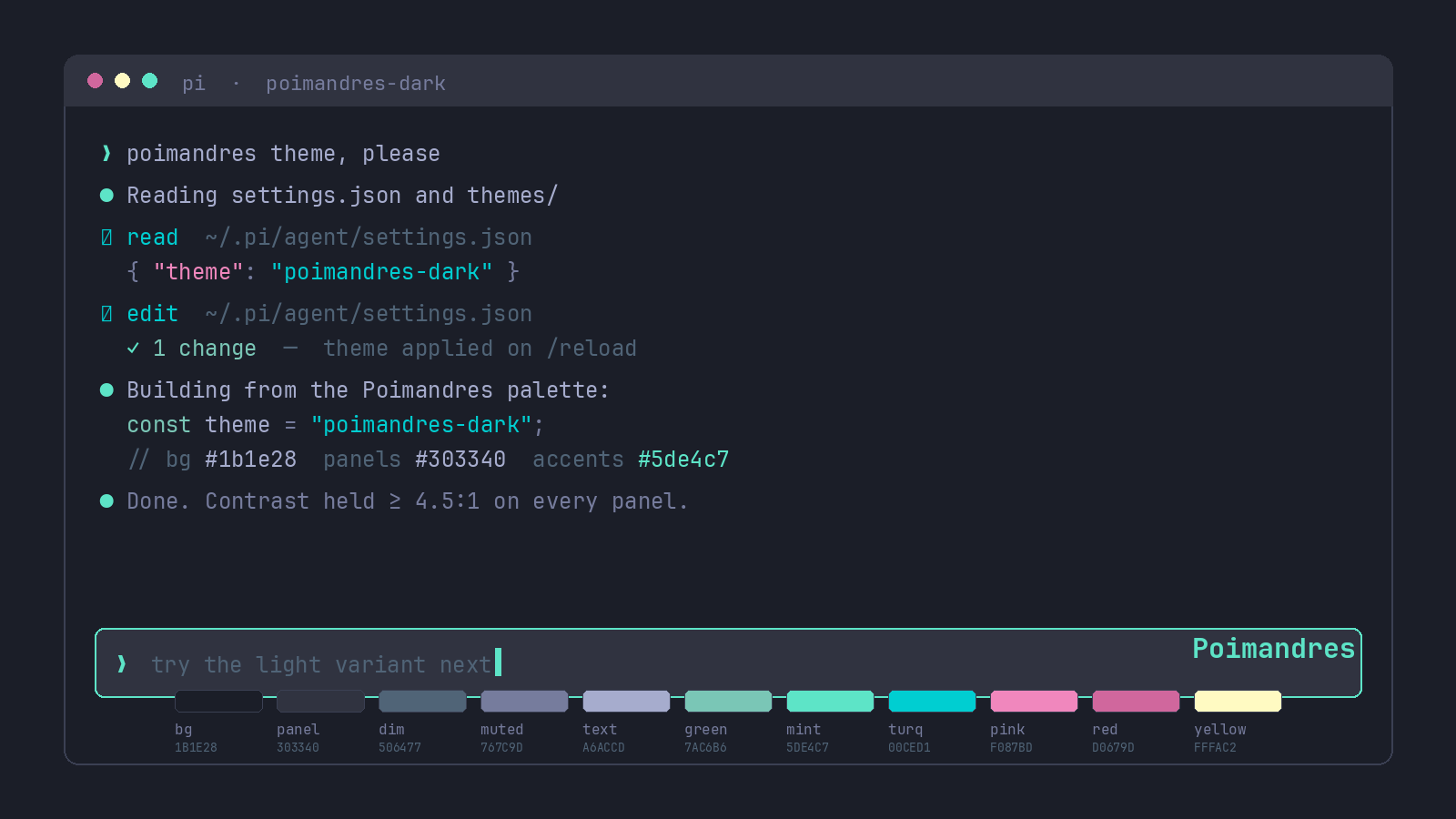
Preview
- Background
#1b1e28, panels#303340 - Accent mint
#5de4c7, turquoise#00ced1 - Text
#a6accd, muted#767c9d, dim#506477 - Errors
#d0679d(hot red), warnings#fffac2
Install
As a package (keeps it updatable through pi update):
pi install npm:@datayoda/pi-poimandres-dark
# or straight from git
pi install git:gitlab.com/Datayoda/pi-poimandres-dark
Also listed in the pi package gallery.
Or copy the theme file:
mkdir -p ~/.pi/agent/themes
cp themes/poimandres-dark.json ~/.pi/agent/themes/
Then pick it in /settings → Theme → poimandres-dark, or set it in ~/.pi/agent/settings.json:
{ "theme": "poimandres-dark" }
For separate light/dark themes use "theme": "<light-theme>/poimandres-dark".
Licence
MIT. Palette credit: drcmda/poimandres-theme.
Colour mapping
| pi token | Poimandres colour | Hex |
|---|---|---|
accent | strong turquoise | #00ced1 |
text | gray | #a6accd |
border / dim | bluish gray | #506477 |
muted | darker gray | #767c9d |
selectedBg | #717cb4 @ 15% over background | #282c3c |
userMessageBg | focus surface | #303340 |
mdHeading, toolTitle, syntaxFunction | bright mint | #5de4c7 |
error, toolDiffRemoved, thinkingXhigh | hot red | #d0679d |
warning, thinkingMax | bright yellow | #fffac2 |
syntaxNumber, thinkingHigh | pink | #f087bd |
syntaxKeyword, syntaxOperator, bashMode | desaturated green | #7ac6b6 |
The *256 fallbacks from the original terminal palette are gone: pi approximates hex colours itself on 256-colour terminals.
Credits
Palette from poimandres-theme. Theme schema: https://pi.dev/schemas/theme.schema.json