
Install
Install with PiG
pig install npm:@crisboarna/pi-account-guardInstall with Pi
pi install npm:@crisboarna/pi-account-guardPackages run code with your permissions and influence agent behavior. Catalog inclusion is not a security audit. Review the source before installing a third-party package.
Video
Declared by the package manifest. Open the file ↗
Pi manifest JSON
The pi field of package.json.
{
  "image": "https://raw.githubusercontent.com/crisboarna/pi-extensions/main/packages/pi-account-guard/media/cover.png",
  "video": "https://raw.githubusercontent.com/crisboarna/pi-extensions/main/packages/pi-account-guard/media/hero.mp4",
  "skills": [
    "./skills"
  ],
  "extensions": [
    "./src/index.ts"
  ]
}
README
Written by the package's publisher, shown as published in version 0.1.0 (README.md). PiG does not review it.
@crisboarna/pi-account-guard





Keeps each pi session on the accounts that belong where it runs: a work subscription never answers in a personal repository, and the other way round. Before each turn, the guard checks the account pi is about to use against the zone of the directory, and when they differ it blocks the turn and offers the fix in one keystroke. It is for anyone with work and personal subscriptions in one pi, especially with rotators and routers that change accounts on their own.
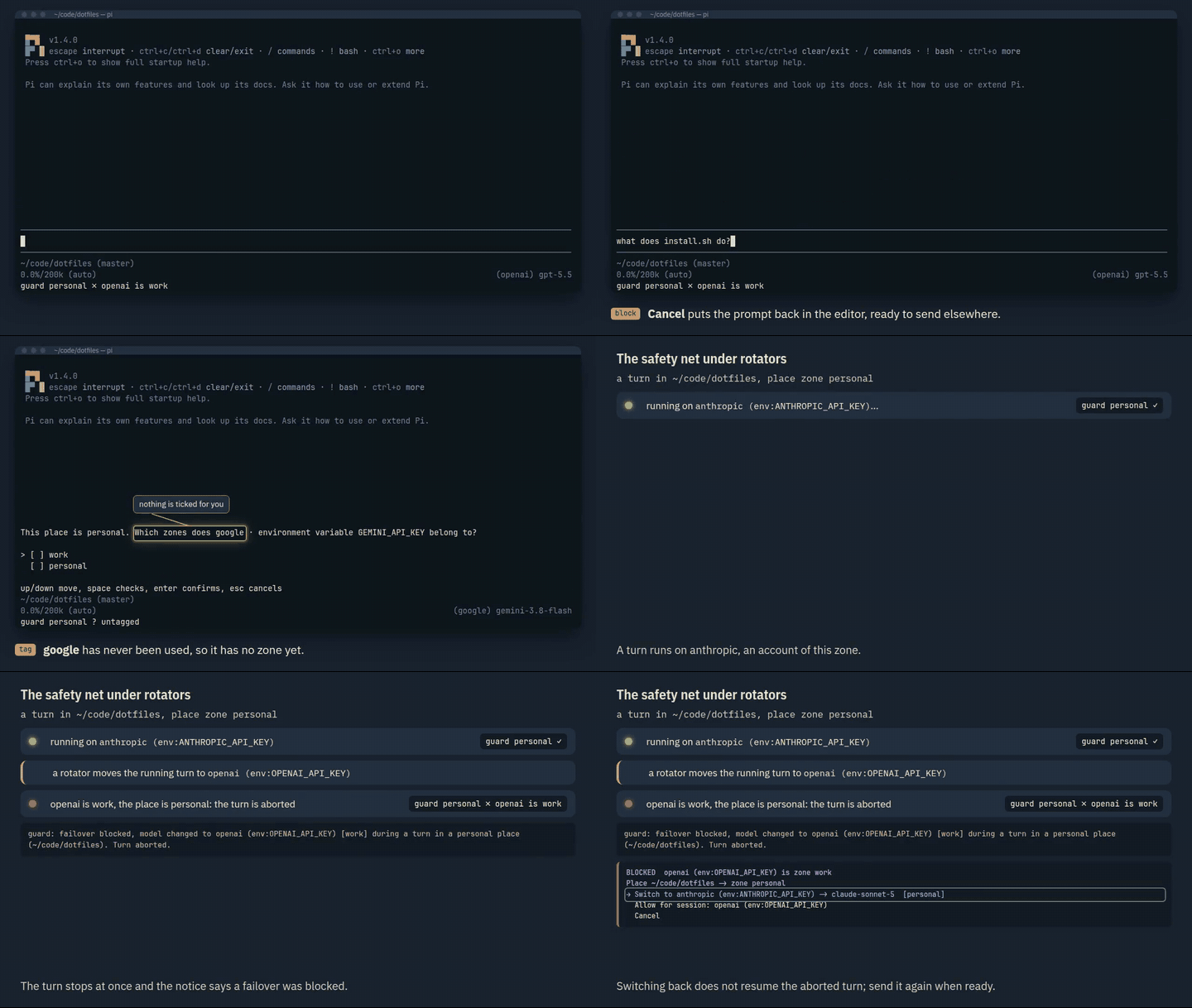
▶ Watch the demo, with narration (2:40): real pi and pi-account-guard with throwaway accounts and repositories; only the model replies are scripted.
It is a guard against slips, not a security boundary: it never reads secrets, and when it cannot decide, it blocks.
Install
pi install npm:@crisboarna/pi-account-guard
Restart pi.
Quick start
With no config the guard knows two zones, work and personal, and every directory is personal.
- In a work repository, run
/guard place add path=here zone=work. This directory and everything below it are nowwork. For every repository of an organization, use its remote instead:/guard place add remote=*/my-company/* zone=work. - Send a prompt. The first time an account is used, the tag prompt asks which zones it belongs to. Tick
work, and the turn goes at once. - Open a personal repository with the same account selected. The turn is blocked, and the select offers Switch rows for the accounts you tagged
personal. - Run
/guardat any time: it shows the place and the rule that decides it, the account and whether it matches./guard check <path>asks the same about another directory, and/guard tourwalks through it all with samples.
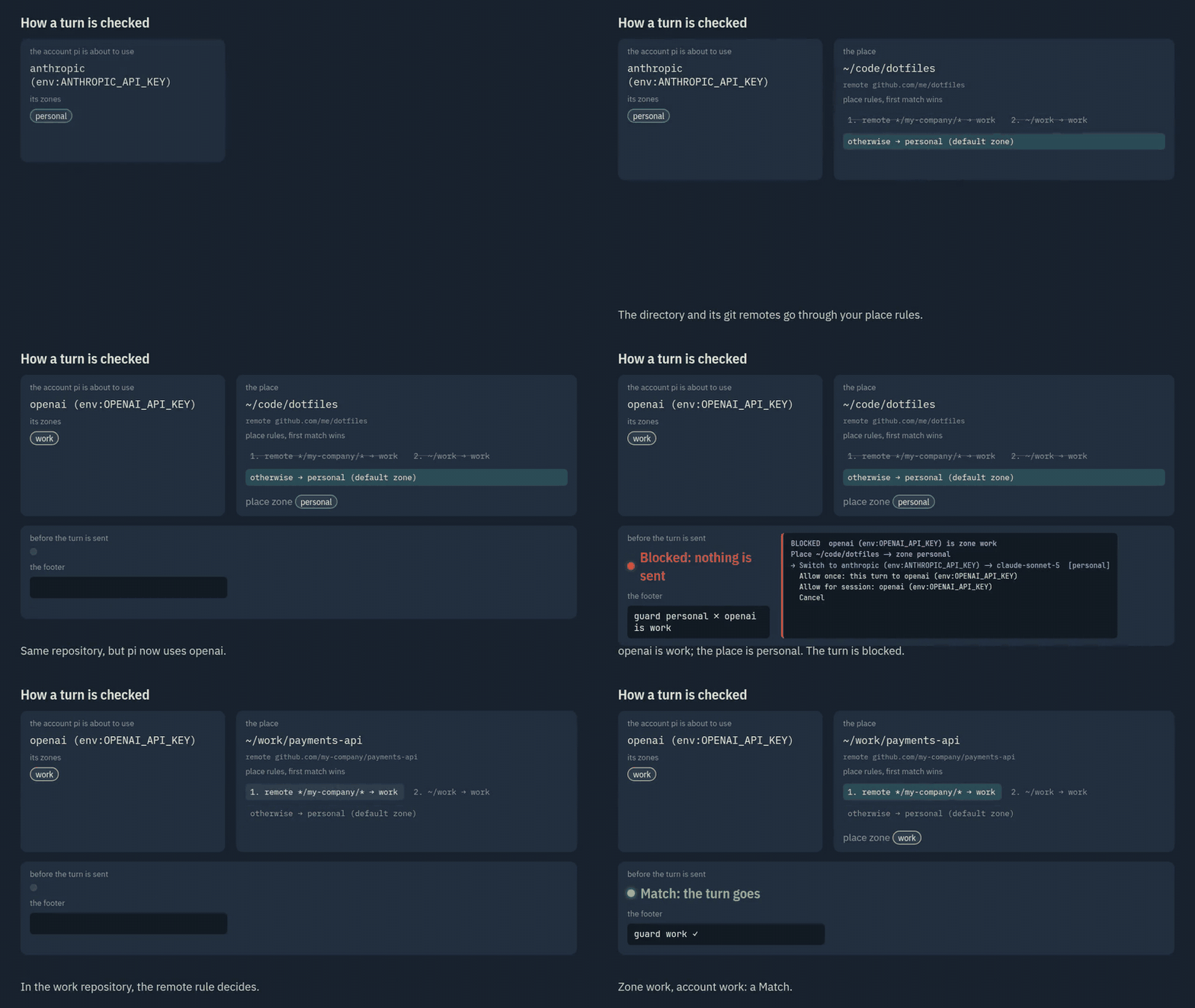
The footer shows the result as you work: guard personal ✓, or guard personal ✗ openai is work before a turn would be blocked.
Agents and scripts
The package ships a skill, pi-account-guard, that pi loads with it. Ask the agent why a turn was blocked or how to set up your zones: it reads account-guard.json and your git remotes, explains the block in plain words and proposes /guard commands for you to run. It never proposes a way around a block. Scripts get exit code 77 and the reason on stderr when a headless run is blocked; see headless use.
What you get
- Fails closed. An untagged account, a broken config or a git failure blocks the turn and says why, instead of letting it through.
- One-keystroke fix. The block offers Switch to an account of this zone, Allow once, Allow for session, or Cancel, which puts your prompt back.
- Tags itself on first use. No config to write up front: each new account asks for its zones once.
- Catches rotators and routers mid-turn. A model change into the wrong zone during a turn (pi-multi-pass rotation,
/model, a router fallback) aborts the turn and offers the previous account first. - Scripts can tell. In print and JSON mode a block exits with code 77, with the reason on stderr.
- Reads no secrets. An account is a provider id plus its auth source, such as
env:OPENAI_API_KEYoroauth, never the key itself.
Configuration
One file, ~/.pi/agent/account-guard.json, edited by /guard or by hand. The settings most people change:
| Setting | Effect | Default |
|---|---|---|
zones | Every zone a tag or rule may name | ["work", "personal"] |
defaultZone | The zone of a directory no rule matches | personal |
accounts | Tags: provider, source and its zones | none, so every account is untagged |
places | Place rules by path, git remote or both; the first match wins | none |
The full format, validation and the JSON Schema are in configuration.
Reference
- Configuration: the file, zones, accounts, place rules, validation and the JSON Schema.
- Blocks: the select, the tag prompt, and a model change during a turn.
- Commands: every
/guardcommand. - Footer: every footer text, and pi-powerline-footer.
- Headless use: exit code 77, the process override and RPC.
- With other extensions: claude-bridge, pi-multi-pass, pooled providers and pi-switchboard.
- Upgrading: what an upgrade keeps and how a breaking change is announced.
- Benchmarks: what loading the package adds to pi's start, measured and charted.
- Alternatives: other extensions that protect a session in a nearby way, and when to choose them.
- Troubleshooting and FAQ.
- DESIGN.md, GLOSSARY.md and the decision records.
Requirements
Node 22.19 or later; pi 1.4 up to, not including, 2.0, the range CI tests. Linux is tested in CI; macOS is checked by hand, not in CI; Windows is not tested, so use WSL.
| How pi runs | What the guard does | Exit code |
|---|---|---|
| Interactive | Checks every turn and every model change; a block opens a dialog with the ways out; the footer shows the state; /guard commands and /guard tour | none |
Print (-p) and JSON | A block does not send the turn: the reason and the fix go to stderr | 77 |
| RPC | A block returns success with disposition: "handled", and the message arrives as a notify request | none |
PI_ACCOUNT_GUARD_ALLOW_UNKNOWN=1 lets an account with no tag through in print, JSON and RPC mode, and nothing else. See docs/headless.md.
Data and privacy
- Network: none. There is no telemetry and no update check.
- Processes:
git remote -v, run in the directory pi is in, to read the repository's remotes. Nothing else. - Files it reads:
account-guard.jsonandmulti-pass.jsonin the agent directory (the second only to name an account), and your git remotes. For a claude-bridge model it also readssettings.jsonin the Claude Code config directory (CLAUDE_CONFIG_DIR, else~/.claude) to see whether it defines anapiKeyHelper; it keeps only that yes or no. - Files it writes:
account-guard.json, when you run/guard tag,placeorzone, in one step so that a crash cannot leave half a file; andaccount-guard.first-run, one line that records that the first-run notice was shown. Both are in the agent directory. - Credentials: it asks pi whether a provider has a key and whether you signed in with OAuth. It never asks for a key itself, and it never reads
auth.json. - Limits: the config holds paths, remotes and account names in plain text. The guard is not a security boundary; see the FAQ.
Limitations
The guard checks the account pi is about to use at the moments below. It does not watch every request.
Not guarded in v1:
pi.sendMessageturns while streaming, and extension/commandsthat start work.- Retries and virtual-model re-routing that change the physical model without an event.
- Out-of-loop model changes (RPC
set_model, the TUI selector) racing a running turn. - Cache warmer keep-alive requests.
- Compaction and branch summaries.
- Subagent child processes and other extensions' own HTTP clients.
Known gaps in account identity, because detecting them needs secrets:
- Re-login into the same provider id as a different human account, a direnv-swapped key under the same variable name, and an
auth.jsonedit made outside pi (seen one refresh late). - A claude-bridge credential defined only in the
envblock of Claude Code's ownsettings.json. - Pooled providers: the guard only warns.
- The members behind a virtual model whose router does not list them on the event bus. pi-switchboard lists them, and the guard checks each one's account (with other extensions).
Also: the place zone is cached at session start (a hand edit of places or a remote change needs /reload), and a rule written against a symlink alias of a directory does not match. See DESIGN.md sections 14 and 15.
Uninstall
pi remove npm:@crisboarna/pi-account-guard
Then delete account-guard.json and account-guard.first-run from the agent directory (~/.pi/agent/) if you want them gone. Without the package, nothing checks which account a turn uses.
Development
The package lives in the pi-extensions monorepo. Run npm install and npm run check from the repository root; the root supplies the pi host packages and the tooling.
npm test --workspace @crisboarna/pi-account-guard                  # unit tests on the pure core (src/core)
npm run test:integration --workspace @crisboarna/pi-account-guard  # fake-pi host loading src/index.ts through jiti
npm run test:smoke --workspace @crisboarna/pi-account-guard        # opt-in: real pi, offline, with the stub provider
The smoke tests run the pi on PATH (override with PI_BIN) with PI_OFFLINE=1, an empty agent directory and credential environment variables removed. test/support/stub-provider.ts answers every prompt locally. The checks that need a real TUI are in docs/manual-checklist.md; they run as simulated terminal scenes with npm run media.