
Install
Install with PiG
pig install npm:@andreaarrighi/pi-meatInstall with Pi
pi install npm:@andreaarrighi/pi-meatPackages run code with your permissions and influence agent behavior. Catalog inclusion is not a security audit. Review the source before installing a third-party package.
Pi manifest JSON
The pi field of package.json.
{
  "image": "https://raw.githubusercontent.com/arro000/pi-meat/main/assets/pi-meat-preview.png",
  "extensions": [
    "./extensions/pi-meat/index.ts"
  ]
}
README
Written by the package's publisher, shown as published in version 0.3.3 (README.md). PiG does not review it.
🥩 pi-meat
Read the change. Skip the gristle
Navigable reading diffs for Pi, powered by Meat and your existing Pi model.



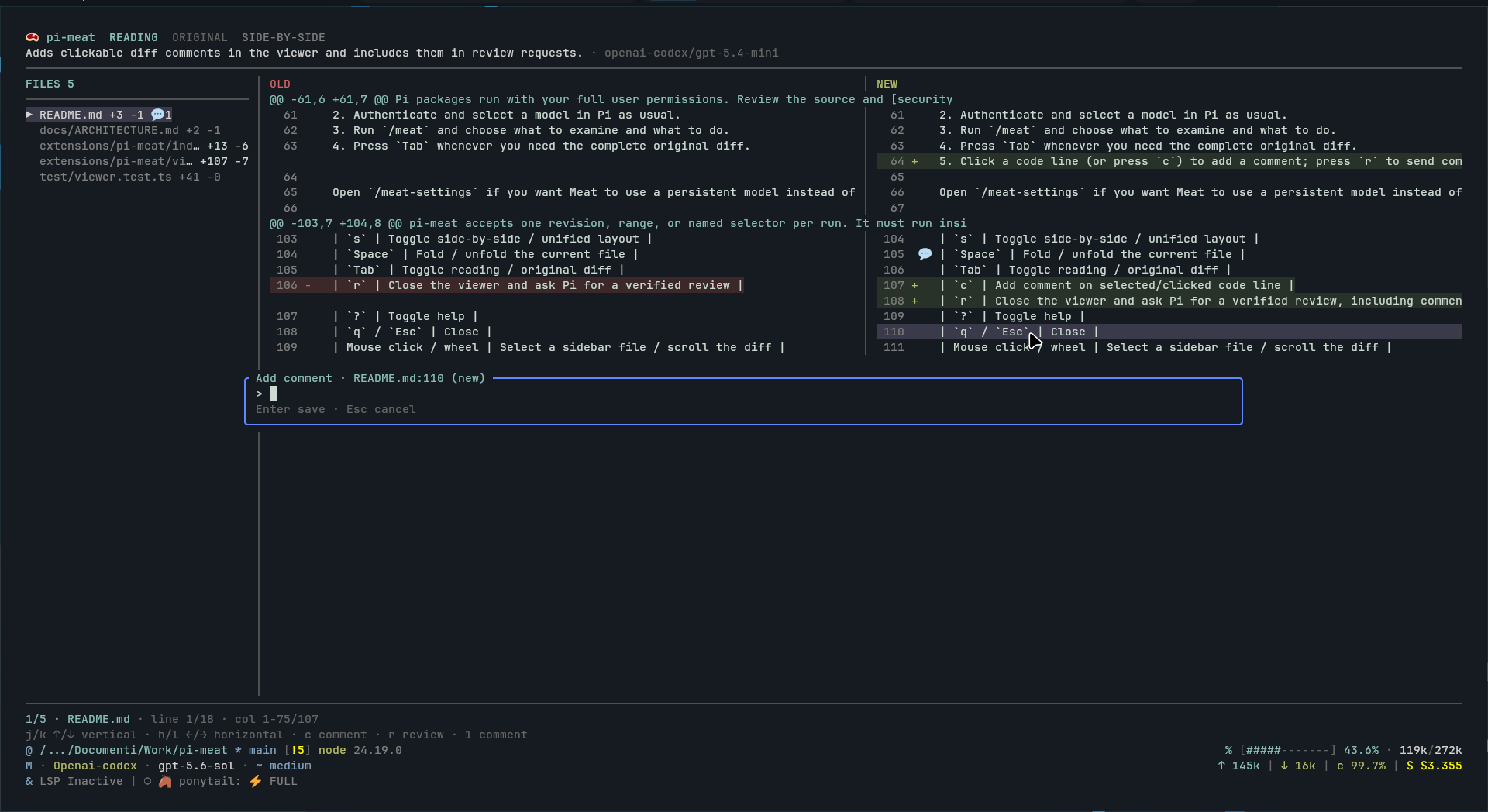
pi-meat opens the original Git diff immediately while it builds a smaller reading diff in the same navigable terminal viewer. It uses the model already authenticated in Pi: no second provider account or API key is required.
- Move directly between changed files.
- Switch between reading and original diffs at any time.
- Use unified or synchronized side-by-side panes.
- Hand the result back to Pi for a verification-oriented review.
A reading diff reduces noise; it does not prove correctness. Verify findings against the original diff and repository source.
Requirements
- Pi interactive TUI
- Node.js 24+
- Go 1.24.13+
- Git
Go is currently required because the package ships the bridge source and falls back to go run. Prebuilt bridge binaries are planned.
Install
Install the latest npm release:
pi install npm:@andreaarrighi/pi-meat
Try it without a persistent install:
pi -e npm:@andreaarrighi/pi-meat
Pin a release or install tagged Git source:
pi install npm:@andreaarrighi/pi-meat@0.1.0
pi install git:github.com/arro000/pi-meat@v0.1.0
Pi packages run with your full user permissions. Review the source and security policy before installation.
Quick start
- Start Pi inside a Git repository.
- Authenticate and select a model in Pi as usual.
- Run
/meat-settingsto set Meat's persistent model, thinking level, and startup mode. - Run
/meatand choose what to examine and what to do. The original diff opens immediately. - In
defaultstartup mode, Meat starts immediately. Inon-demandmode, pressTabto open Reading andEnterto start Meat. - Select code with a left drag and press the right mouse button to comment the selection — or the line under the cursor; type the comment in the overlaid dialog and press
Enter. Click a commented line with the right button to read or edit its comment, then pressrto send comments with the review request to Pi.
Choose changes
Running /meat without arguments opens an interactive menu. First choose what to examine:
- Latest commit (
HEAD) - Staged changes
- Unstaged changes
- All local changes
- A commit range, such as
v1.2.0..HEAD - Current branch compared with
main(main...HEAD) - A custom revision or range
Then choose whether to explore the reading diff or review the changes with Pi. The menu requires Pi's interactive TUI.
CLI shortcuts remain available:
| Command | Changes opened |
|---|---|
/meat <revision> | Specific commit |
/meat main...HEAD | Revision or branch range |
/meat staged | Staged changes |
/meat worktree | Unstaged changes |
/meat w | Short alias for worktree |
/meat all | Staged and unstaged changes |
/meat HEAD --fresh | Ignore the matching cached result and create a new one |
pi-meat accepts one revision, range, or named selector per run. It must run inside a Git repository.
Viewer controls
| Key | Action |
|---|---|
j / k, ↑ / ↓ | Scroll vertically |
h / l, ← / → | Scroll source horizontally |
PgUp / PgDn, Home / End | Page or jump through the current file |
n / p | Next / previous changed file |
s | Toggle side-by-side / unified layout |
Space | Fold / unfold the current file |
Tab | Toggle reading / original diff; the status line below the modes remains visible throughout generation |
Enter | Start Meat from the Reading view when startup mode is on-demand; restart Meat after a failure |
R | Restart Meat and rebuild the reading diff after a failure, from either view |
c | Add or edit the comment of the line at the top of the viewport (Enter saves, empty input deletes, Esc cancels) |
r | Close the viewer and ask Pi for a verified review, including comments |
? | Toggle help |
q | Close |
Esc | Clear the text selection, or close the viewer when nothing is selected |
| Left drag | Select diff text; the selection is shown with a background and counted in the status line |
| Right click | Comment the selection, or the single line under the cursor when nothing is selected; clicking a commented line edits it |
| Mouse hover / click / wheel | Highlight a code line, select a sidebar file, or scroll the diff |
Horizontal wheel / Shift + wheel | Scroll horizontally when supported by the terminal |
Wide terminals show a file sidebar and old/new panes. Commented files show a 💬 count, and commented lines show 💬 beside the diff marker. Medium terminals keep full-width side-by-side panes; narrow terminals switch to unified layout. The footer always spells out drag select · right-click comment, and ? repeats it with the full gesture list.
A right-clicked selection is anchored on its first line and stores the exact selected text, so a review comment can quote a fragment or several lines. In side-by-side layout a drag inside one pane selects that pane only. Selection is held in pi-meat, not in the terminal clipboard: hold Shift while dragging to use the terminal's own text selection and system clipboard instead.
Model settings
By default, Meat uses Pi's active model and thinking level. /meat-settings, /meat settings, or Ctrl+Shift+M configures an independent persistent model, model-supported thinking level, and startup mode without changing Pi's active settings.
Startup mode is default unless changed:
default: Meat starts when the diff viewer opens.on-demand: the original diff opens without starting Meat; switch to Reading and pressEnterwhen you want to generate it.
The viewer always shows Meat's state directly below the Reading/Original choices. When the reading diff is ready, ✨ appears beside Reading. Cached reading diffs are ready immediately and do not require another run.
If generation fails, the viewer keeps the original diff, shows the failure below the mode choices, and offers a restart: press Enter or R to rebuild the reading diff without leaving the viewer or reopening /meat. The original diff stays on screen while the new attempt runs, and the retry reuses the same revision, model, and thinking level. When no restart is possible, the panel points back to /meat instead.
The same dialog exposes Background pre-processing. When it is on, pi-meat watches for new commits and pre-builds the reading diff in the background, so /meat HEAD opens from the cache without waiting for the model. Detection uses Pi events for commits made by the agent or by ! commands, plus a backed-off git rev-parse HEAD poll for commits made outside Pi. Only committed revisions are pre-processed, never staged or unstaged changes.
Background pre-processing is off by default because it sends committed diffs to your model provider and spends subscription tokens without a per-commit prompt. It is skipped while Pi is working on a turn, and it yields to an explicit /meat run.
Settings are stored in ~/.pi/agent/pi-meat.json. Cache entries are separated by model and effective thinking level. Set PI_MEAT_SETTINGS to use another path.
Local data and privacy
The selected diff is sent to the model provider configured in Pi. pi-meat does not enable repository read or grep tools for abridgement, and it adds no independent telemetry.
Original and reading diffs are cached as plaintext under ~/.pi/agent/cache/pi-meat/ with no automatic expiry. The cache keeps the 50 most recent entries and deletes older ones after each background pre-processing run. Delete the whole cache with:
rm -rf ~/.pi/agent/cache/pi-meat
Set PI_MEAT_CACHE to choose another cache directory. See privacy and data flow for stored fields, permissions, credentials, retention, and provider boundaries.
Troubleshooting
| Problem | Action |
|---|---|
pi-meat currently requires Pi's interactive TUI | Start a regular interactive Pi session. |
pi-meat must run inside a Git repository | Start Pi from the repository or one of its subdirectories. |
No changes found | Check the selected revision or use staged, worktree, or all. |
| Configured model is unavailable | Run /meat-settings and select an authenticated model. |
| Bridge startup or Go module error | Confirm Go 1.24.13+ is installed and can download the pinned modules. The first run may be slower. |
| Stale reading diff | Run the same selector with --fresh. |
| Reading diff generation failed | Press Enter or R in the viewer to retry. Use --fresh for a new cache entry if the failure persists. |
| Background pre-processing does not trigger | Check that the toggle is on in /meat-settings, that a model is available, and that Pi is idle. It never runs outside a Git repository. |
For unresolved problems, follow the support guide.
Status
0.1.x is an early public release. Commands, cache layout, and bridge protocol may change before 1.0.0.
Reference
- Architecture: components, model bridge, protocol, and trust boundaries.
- Privacy: provider data, local artifacts, credentials, and deletion.
- Contributing: development setup, tests, and pull requests.
- Changelog and roadmap: current status and planned work.
pi-meat is an independent integration. It is not affiliated with or endorsed by Pi maintainers or Bold Software, Inc. Meat attribution is provided in NOTICE; naming and visual guidance live in the brand guide.
Apache-2.0 © 2026 arro000