
Install
Install with PiG
pig install npm:@aeondave/pi-personaInstall with Pi
pi install npm:@aeondave/pi-personaPackages run code with your permissions and influence agent behavior. Catalog inclusion is not a security audit. Review the source before installing a third-party package.
Video
Declared by the package manifest. Open the file ↗
Pi manifest JSON
The pi field of package.json.
{
  "image": "https://raw.githubusercontent.com/AeonDave/pi-persona/v1.20.2/assets/banner.png",
  "video": "https://cdn.jsdelivr.net/gh/AeonDave/pi-persona@v1.20.2/assets/demo.mp4",
  "extensions": [
    "./src/extension.ts"
  ]
}
README
Written by the package's publisher, shown as published in version 1.20.2 (README.md). PiG does not review it.
Give Pi a supervised team.
The most advanced supervisor system for Pi.
Delegate focused work. Steer it live. Keep the whole team in view.



Quick start · See it work · Features · Personas · Documentation
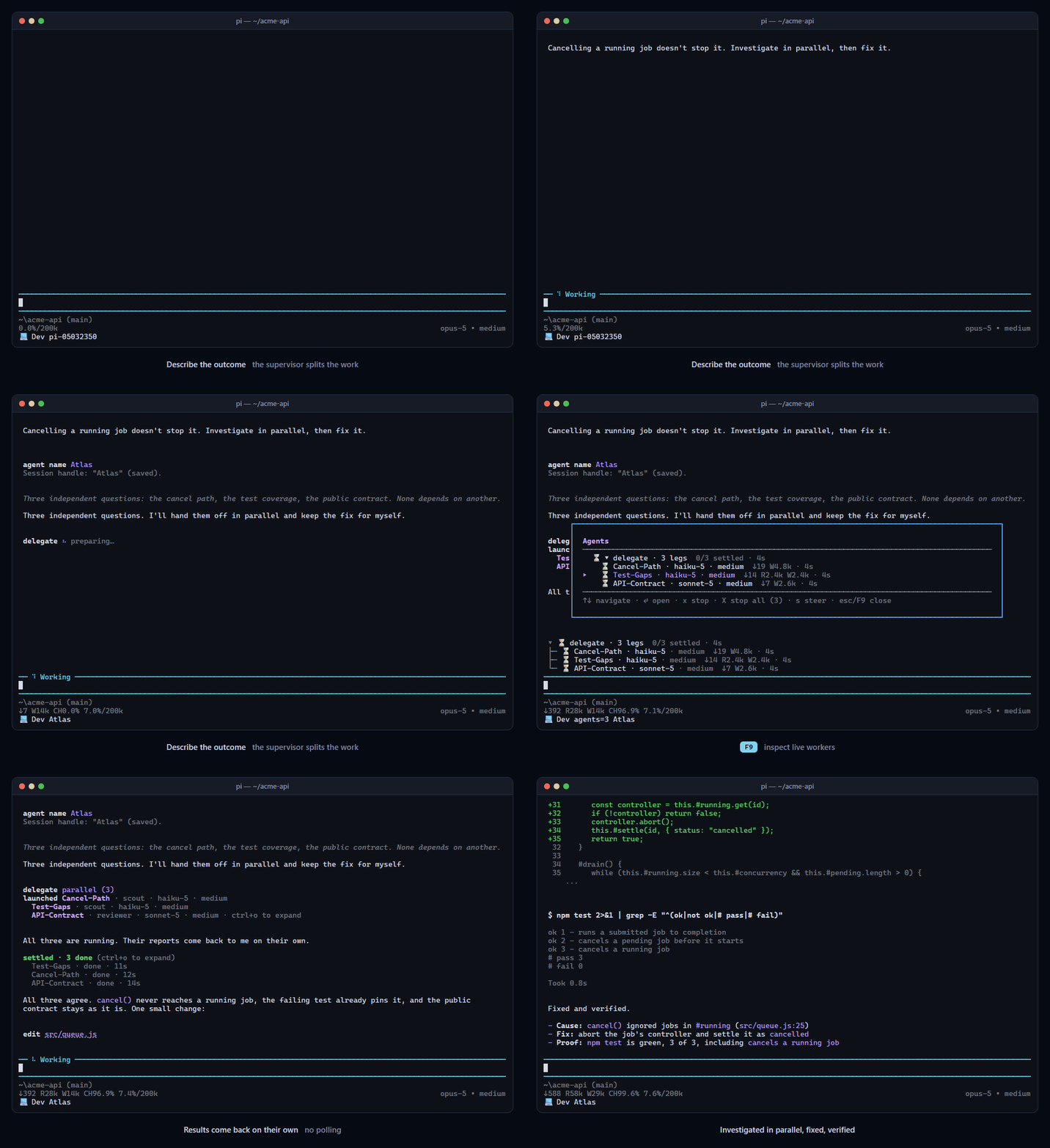
pi-persona is an extension for the Pi coding agent. Describe an outcome: the
supervisor splits the work across parallel workers, collects their reports and checks the result.
You watch every worker live, and can read, redirect or stop any of them at any moment.
Quick start
Requires Pi 1.6.0, Node.js ≥ 22.19 and Git, with a model provider already configured in Pi.
pi install npm:@aeondave/pi-persona
Inside Pi, install the bundled personas and agents, then pick a supervisor:
/persona seed
/persona dev
Now describe the work in plain language:
Fix the cancellation bug. Delegate independent investigations, preserve the public API, implement the fix, and run the relevant checks.
Later sessions can start directly with pi --persona dev. Seeding never replaces your customizations.
Project-only installs, version pins and updates
| Option | Command |
|---|---|
| This project only | pi install -l npm:@aeondave/pi-persona |
| Pin this release | pi install npm:@aeondave/pi-persona@1.20.2 |
| Pin the Git tag | pi install git:github.com/AeonDave/pi-persona@v1.20.2 |
| Update an unpinned install | pi update npm:@aeondave/pi-persona |
Restart Pi after updating. Update pinned installs explicitly. When switching from Git to npm, remove
the exact Git source first (pi remove git:github.com/AeonDave/pi-persona for the unpinned source)
to avoid loading the extension twice. Historical Pi versions are not maintained: update Pi together
with this extension.
See it work
Supervise every worker, live
Press F9 to see the whole team. Open a worker to read its conversation and tool calls as they
happen, press s to send it a new instruction mid-run, or x to stop the one you no longer need.
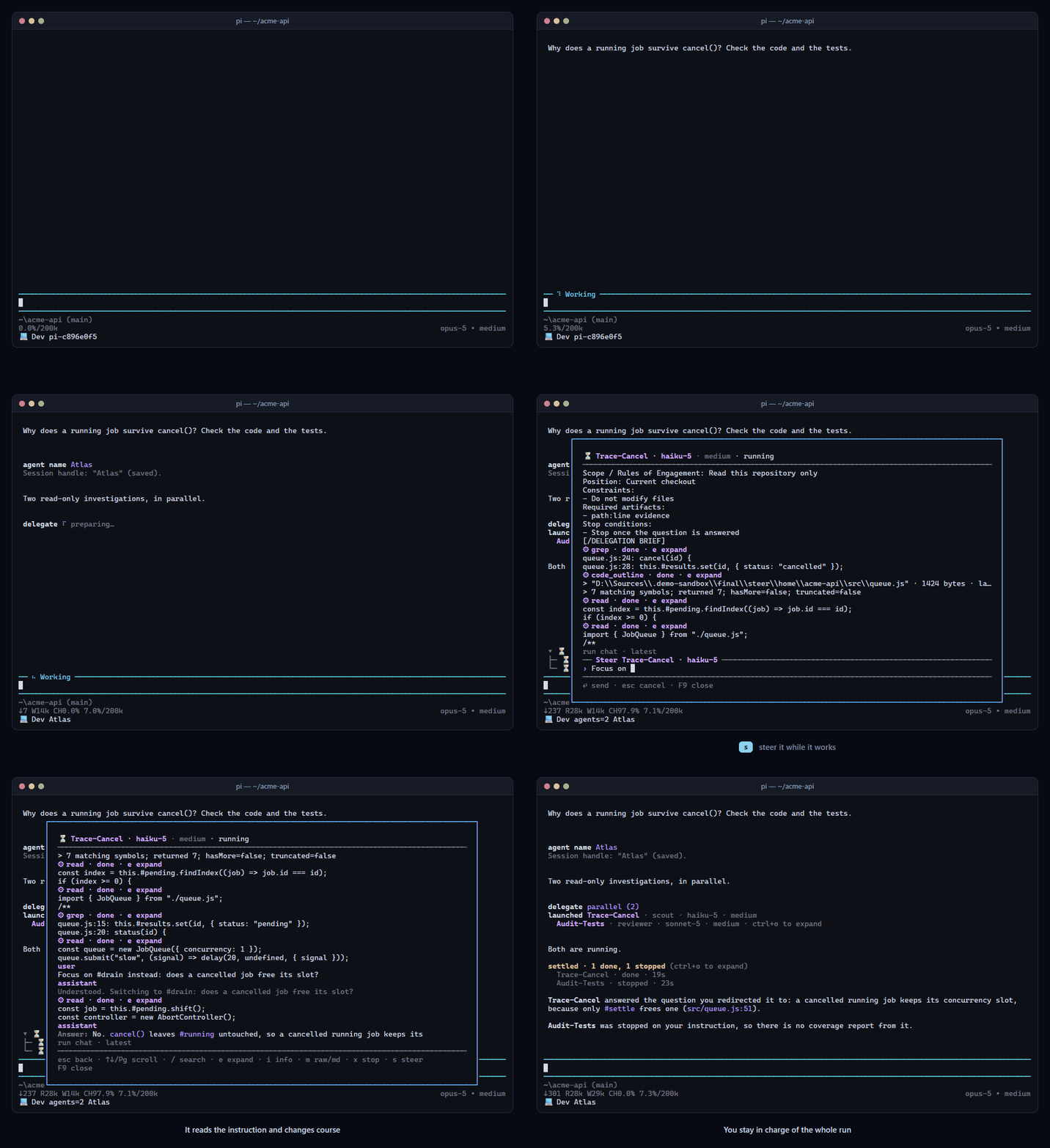
Reading and messaging workers →
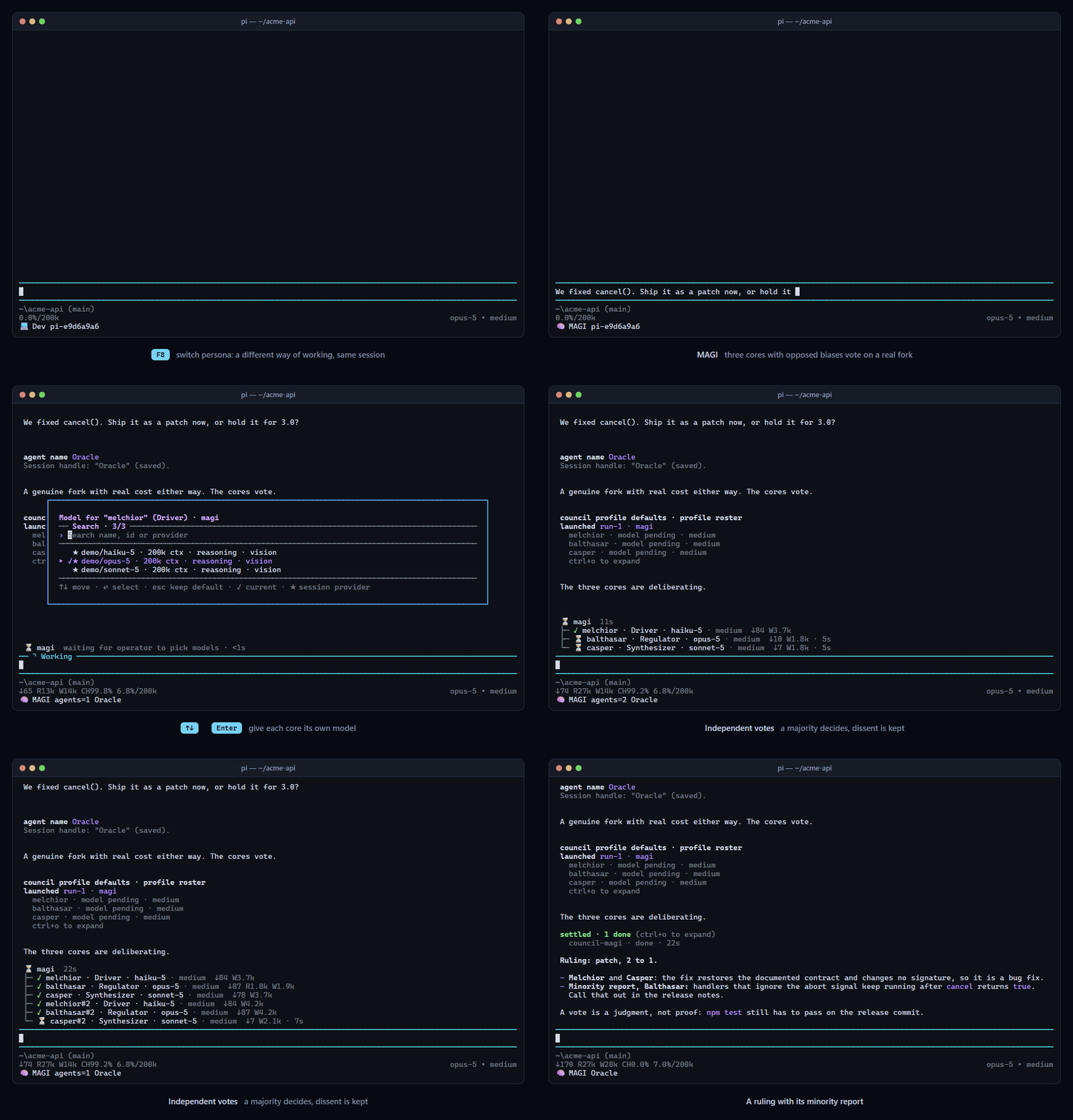
Decide with a council
Press F8 to switch persona. Under MAGI, three cores with opposed biases vote on a real fork, each on the model you assign it. The majority decides and the dissent is kept as a minority report.
Collaborate across sessions
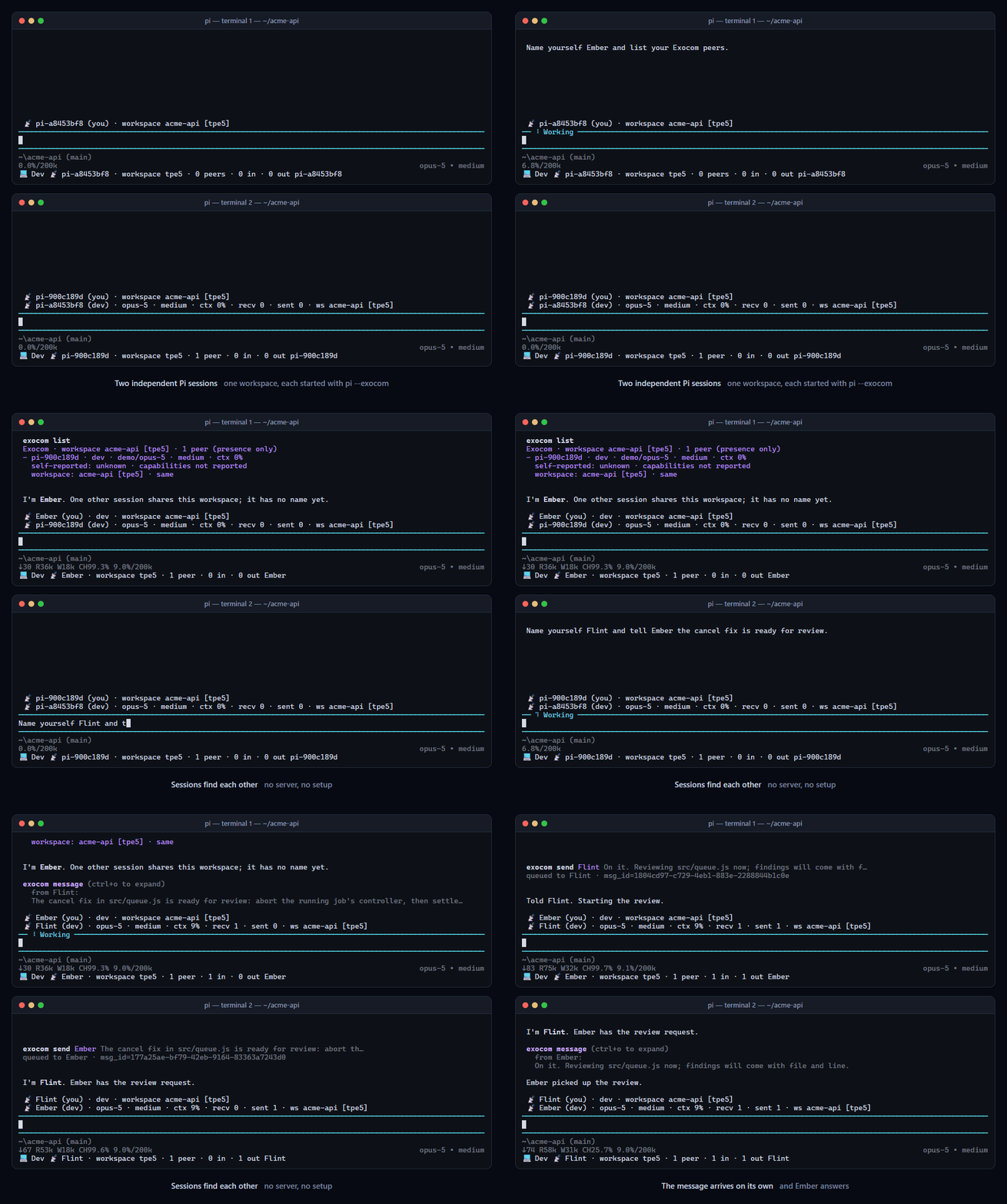
Start two Pi sessions in the same workspace with pi --exocom and they find each other: no server,
no setup. Messages arrive on their own, so one session can hand a review to another and keep working.
Keep work in the background
Ask for a background build, a watch on a deploy or a reminder in plain language. Scripts, event monitors and timers sit in the same F9 view as your workers, and each one wakes the supervisor when it has news.
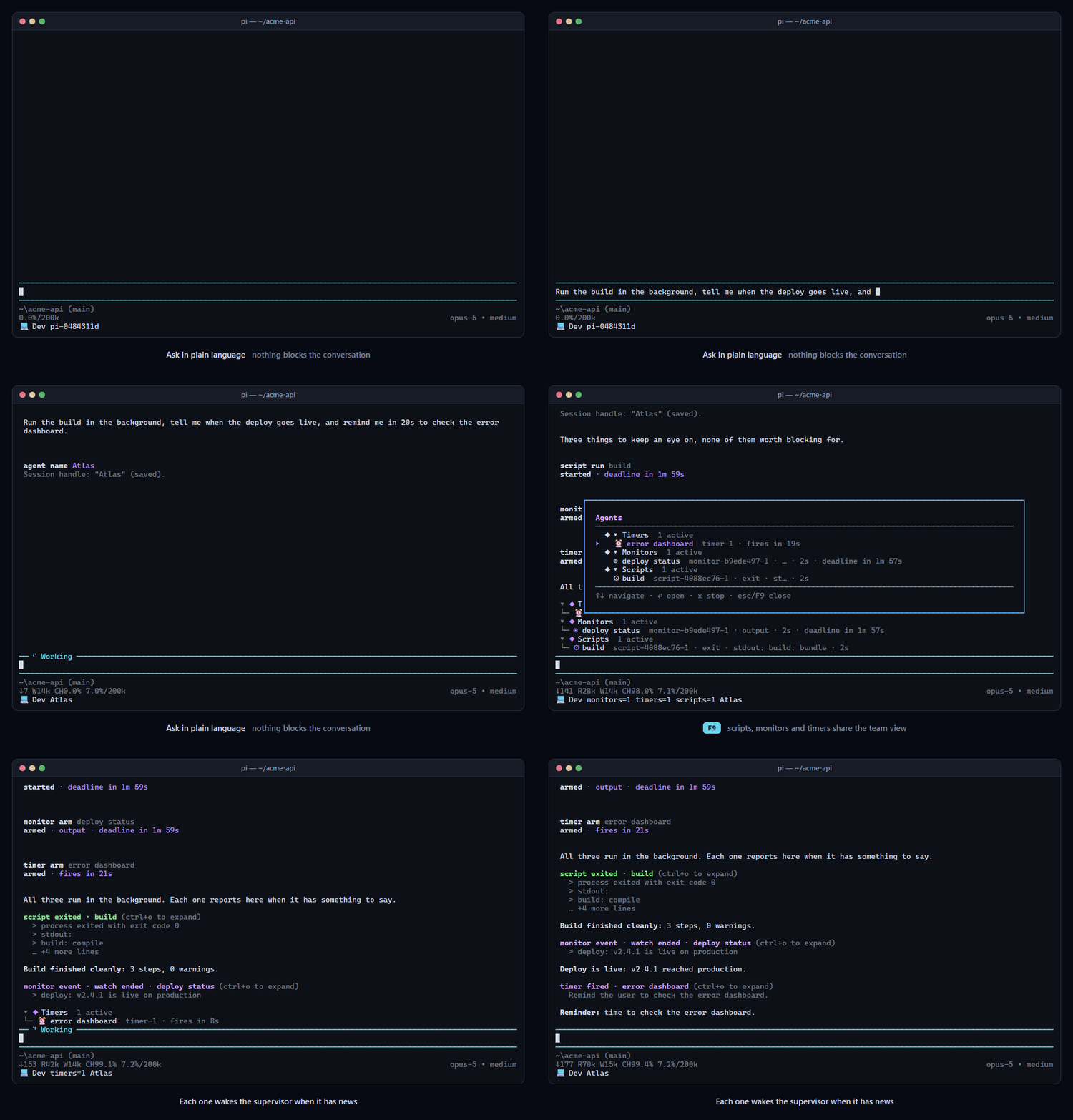
Timers, monitors and scripts →
The recordings show the real Pi interface running this extension. Model replies are scripted so
that they are reproducible and cost nothing: see scripts/demo.
Features
| Feature | What you can do |
|---|---|
| Parallel workers | Split a task across workers and receive their results automatically while you keep working. |
| Focused specialists | Choose each worker's role, tools, skills, model and effort. |
| Live supervision | Open F9 to read searchable worker chats, inspect tool calls, send instructions and stop runs. |
| Switchable personas | Change the supervisor's approach with F8, using bundled personas or your own. |
| Reviews and staged work | Gather independent perspectives, compare proposals, or run flows with approval gates. |
| Pi-to-Pi collaboration | Let independent sessions exchange findings, offer tasks and coordinate file ownership through Exocom. |
| Conversation continuity | Continue a successfully saved worker conversation with a follow-up task. |
| Reviewable changes | Isolate edits in Git worktrees, run verification commands and inspect the resulting diffs and check outcomes. |
| Structured findings | Collect findings with file, line, severity and evidence; validate their structure or define your own format. |
| Code navigation | Find files and text, then extract functions, classes and line ranges without reading entire source files. |
| Background jobs and reminders | Run scripts asynchronously, watch for events and schedule reminders, with logs and controls in F9. |
| Terminal images | View local images using native terminal graphics, ANSI color or plain ASCII, with click-to-enlarge previews. |
The full reference covers every tool, command, permission and setting. Optional project memory comes from pi-persona-mind.
How a run works
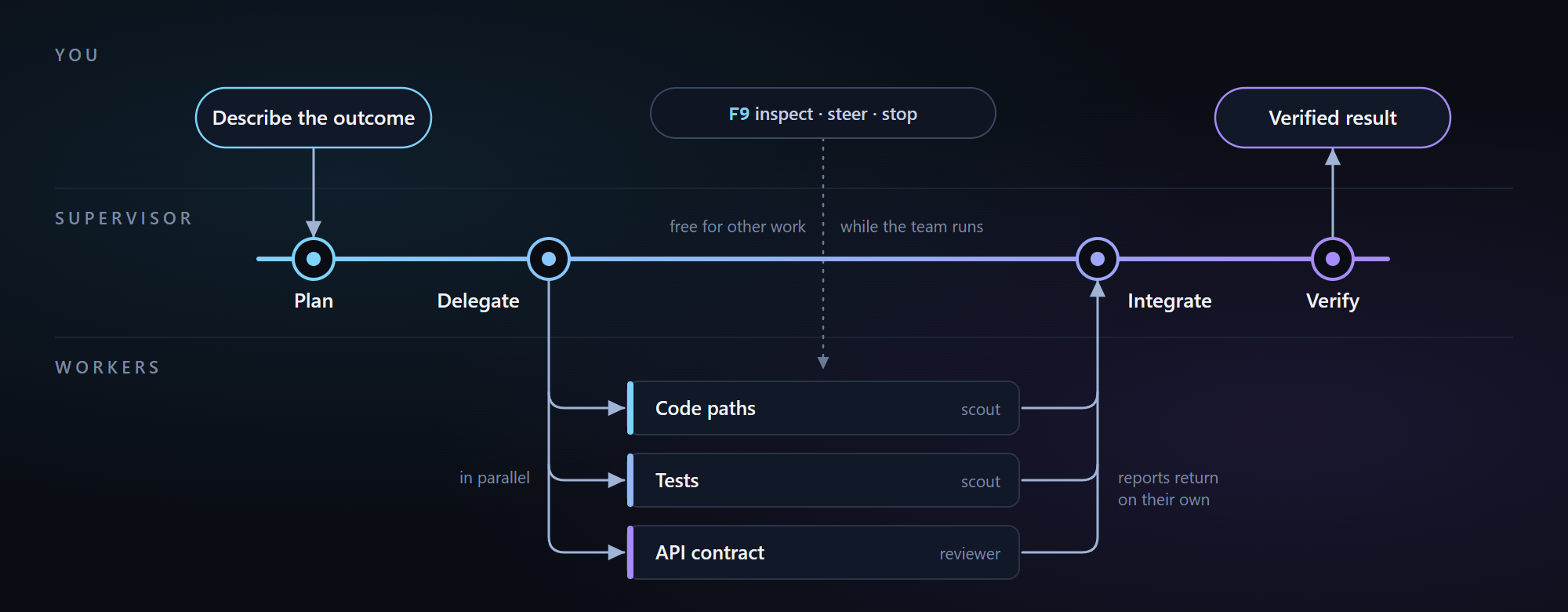
- Parallel where it is safe. Independent questions run in parallel; dependent steps run in
order. Parallel writers declare disjoint
writeSetpaths, which coordinate ownership but do not sandbox filesystem access. Multi-agent quick start → - No polling. Interactive runs work in the background and report back when the supervisor is
free. Headless
pi -preturns results inline. Follow the work → - Changes you can review. Optional Git worktrees need a clean checkout, isolate the edits and
return a diff. Attach a
verificationcommand such asnpm test: its exit status and output are recorded before the diff is exported, and a failed check keeps the worktree for recovery. Verification and recovery → - Follow-ups keep their context. Continue a saved worker conversation with
delegate { resume: "run-1", task: "Check the remaining edge case" };intercom { action: "conversations" }lists what is available. Continuation, storage and cleanup → - Jobs and reminders in the same view. Ask “remind me in ten minutes,” “let me know when this build finishes,” or “run the tests in the background.” Timers, monitors and scripts appear in F9 with their logs. They are session-scoped, so keep Pi open. Examples and controls →
Controls
| Control | Action |
|---|---|
| F8 | Cycle installed personas |
F9 or /agents | Inspect and control live work; F9 closes the panel |
| Enter on a worker | Open its scrollable chat; / searches, s steers, x stops |
/agents send <name> <message> | Message a running worker directly; autocomplete supplies unambiguous run IDs |
| Click a card / Ctrl+O | Expand prompts, messages and diagnostics using Pi's configured expand binding |
/peek | Show a compact progress summary |
/flow | List flows; /flow <name> <task> runs one, with approval at configured gates |
/persona-settings / /doctor | Open settings / check configuration and capabilities |
Recent workers stay readable while retained. Ordinary progress stays in the live view; stall and resume notices draw attention when needed. Chat controls → · Retention and cleanup →
Personas
A persona shapes how the supervisor works and which orchestration it reaches for. F8 cycles the
installed ones, /persona <name> selects one and /persona off turns it off. A new persona's prompt
applies on the next run.
| Persona | Pick it when |
|---|---|
| 💻 dev | The deliverable is a working change: tests first, heavy work handed off, every claim proved by a fresh check. |
| 🧭 multiagent | Mixed research, code, docs or troubleshooting needs coordinated independent perspectives. |
| 🗺️ planner | You want a bounded, verifiable plan or design document before building. |
| 🔬 audit | A change needs review through correctness, security, performance and test lenses. |
| ✅ verify | “Done” must mean proven by a real build and test run. |
| 🧠 magi | A contested choice between real alternatives deserves a three-core vote with dissent kept. |
| 🏛️ judge | Rival complete answers need an impartial pick from an anonymised ballot. |
| 🐝 swarm | One operation repeats over many independent items. |
| 📚 researcher | The answer must rest on citable evidence. |
| 📊 data | Pipelines, models and analytical questions depend on data quality and reproducible evidence. |
| 🔬 reverser | The work is led by an artifact: binaries, malware, patches, CTF challenges or an unfamiliar project. |
| 🎯 elite | You are driving security objectives and need auditable evidence. |
Browse the bundled personas and worker agents, or use the practical guide to choose a workflow.
Councils and strategies
The council tool runs one decision or deliverable through a strategy: a fixed way for several
agents to work on it. A persona can make one its default, which is why MAGI votes and Judge
arbitrates. No strategy belongs to a persona, though: any supervisor can name any of them for a
single call, or you can simply ask for it (“debate this with the review team”).
| Strategy | How the agents work | Default for |
|---|---|---|
critic-loop | One draft, an adversarial critique, revised until the critic approves. | dev, planner, verify, data, elite |
synthesize | Gatherers work in parallel; one synthesiser merges them into a single deliverable. | audit |
magi | Voters answer a closed question; the majority decides and the dissent is kept. | magi |
judge | An independent panel writes rival complete answers; an impartial arbiter picks one blind. | judge |
map | A splitter lists the items it finds at run time; one worker handles each in parallel. | swarm |
fanout | One question to a panel of distinct lenses or models; answers side by side, no vote. | on demand |
debate | Members argue with each other live, then vote. | on demand |
council-rounds | A hard fork is re-voted round after round until a best-of majority holds. | on demand |
compete | Rival implementations in isolated worktrees, judged blind; returns the winning diff. | on demand |
pair | One member works while a navigator reviews live. | on demand |
pipeline | Ordered stages you name; each member refines the previous output. | on demand |
// Dev's default is a critic loop; this one decision goes to a debate instead.
council({ question: "Cache this or recompute?", strategy: "debate", roster: "review" })
A flow chains strategies into phases with optional approval gates: /flow gated-build <task>
plans with a MAGI vote, waits for your approval, builds in a critic loop, then verifies with a
fan-out review. Strategies and flows →
Make it yours
Edit installed personas and agents in ~/.pi/agent/persona/agents/, or add project overrides in
.pi/agents/. Run /persona reload to refresh definitions after editing.
/persona seed preserves existing files. /persona restore overwrites bundled defaults,
including your edits to them. Additional custom files, settings and project overrides are retained.
/persona-settings manages Persona preferences and model assignments. Scalar changes apply after
restarting Pi or Pi's native /reload; model changes apply to future runs.
Configuration, settings and companion integration →
Collaborate with another Pi
Intercom connects a supervisor to its workers. Exocom is a separate, opt-in plane between independent Pi sessions. In two terminals in the same workspace, start each with:
pi --exocom --persona dev
Use /exocom status to inspect the connection and workspace code, or /exocom help for usage. Then try:
Pi A: Name yourself Ember for this session and list your Exocom peers.
Pi B: Name yourself Flint, list your Exocom peers, and send Ember: Hello from Pi B.
Pi A receives the message automatically. Peers can also ask questions, offer voluntary tasks and share evidence; creating a task does not start another session's work.
To join from another workspace, use the exact code shown, for example pi --exocom=Ab0T.
Sessions must share a machine and Pi agent directory; foreign-workspace participation has narrower
write-coordination permissions. First exchange, task workflows and delivery guarantees →
Explore source code
Find files and text with Pi's native grep, find and ls; Windows also gets native PowerShell.
Use code_outline to locate declarations before reading a source file:
code_outline({ path: "src/cart.ts" })
For a file containing a Cart class and its total method, the result looks like:
"Cart" [class] L1-3
"total" [method] in "Cart" L2-2
The TUI card puts declarations and line ranges first; expand it to inspect every returned symbol.
Narrow the outline with a literal name, kind or container, then read only the relevant lines:
code_outline({ path: "src/cart.ts", query: "total" })
read({ path: "src/cart.ts", offset: 2, limit: 1 })
Supports JavaScript/TypeScript, Python, Go, Rust, C-family and C# source, with local parsing and no persistent index. Supported syntax and limits → · Native search setup →
Display an image
Use show_image({ path: "assets/diagram.png" }) to show a local PNG, JPEG, GIF or WebP to the
user. It appears centered, using native graphics or ANSI/ASCII without external image programs.
Click it or press Ctrl+O to enlarge it. Use Pi's read tool for model image analysis.
Formats, display modes and limits →
Optional memory companion
pi-persona-mind adds
project/persona memory, session notes, an F10 inspector, consolidation and evidence-grounded review.
Install it with
pi install npm:@aeondave/pi-persona-mind, then restart Pi or use /reload. Its
README covers scope, review limits and undo.
Documentation
| You want to… | Read |
|---|---|
| Choose a workflow and supervise it | Everyday use |
| Connect independent Pi sessions | Collaboration |
| Configure tools, permissions and storage | Reference |
| Build councils, review loops and staged work | Strategies and flows |
| Schedule reminders and run background jobs | Timers, monitors and scripts |
| Understand implementation contracts | Architecture · Shared prompts · Telemetry |
For the complete map, open the documentation index. This README follows the current checkout; the changelog distinguishes released features from upcoming changes.
Develop
From a checkout:
npm ci
npm run typecheck
npm test
Native search integration tests require real rg and fd on PATH; CI prepares them with Pi's
downloader before offline tests. See AGENTS.md for isolated preparation.
Pi loads the TypeScript extension directly; there is no build step. See AGENTS.md for contribution conventions, the architecture for module boundaries, and the security policy for private vulnerability reporting. Licensed under MIT.