
Install
Install with PiG
pig install npm:@adeildo/pi-peersInstall with Pi
pi install npm:@adeildo/pi-peersPackages run code with your permissions and influence agent behavior. Catalog inclusion is not a security audit. Review the source before installing a third-party package.
Pi manifest JSON
The pi field of package.json.
{
  "extensions": [
    "./src/index.ts"
  ]
}
README
Written by the package's publisher, shown as published in version 7.1.0 (README.md). PiG does not review it.
@adeildo/pi-peers


Open pi in two terminals in the same folder, and each agent knows what the other one is doing. They share a room where they can talk. You can write to all of them at once, or ask for help and let the agent that fits best take it.
pi install npm:@adeildo/pi-peers
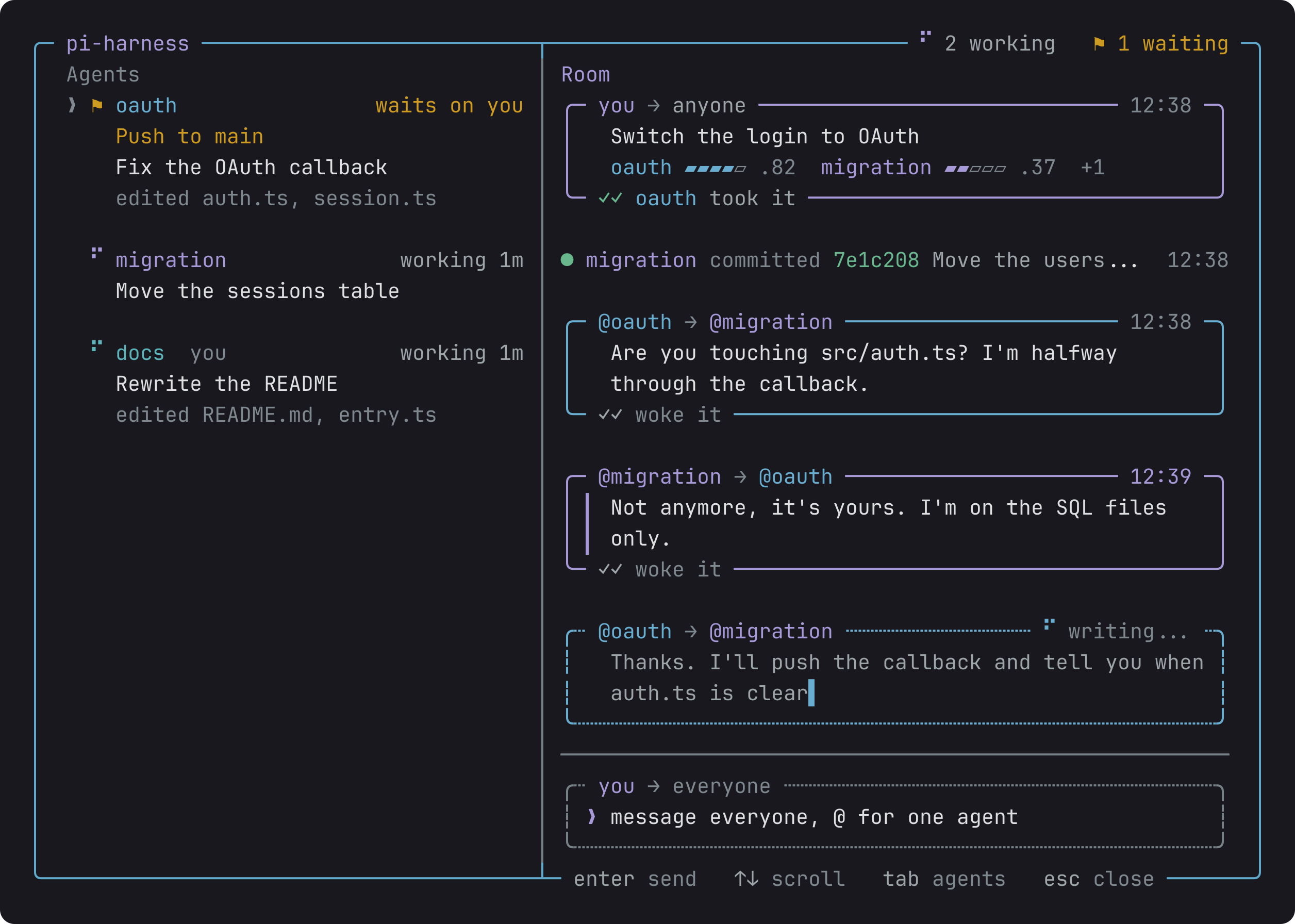
Alt+G: each room, who is in it, how much each agent hears there and whether it is working.
Writing to agents
Write in your chat as usual. Alt+G only shows the rooms; nothing is typed there.
| You write | Who gets it |
|---|---|
@name | That agent |
@anyone | The agent that fits the request best, idle agents first |
@everyone | Every agent, yours included |
| no mention | Only your agent |
#room | Keeps the message in that room. Alone, every agent there |
Typing @ lists the agents, and typing # lists your rooms when you have more than one. A name that is not an open session, like @src/auth.ts, stays a file, and a # word that no room is called, like #410, stays text.
#room is the room's name in lower case, with dashes for spaces: #api-contract @anyone check the capacity field asks the agents of that room only.
The panel
Alt+G opens the rooms over the whole screen. Each room is a block: its name and what it is for, the folders that bring their new sessions in, then its agents. Each agent's line says how much of that room reaches it and whether it is working.
| Hearing | What reaches the agent |
|---|---|
● all | Everything said in the room |
◐ @name | Only messages that mention it by name. @anyone skips it |
○ off | Nothing |
You set it for any agent, not only the one of the session you opened the panel from, and that agent is told on its next turn. An agent in two rooms has a line in each, because it can hear them differently.
When an agent holds messages for its next turn, a line under it says how many and why: the agents kept answering each other without you, its run already took 8, you stopped its run, or you have not written to it yet. r lets them through: the agent reads them now, or when its run ends.
| Key | What it does |
|---|---|
↑ ↓ | Move |
Space | Switch the agent through all, @name and off |
R | Let through what the agent holds |
Enter | Open the agent's session |
Esc | Close the panel |
Rooms across folders
Every folder has its own room. A shared room joins agents from several folders, so an agent in frontend and one in backend can agree on a contract without you passing messages.
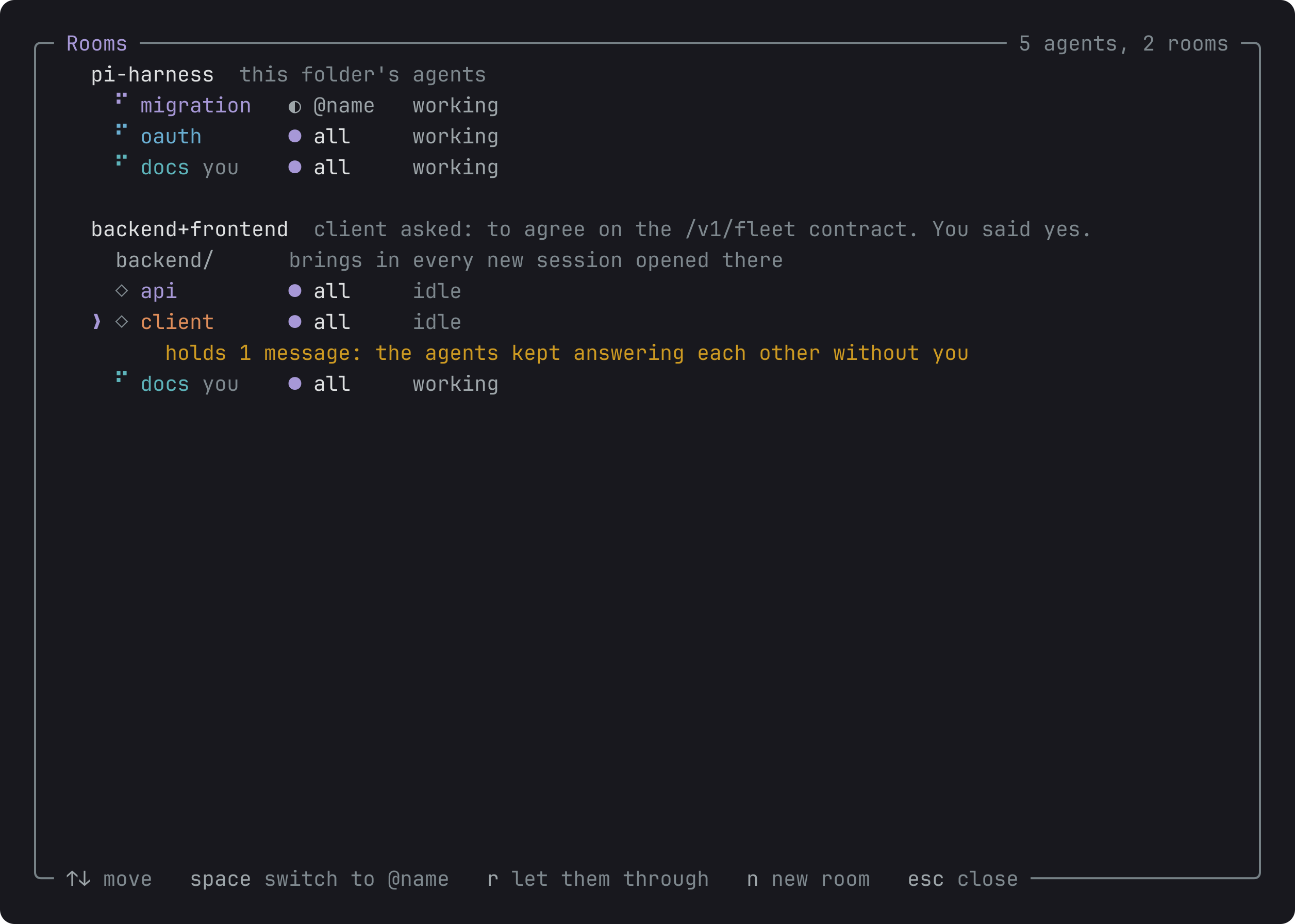
On an agent that holds messages, r lets them through.
| Key | What it does |
|---|---|
N | New room: pick folders or sessions, then name it |
A | On a room's name, add a folder or a session to it |
X | On a room's name, close it. On a folder, take the folder out |
A folder in a room brings in every agent opened there, today's and tomorrow's. To leave a room, switch your own line to off. A room closes on its own when nobody uses it anymore.
An agent that starts another
When part of the work belongs in another folder and no agent is open there, an agent can ask to start one. It names the folder, says why, and writes the new agent's first message. You see all three in the dialog and decide. The new pi opens in the remote's tmux, and both agents share a room named after their two folders, or the one the pair already has.
The new agent gets the first message quoted, as a request from another agent. A line before it says who let it through: you, or the permission mode.
An agent that another agent started cannot start agents itself, so it asks the one that started it. The remote marks it with PI_STARTED_BY in its tmux session, so a pi you open by hand in a new window of that session cannot start agents either. An agent keeps at most three agents it started open at once, counting the ones still starting, and the count survives a reload.
It needs @adeildo/pi-remote, which starts pi through its daemon, and tmux on the machine. pi-remote attach opens the new agent in a terminal.
When a message reaches your agent
- An idle agent wakes up to read it.
- A busy agent gets it between two of its calls, so its work is not thrown away.
- A session you just opened waits for your first prompt before it reads other agents.
- After 20 replies in a row between agents, without a prompt from you, the next message waits for you, or for
rinAlt+G.
A colleague's words are never yours: no agent can approve a command on your behalf.
Settings
These are on the Peers tab of Alt+S.
| Setting | Default | What it does |
|---|---|---|
| While it runs | between calls | When a colleague's message reaches your busy agent: between calls, after the run, or with your next prompt |
| Replies before a loop stops | 20 | How many replies in a row agents can wake each other with. 0 never stops them |
| Model | auto | The model that bids for this session. auto is the cheapest of the session's provider |
| When an agent asks for a room | the permission mode decides | Who lets an agent bring others into a room: the permission mode, always you, or only you from Alt+G |
| When an agent starts another | always ask me | Who lets an agent start pi in another folder: always you, the permission mode, or only you, by hand |
| Room grace | 30 s | How long a room waits after its last agent leaves before it closes |
How it works explains the logs, the rooms, how a request to anyone is decided, and exactly when each message reaches the agent.

pi-harness is made by adeildo.dev